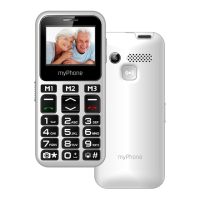
© 2019 mPTech. All rights reserved. MAESTRO+
3
damage. The battery should be used according to its purpose. Do not destroy, impair
or throw the battery into flames - it might be dangerous and may cause fire. Worn-
out or impaired battery should be placed in a dedicated container. Excessive charging
the battery can cause damage. Therefore, a single battery charge should not last
longer than 1 day. Installing an incorrect battery type can cause an explosion. Never
open the battery. Please dispose of battery according to the instructions. Disconnect
an unused charger from power grid. In case of the charger wire damage, it should not
be repaired but replaced with a new one. Use the original manufacturer’s accessories
only.
—HEARING—
To avoid hearing damage, do not use the device at high volume levels for
a long period of time, do not put operating device directly to the ear.
—EYESIGHT—
To avoid eyesight damage do not look closely onto the flash light during
its work. A strong bean of light may cause permanent eye damage!
Manufacturer:
mPTech Sp. z o.o.
street Nowogrodzka 31
00-511 Warsaw
Poland
Website: myphone.mobile.com
Made in China
Table of Contents
Table of Contents ............................................................................................................................. 3
Package content ............................................................................................................................... 4
Technical Specifications ................................................................................................................. 5
1. Introduction .................................................................................................................................... 5
Appearance of the phone ........................................................................................................ 5
Turning the phone on/off ........................................................................................................ 7
Inserting SIM, memory cards and the battery............................................................... 7
Charging the battery ................................................................................................................. 7
2. Using the basic functions ......................................................................................................... 7
Keypad lock.................................................................................................................................... 7
Phone menu access ................................................................................................................... 7
Customize your phone .............................................................................................................. 8
Sounds and user profiles ........................................................................................................ 8
Switching the "meeting” mode on and off ..................................................................... 8
Call handling functions ............................................................................................................. 8
Calling ............................................................................................................................................... 8
Answering ....................................................................................................................................... 8
News ................................................................................................................................................. 9
Creating and sending text messages ............................................................................... 9
Messages display ........................................................................................................................ 9
Contacts on myPhone Maestro+ .......................................................................................... 9
Adding a new contact ............................................................................................................... 9
Search for a contact .................................................................................................................. 9
Deleting contacts ...................................................................................................................... 10
3. Using the basic functions ....................................................................................................... 10
Calling a contact from the phone book ........................................................................... 10



 To Next Page