EasyManua.ls Logo

NAD 5240 - Disc Table Mounting

NAD 5240
25 pages
Print Icon
To Next Page IconTo Next Page
To Previous Page IconTo Previous Page
Loading...
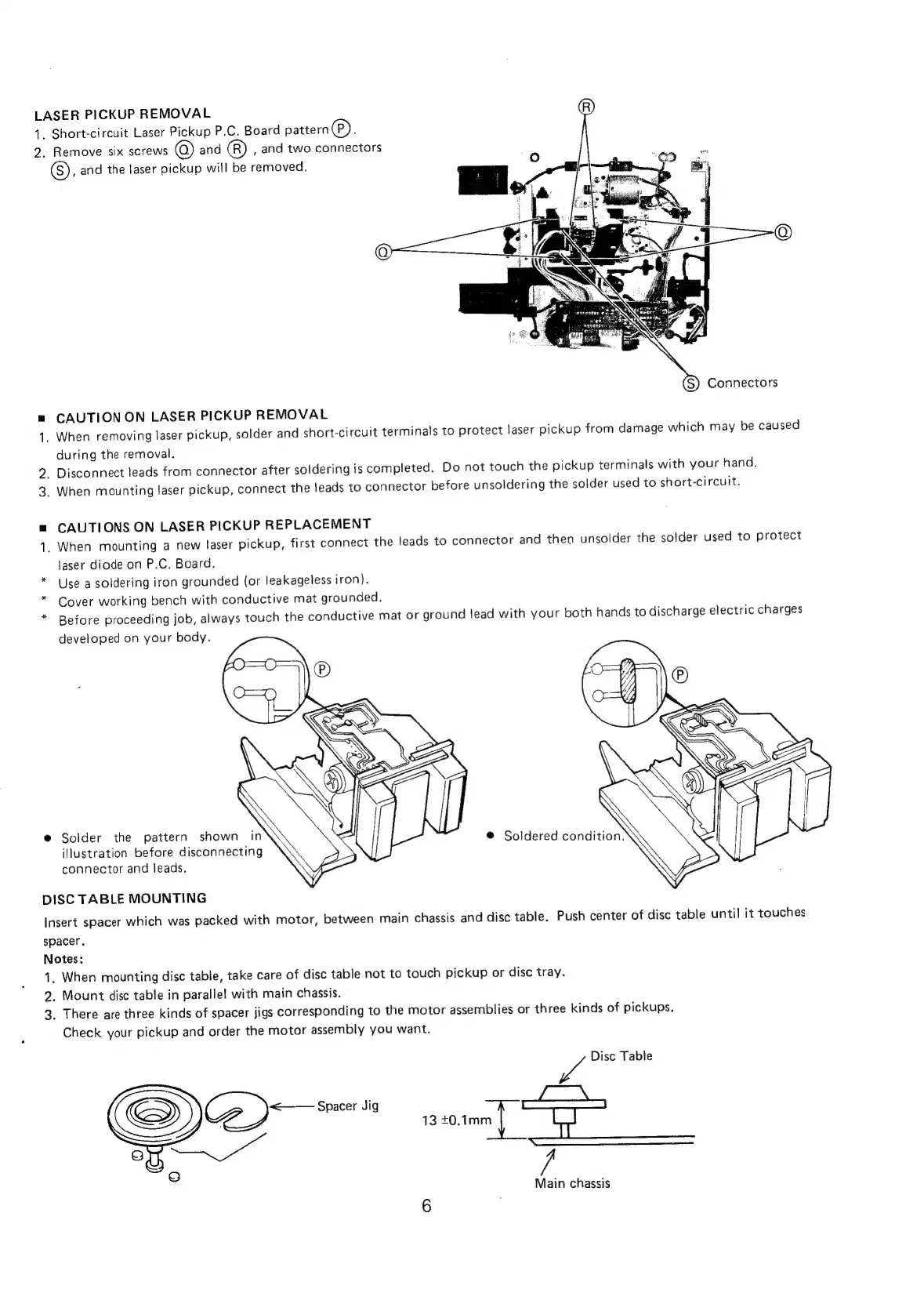
LASER
PICKUP
REMOVAL
1.
Short-circuit
Laser
Pickup
P.C.
Board
pattern(P).
2.
Remove
six
screws
and
®)
,
and
two
connectors
(S),
and
the
laser
pickup
will
be
removed.
(S)
Connectors
CAUTION
ON
LASER
PICKUP
REMOVAL
1.
When
removing
laser
pickup,
solder
and
short-circuit
terminals
to
protect
laser
pickup
from
damage
which
may
be
caused
during
the
removal.
2.
Disconnect
leads
from
connector
after
soldering
is
completed.
Do
not
touch
the
pickup
terminals
with
your
hand.
_
When
mounting
laser
pickup,
connect
the
leads
to
connector
before
unsoldering
the
solder
used
to
short-circuit.
wo
CAUTIONS
ON
LASER
PICKUP
REPLACEMENT
_
When
mounting
a
new
laser
pickup,
first
connect
the
leads
to
connector
and
then
unsolder
the
solder
used
to
protect
laser
diode
on
P.C,
Board.
Use
a
soldering
iron
grounded
(or
leakageless
iron).
Cover
working
bench
with
conductive
mat
grounded.
*
Before
proceeding
job,
always
touch
the
conductive
mat
or
ground
lead
with
your
both
hands
to
discharge
electric
charges
developed
on
your
body.
=
e
Solder
the
pattern
shown
in
ilustration
before
disconnecting
connector
and
leads.
DISC
TABLE
MOUNTING
Insert
spacer
which
was
packed
with
motor,
between
main
chassis
and
disc
table.
Push
center
of
disc
table
until
it
touches
spacer.
Notes:
1.
When
mounting
disc
table,
take
care
of
disc
table
not
to
touch
pickup
or
disc
tray.
2.
Mount
disc
table
in
parallel
with
main
chassis.
3.
There
are
three
kinds
of
spacer
jigs
corresponding
to
the
motor
assemblies
or
three
kinds
of
pickups.
Check
your
pickup
and
order
the
motor
assembly
you
want.
wf
Disc
Table
CD
am
Spacer
Jig
Alle
13
+0.1mm
|
Main
chassis

Other manuals for NAD 5240

Related product manuals