EasyManua.ls Logo

NAD 5420 - Laser Pick-up Replacement; Replacement Precautions; Replacement Steps

NAD 5420
26 pages
Print Icon
To Next Page IconTo Next Page
To Previous Page IconTo Previous Page
Loading...
me
att,
oe
sheets
.
a
fais
TR
~~
ah
i
i
us
nay
.
ae
res
Es
a
11
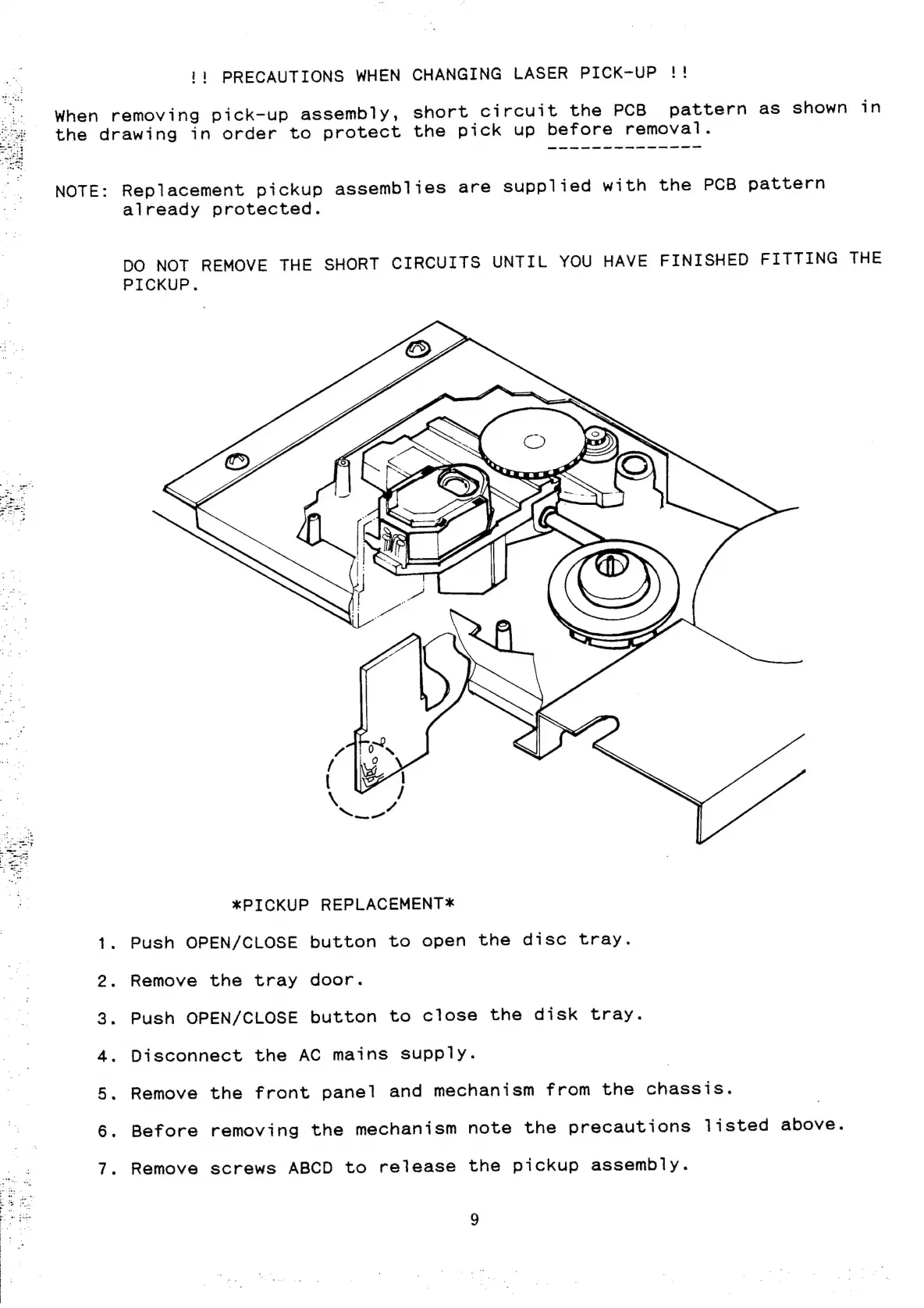
PRECAUTIONS
WHEN
CHANGING
LASER
PICK-UP
!!
When
removing
pick-up
assembly,
short
circuit
the
PCB
pattern
as
shown
in
the
drawing
in
order
to
protect
the
pick
up
before
removal.
NOTE:
Replacement
pickup
assemblies
are
supplied
with
the PCB
pattern
already
protected.
DO
NOT
REMOVE
THE
SHORT
CIRCUITS
UNTIL
YOU
HAVE
FINISHED
FITTING
THE
PICKUP.
*PICKUP
REPLACEMENT*
1.
Push
OPEN/CLOSE
button
to
open
the
disc
tray.
2.
Remove
the
tray
door.
3.
Push
OPEN/CLOSE
button
to
close
the
disk
tray.
4.
Disconnect
the
AC
mains
supply.
5.
Remove
the
front
panel
and
mechanism
from
the
chassis.
6.
Before
removing
the
mechanism
note
the
precautions
listed
above.
7.
Remove
screws
ABCD
to
release
the
pickup
assembly.

Other manuals for NAD 5420

Related product manuals