
 To Next Page

J
joseph14Aug 20, 2025
What to do if the tray won't open on my NAD CD Player?
- YYolanda WebbAug 20, 2025
If the tray won't open, check the open/close signal at U401 PIN 66, 65.

What to do if the tray won't open on my NAD CD Player?
If the tray won't open, check the open/close signal at U401 PIN 66, 65.
What to do if the tray won't close on my NAD CD Player?
If the tray refuses to close, examine the open/close signal at U401 PIN 65 PIN 66.
What to do if my NAD CD Player displays 'TRAY OPEN'?
If your NAD CD Player displays 'TRAY OPEN', check the open/close signal at U401 PIN 65 PIN 66.
What to do if my NAD CD Player displays 'TRAY CLOSE'?
If the display shows 'TRAY CLOSE', check the open/close signal at U401 PIN 65 PIN 66.
Why does my NAD CD Player not play discs?
If your NAD CD Player isn't playing discs, verify that the tracking servo circuit is correct.
Why does initial reading not occur on my NAD CD Player?
If initial reading does not occur, check the laser light, ensure the lens moves up and down, and verify the focus signal output.
Why is there no sound coming from my NAD CD Player?
If you're not getting any sound from your NAD CD Player, first, double-check that the audio cables are correctly connected between the CD player and your amplifier or receiver. Also, ensure that the input selector on your amplifier or receiver is set to the correct CD input. The issue may be due to incorrect audio cable connections or incorrect amplifier/receiver operation.
What to do if the NAD C 542 CD Player remote control does not work?
If the remote control for your NAD CD Player isn't working, the batteries in the remote might be dead, so try replacing them. Also, make sure there's nothing blocking the remote sensor on the player. The problem may arise because batteries in the remote control handset have expired or there's an object obscuring the remote sensor on the player.
What to do if my NAD CD Player disc play does not start?
If your NAD CD Player isn't starting disc playback, make sure the disc is loaded with the label side up. Also, check if the disc is dirty, and if so, clean it. The disc may be loaded upside down or the disc may be too dirty.
How to fix sound skipping on NAD C 542 CD Player?
If the sound skips on your NAD CD Player, the player might be subject to vibration or physical shock from external sources. Try changing the installation location to avoid these disturbances.
Covers risk of shock, fire, moisture, placement, power cord handling, water, and servicing warnings.
Details on grounding outdoor antennas for surge protection and lightning safety.
Information on proper recycling and disposal of electronic equipment.
Connects amplifier to line out and digital audio outputs.
NAD Link, IR In, and +12V Trigger connections for system control.
Buttons for disc playback, program, scanning, and track selection.
Indicates the player's power status (on or stand-by).
Using the remote for powering the player on and off.
Direct track selection and programming using the remote.
Step-by-step instructions for initial player setup and playback.
Descriptions of Line Out, Optical, and Coaxial digital outputs.
Details on NAD Link, IR In, Trigger inputs, and AC power cord.
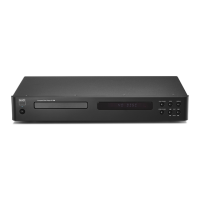
Operation of the disc drawer and information shown on the display.
Functions for playing, pausing, stopping, and selecting tracks.
How to use repeat play for single tracks or entire discs, and random playback.
Using scan for quick track searching and skip for track selection.
Explains the LED indicator for player power status.
Using the remote, numeric keypad, and programming playback sequences.
Steps to program, review, and play custom track sequences.
How to remove unwanted tracks from playlists in Program or Stop mode.
Information on HDCD encoding and compatibility with CD-R/RW discs.
Proper methods for handling, cleaning, and maintaining compact discs.
Details about the laser system used for reading discs.
Guides users through common issues and their resolutions.
 General
| Type | CD Player |
|---|---|
| Signal-to-Noise Ratio | >110dB |
| Frequency Response | 20Hz - 20kHz |
| Channel Separation | >95dB |
| Digital Output | Coaxial |
| Digital-to-Analog Converter (DAC) | 24-bit/192kHz Delta-Sigma |
| Output Impedance | 100 Ohms |