Need help?
Do you have a question about the NAD C3050 LE and is the answer not in the manual?
Covers safe operation, cleaning, attachments, and general handling advice for the amplifier.
Details precautions for power sources, cords, grounding, lightning, power lines, and overloading.
Highlights warnings for hazards like flame sources, liquid entry, headphone usage, and servicing.
Lists the items included with the C 3050 LE amplifier.
Explains how to reset the C 3050 LE to its factory default settings.
Provides initial steps for setting up the C 3050 LE, including network connection.
Details the buttons, knobs, and indicators on the front of the C 3050 LE.
Describes the various input, output, and connection terminals on the rear of the unit.
Explains the functionality and operation of the included SR 10 remote control.
Details the Dirac Live room correction technology and its setup.
Guides on using the BluOS Controller App for streaming and features.
Lists detailed technical data for the C 3050 LE amplifier's performance and features.
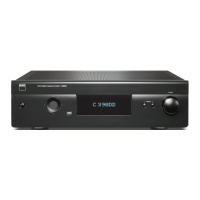
The NAD C3050 LE is a stereophonic amplifier designed to deliver high-quality audio performance. It functions as a central hub for various audio sources, amplifying signals for speakers and headphones, and offering advanced features for sound customization and network connectivity.
The primary function of the C3050 LE is to amplify audio signals from various sources, providing power to both main and secondary speaker sets, as well as headphones. It incorporates a proprietary Dirac Live room correction technology, which optimizes the sound output based on the acoustic characteristics of your listening environment. This technology corrects both frequency and impulse responses of the loudspeakers, aiming to create a natural, realistic, and transparent sound with tighter bass and reduced room modes.
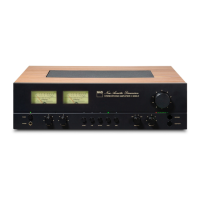
The amplifier features a pair of Power meters (VU meters) on the front panel, which monitor either the input signal or the speaker output levels, calibrated in Watts and dB for an 8-ohm load. A Power LED indicator changes color to show the unit's status: amber for standby, green for operational, and red for protection circuit engagement in cases of abuse like excessively low loudspeaker impedance or short circuits.
The C3050 LE supports a wide range of audio inputs, including a dedicated Moving Magnet (MM) phono input for turntables, line-level inputs for CD players or tuners, and digital optical and coaxial inputs for various digital sources like BD/DVD players or cable boxes. It also includes an HDMI eARC port, allowing it to receive audio signals from a compatible TV, supporting HDMI Control (CEC) for integrated power management.
For external processing, the unit offers MAIN IN sockets, allowing it to be used with an external preamplifier or processor, and PRE OUT sockets, enabling it to function as a preamplifier for other amplifiers or receivers. A SUBW output is provided for connecting a powered subwoofer, sending low-frequency information up to 80 Hz.
Network connectivity is a core feature, facilitated by both wired Ethernet and Wi-Fi connections. This allows the C3050 LE to integrate with the BluOS ecosystem, enabling streaming from various cloud services, internet radio stations, and networked music collections. Bluetooth connectivity is also available for wireless audio streaming from compatible devices.
The C3050 LE offers intuitive controls for managing audio playback and settings. On the front panel, dedicated buttons allow for direct selection of active source inputs (Phono, Line, Optical, Coax, HDMI, BluOS). Each source input has a corresponding LED indicator that illuminates green when selected.
Tone controls for Bass and Treble allow users to adjust the tonal balance of their system, with a 12 o'clock detent position indicating a "flat" setting. A Balance control adjusts the relative levels of the left and right speakers, also with a 12 o'clock detent for equal levels.
The SPEAKERS knob provides control over speaker output, allowing selection of SPEAKERS A, SPEAKERS B, both (A+B), or OFF. When headphones are in use, it is advisable to set the SPEAKERS knob to "OFF" to mute the main speakers. A 1/4" stereo jack socket is available for headphone listening, with volume, tone, and balance controls remaining active.
The unit features an Auto Standby mode, which automatically switches the C3050 LE to standby if there is no user interface interaction or audio at the current source for 15 minutes. This feature can be enabled or disabled. A Network Standby mode is also available, maintaining network and Bluetooth connections at a reduced power consumption level. From Network Standby, the unit can be reactivated by resuming playback, activating the BluOS App, playing a paired Bluetooth source, or pressing any source or power buttons. A Deep Standby mode further reduces power consumption to less than 0.5W.
The included SR 10 remote control handset provides comprehensive control over the C3050 LE and can also manage up to four other devices. It features separate ON and OFF buttons, volume controls, source selection, and numeric keys for direct input selection. The remote also includes playback controls for BluOS sources, such as play/pause, skip back, and skip forward. The SR 10 remote control has a library of default NAD codes, allowing it to control various NAD CD players, BluOS players, or tuners, and users can load different library codes if needed.
For Dirac Live setup and calibration, a USB MIC Sound Adaptor and Mic Assembly with Ferrite Base are connected to the rear panel USB port. Detailed guidelines for Dirac Live setup are available online.
The C3050 LE is designed for user-friendly maintenance and long-term reliability. For cleaning, it is recommended to unplug the product from the wall outlet and use a dry, soft cloth, lightly dampened with soapy water if necessary. Avoid liquid or aerosol cleaners, as well as solutions containing benzol or other volatile agents.
The unit's packaging should be retained for safe transport or relocation, as it provides the best protection against damage. Adequate ventilation is crucial for the C3050 LE's reliable operation and to prevent overheating. It should be placed on a firm, level surface, away from direct sunlight, heat sources, and dampness.
In case of a protection circuit engagement (indicated by a red Power LED), the unit should be turned OFF via the rear panel POWER switch, allowed to cool down, and speaker connections should be checked before resuming normal operation.
The C3050 LE can be factory reset to restore it to default settings, which is useful if the unit is not functioning correctly or if a firmware upgrade has failed. This process involves a specific sequence of pressing and holding the front panel POWER button while toggling the rear panel POWER switch.
The SR 10 remote control requires two AA batteries, and proper insertion as indicated on the battery compartment is important. The remote can also be reset to its factory default settings through a specific button sequence.
For optimal performance and reliability, it is recommended to use high-quality leads and ensure all sockets are firmly connected. Bare wire speaker connections should be carefully made, ensuring no loose strands touch the back panel or other sockets.
Firmware updates are important for maintaining the C3050 LE's optimal performance and accessing new features. Information on firmware updates is available on the NAD Electronics website.
 General
| Preamp Output | Yes |
|---|---|
| Power Output | 100W per channel (8Ω) |
| Frequency Response | 20Hz - 20kHz (±0.3dB) |
| Rated Power | 100W per channel (8Ω) |
| Digital Inputs | Optical, Coaxial, USB |
| Wireless | Bluetooth |
| Input Impedance | 47kΩ (line), 47kΩ (MM phono) |
| Inputs | USB |

 To Next Page