EasyManua.ls Logo

NAD C316BEE - User Manual

NAD C316BEE
12 pages
Print Icon
To Next Page IconTo Next Page
Loading...
ENGLISHFRANÇAISESPAÑOLITALIANODEUTSCHNEDERLANDSSVENSKAРУССКИЙ
®
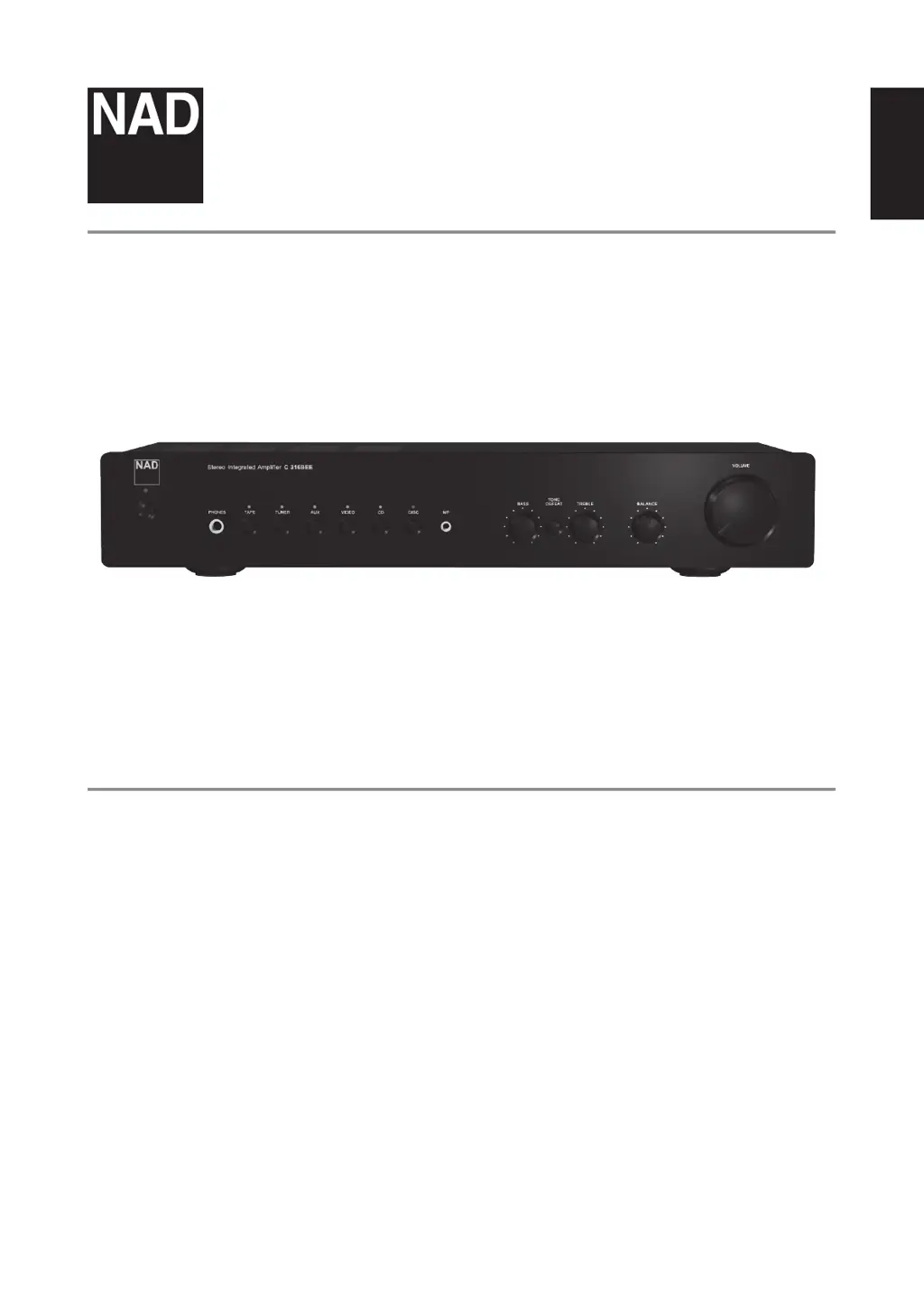
Owners Manual
C 316BEE
Stereo Integrated Amplier

Other manuals for NAD C316BEE

Questions and Answers

  • A
    Adam DavisJul 26, 2025
    What to do if one channel has no sound on NAD Amplifier?
    • Z
      znunezJul 26, 2025
      First, check the balance control and ensure it is centered. Then, inspect the speaker connections to make sure they are properly connected and not damaged. Finally, verify that the input leads are correctly connected and not damaged.
  • S
    Sara LutzAug 2, 2025
    Why does the standby LED turn red on my NAD Amplifier?
    • J
      Joseph BrownAug 2, 2025
      If the Standby LED turns red during operation, it indicates that your NAD C 316BEE amplifier has overheated. Turn the amplifier OFF and ensure that the ventilation slots on the top and bottom are not blocked, allowing proper airflow. After the unit has cooled down, turn it back ON. Also, ensure the overall loudspeaker impedance is not below 4 ohms.
  • G
    gcareyAug 10, 2025
    Why is my NAD C316BEE Amplifier remote control not working?
    • M
      Martin BarnettAug 10, 2025
      Check or replace the battery in the remote control. Ensure it is correctly inserted. Then, make sure there are no obstructions blocking the IR transmitter or receiver windows. Finally, avoid direct sunlight or very bright ambient light on the IR receiver.
  • W
    Wayne CooperAug 17, 2025
    What causes weak bass and diffused stereo image on NAD Amplifier?
    • W
      Wendy VaughnAug 18, 2025
      Check the connections to all speakers in your system to ensure they are wired correctly and in phase.

Summary

Important Safety Instructions

General Safety Precautions

Includes operating, water, ventilation, and power source safety guidelines.

Electrical and Surge Protection

Covers polarized plugs, cord protection, grounding, and lightning protection.

Important Safety Instructions Continued

Service and Replacement Parts

Refer to qualified personnel for service; use manufacturer-specified replacement parts.

Mounting, Heat, and Headphones

Mount as recommended, site away from heat, use headphones safely.

General Warnings and Placement

Do not expose to rain/moisture, match plug blade, do not open cover, ensure ventilation.

Safety and Environmental Information

Environmental Protection and Disposal

Dispose of product and batteries at recycling points, not household waste.

Voltage Compatibility

Connect only to the prescribed AC outlet (120V 60Hz or 230V 50Hz).

Model and Serial Number Recording

Record model and serial numbers for future convenience.

Introduction and Getting Started

Unpacking and Packaging

Check contents, save packaging for transport and protection.

Choosing a Location and Installation

Select a well-ventilated location, site properly, and switch off before connecting.

Speaker Terminal Connections

Warning about live terminals; insert bare wire/pins correctly to avoid shorts.

Quick Start Guide

Steps for initial setup and powering on the C 316BEE.

Identification of Front Panel Controls

Front Panel Controls Overview

Identifies and describes front panel buttons, LEDs, and sockets.

Standby Button and LED Indicator

Controls unit power state and indicates operation status.

Input Selectors and MP Socket

Selects audio input sources and connects external media players.

Headphone Socket and Remote Sensor

Provides headphone output and receives remote control signals.

Identification of Tone and Volume Controls

Tone Controls (Bass and Treble)

Adjust Bass and Treble for tonal balance; 12 o'clock is flat.

Tone Defeat Switch

Bypasses the tone control section for a pure signal path.

Balance Control

Adjusts relative levels between left and right speakers.

Volume Control

Adjusts the overall loudness for speakers or headphones.

Identification of Rear Panel Controls

Rear Panel Connections Overview

Details all input/output terminals and power connections on the rear panel.

Audio Inputs and Tape Connections

Includes various audio inputs and tape recorder connections.

Speaker Outputs and Power Connections

Connect speakers (min 4-ohm) and AC power cord; locate master power switch.

Identification of Remote Control

Remote Control Operation Overview

Overview of the AMP 1 remote control functions and range.

Remote Power, Mute, and Volume

Control unit power state, mute sound, and adjust loudness remotely.

Remote Input Selection and CD Controls

Select input sources and control compatible CD players via remote.

Reference: Troubleshooting

Troubleshooting: No Sound

Diagnose and resolve issues related to no sound or one channel sound.

Troubleshooting: Audio Quality & Remote

Address weak bass, diffused stereo image, and remote control problems.

Troubleshooting: Standby LED Red

Identify causes for red standby LED, such as overheating or impedance issues.

Reference: Specifications

Line Level Input Specifications

Details input impedance, sensitivity, and maximum input signal.

Line Level Output Specifications

Details output impedance, tone control range, and tape output.

Physical Specifications

Provides unit dimensions, net weight, and shipping weight.

NAD C316BEE Specifications

Line Level Input IconLine Level Input
input impedance50kΩ + 100pF
input sensitivity, rated power200mV
maximum input signal7V
Line Level Output IconLine Level Output
tape out impedanceSource Z + 600Ω
treble adjustment±5dB at 10kHz
bass adjustment±8dB at 100Hz
Power and Performance IconPower and Performance
continuous output power into 8Ω40W (16dBW)
clipping power45W
IHF dynamic headroom 8Ω+3.5dB
IHF dynamic headroom 4Ω+4.8dB
IHF dynamic power 8Ω90W (19.5dBW)
IHF dynamic power 4Ω120W (20.8dBW)
damping factor>200 (ref. 8Ω, 1kHz)
voltage gain39dB
Audio Performance IconAudio Performance
signal / noise ratio, A-weighted95dB (ref. 1W)
THD + noise<0.01%
SMPTE IM<0.02%
IHF IM<0.01%
headphone output impedance68Ω
Weight and Dimensions IconWeight and Dimensions
width435 mm
height79.8 mm
depth286.2 mm
net weight5.52 kg
shipping weight6.65 kg

Related product manuals