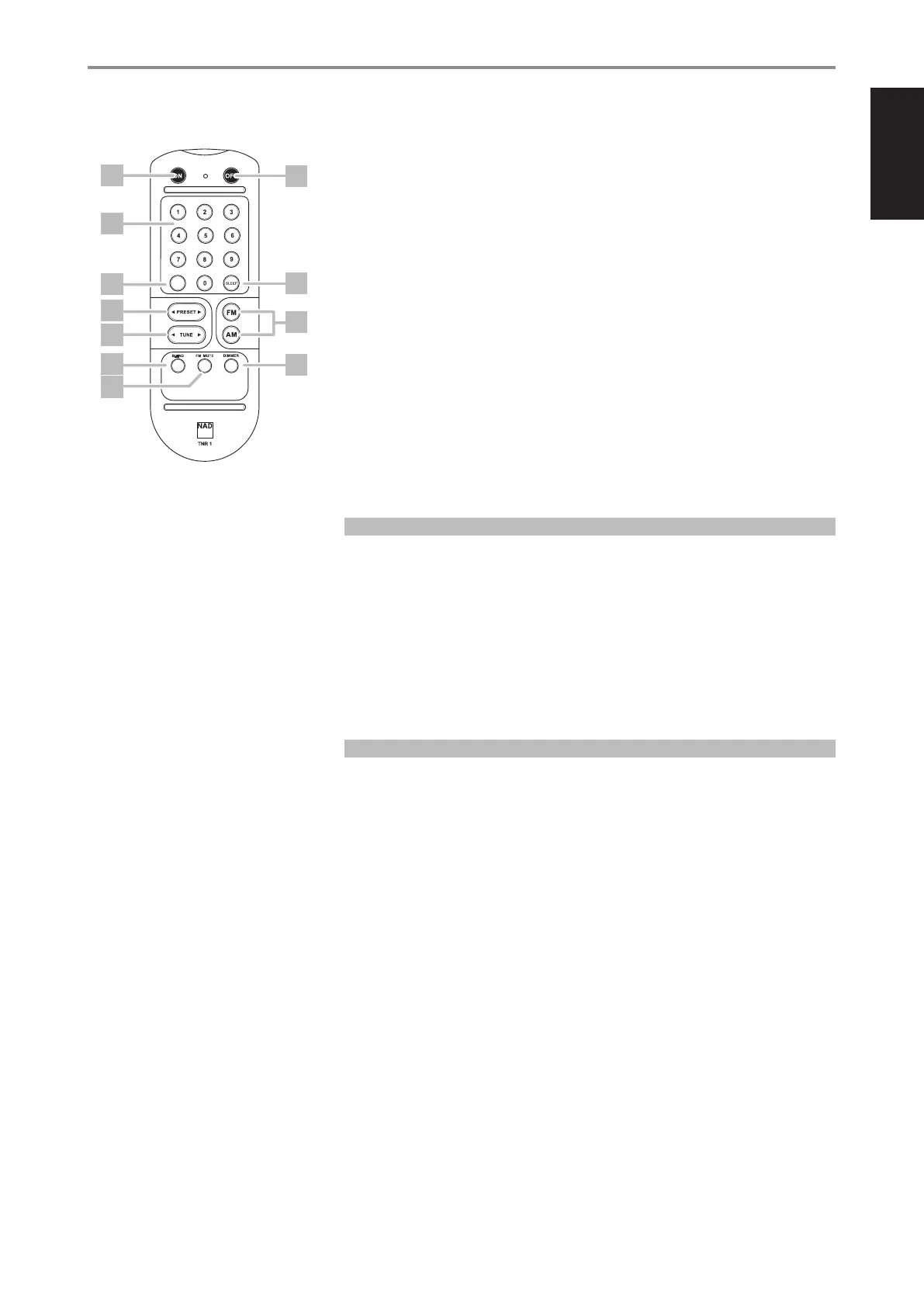
1 ON: Power up C 426 from standby mode.
2 OFF: Switch C 426 to standby mode.
3 0-9 number buttons: Direct-entry of frequency channel or preset number.
4 DISP: Show RDS PS, RDS PT, Preset name or station frequency as applicable.
5 SLEEP: Set sleep mode timer.
6 PRESET: Step up or down between stored radio presets.
7 TUNE: Tune forward or backwards.
8 FM/AM: Select AM or FM band.
9 BLEND: Activate or deactivate BLEND feature.
10 FM MUTE: Activate or deactivate FM MUTE FM STEREO mode.
11 DIMMER: Reduce, turn o or restore VFD brightness.
SLEEP MODE
The Sleep Mode timer will switch the C 426 to standby mode automatically after a preset number of
minutes. Toggle TNR 1’s [SLEEP] key to select through the following Sleep mode timer settings – SLEEP
30, SLEEP 60, SLEEP 90 and OFF. Stop at the desired Sleep mode timer setting. A corresponding “SLEEP”
icon will be illuminated in the VFD.
While at SLEEP time mode, pressing the TNR 1’s [SLEEP] button once will display the remaining minutes
(i.e. “SLEEP _ _”; “_ _” is the number of minutes remaining) before the C 426 goes to standby mode.
To cancel the sleep mode, continue pressing the TNR 1’s [SLEEP] button until “OFF” displays on the VFD.
Switching the C 426 to standby from either the TNR 1’s [OFF] button or the front panel Standby button
will also cancel the sleep mode.
DIMMER
The VFD brightness can be adjusted in three ways. Toggle the [DIMMER] button to reduce, turn o or
restore VFD brightness.
IDENTIFICATION OF CONTROLS
TNR 1 REMOTE CONTROL
BLEND
DISP
1
3
4
9
10
7
2
5
8
11
6
9
ENGLISHFRANÇAISESPAÑOLITALIANODEUTSCHNEDERLANDSSVENSKAРУССКИЙ


 To Next Page