GB
7
TROUBLESHOOTING
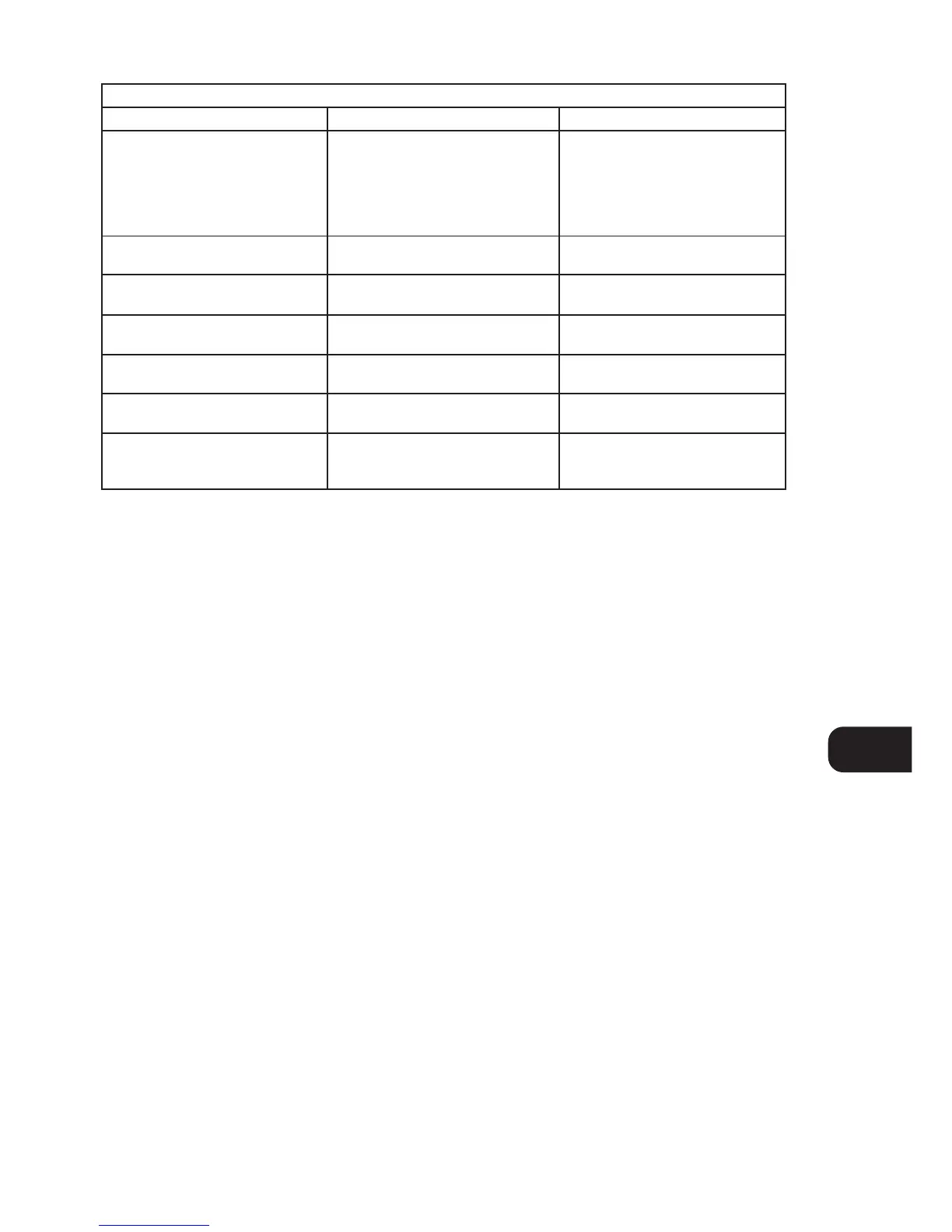
NO SOUND • Power AC lead unplugged or power not
switched on
• Signal leads incorrectly connected
• Station not selected or weak signal with
FM Mute on.
• Internal fuse blown
• Check AC lead
• Check connections to amplifier
• Re-tune or switch off FM Mute
• Consult dealer
Problem Cause Solution
NO SOUND IN ONE CHANNEL • Signal leads to amplifier disconnected
or damaged
• Check leads and connections
NOISE, HISS • Weak signal • Check station tuning. Adjust or replace
antenna.
DISTORTION • Multi-path signals or interference from
another station
• Check station tuning. Adjust or replace
antenna
WHISTLES OR BUZZES ON FM & AM • Interference from other electrical
sources - computers, games consoles
• Check station tuning. Switch off or
move the source of the electrical noise
WHISTLES OR BUZZES ON AM • Interference from fluorescent lighting
or electrical motors
• Check station tuning. Adjust or replace
AM antenna
NO RDS INFORMATION • Station signal too weak.
• Station not transmitting RDS data
• Check station tuning. Adjust or replace
antenna
• No remedy


 To Next Page