, HDCD
®
, High Definition Compatible Digital
®
and
Pacific Microsonics™ are either registered trademarks or
trademarks of Pacific Microsonics, Inc. in the United States and/or
other countries.
HDCD system manufactured under license from Pacific
Microsonics, Inc. This product is covered by one or more of the
following patents: In the USA: 5,479,168, 5,638,074, 5,640,161,
5,808,574, 5,838,274, 5,854,600, 5,864,311, 5,872,531, and in
Australia: 669114. Other patents pending.
ABOUT THE OPTICAL PICKUP
The Compact Disc player uses a solid-state semi-conductor diode
laser, mounted on a tracking servo-mechanism, to play the disc.
The laser illuminates the track of microscopic pits representing
the digital data bits, while photo-diodes detect the reflected
illumination from the disc and convert it into an electronic signal
which is then decoded to recover the musical waveform in each
stereo channel.
You cannot see the laser operating, because it operates at
wavelength of 7800 Angstroms, which is in the infrared and thus
invisible to the human eye.
The Compact Disc player is completely safe for children to use.
The laser operates at very low power and is concealed within the
player mechanism. Even when the player is disassembled, the
laser remains sealed within an optical system that causes its light
to focus only 1 millimeter from the lens and then diverge rapidly,
reducing its intensity to negligible levels.
GB
8
TROUBLESHOOTING
NO POWER WHEN THE POWER BUTTON
IS SET TO ON
• Poor or no power plug connection at
the AC outlet
• Insert the power plug firmly into the AC
outlet.
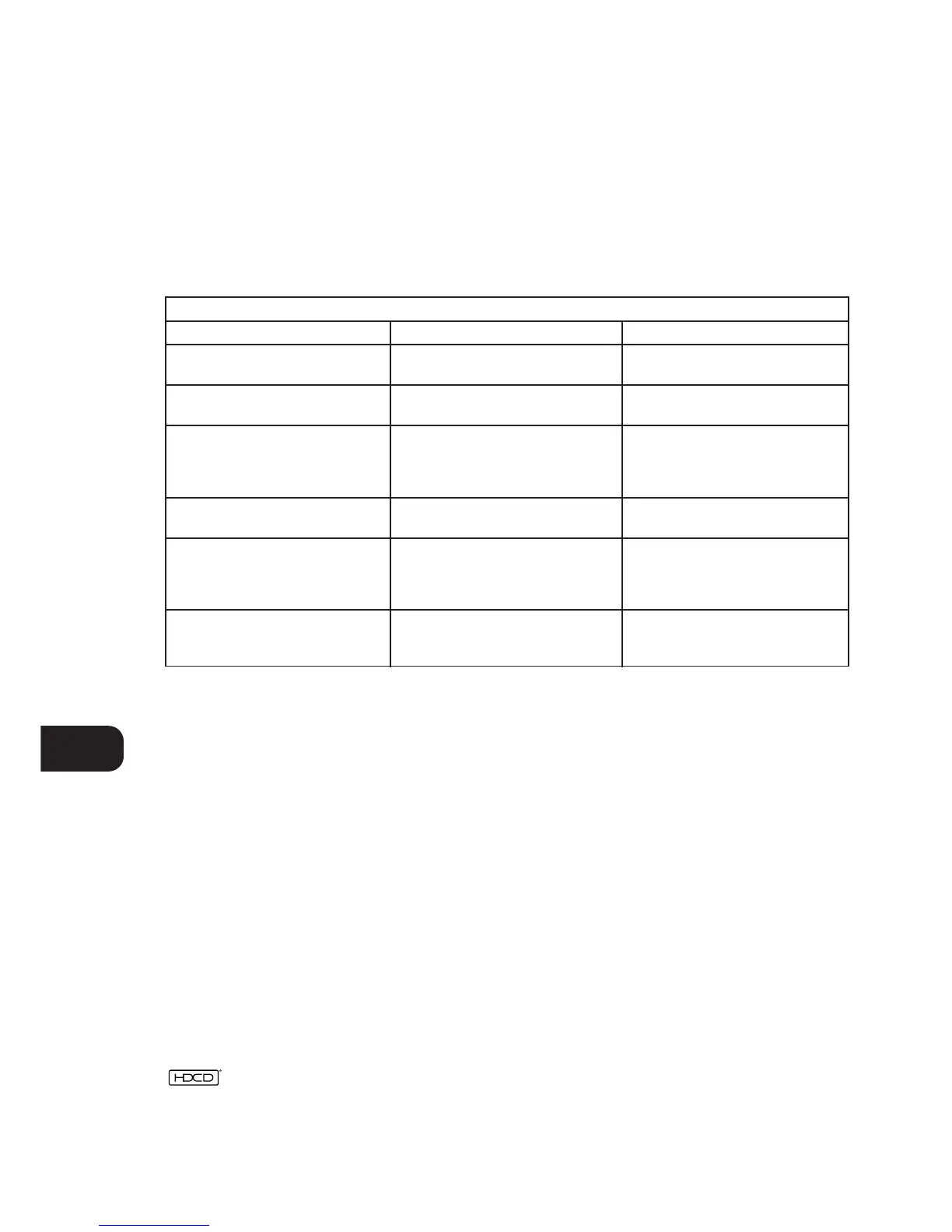
SYMPTOM POSSIBLE CAUSE SOLUTION
DISC PLAY DOES NOT START • The disc is loaded upside down
• The disc is too dirty
• Reload the disc with the label side UP
• Clean the disc
NO SOUND • Incorrect audio cable connections
• Incorrect amplifier/receiver operation
• Connect the CD player to the
amplifier/receiver correctly
• Make sure that the input selector on
your amplifier or receiver is set to CD
SOUND SKIPS • The CD player is subject to vibration or
physical shock from external sources
• Change the installation location
REMOTE CONTROL DOES NOT WORK • Batteries in Remote Control handset
have expired
• Object obscuring remote sensor
on the player
• Replace batteries
• Remove any objects directly in front of
the player
A “HUMMING” SOUND CAN BE HEARD • Loose cable connections • Check the cable connections,
particularly the phono connecting
cables


 To Next Page