ENGLISH
6
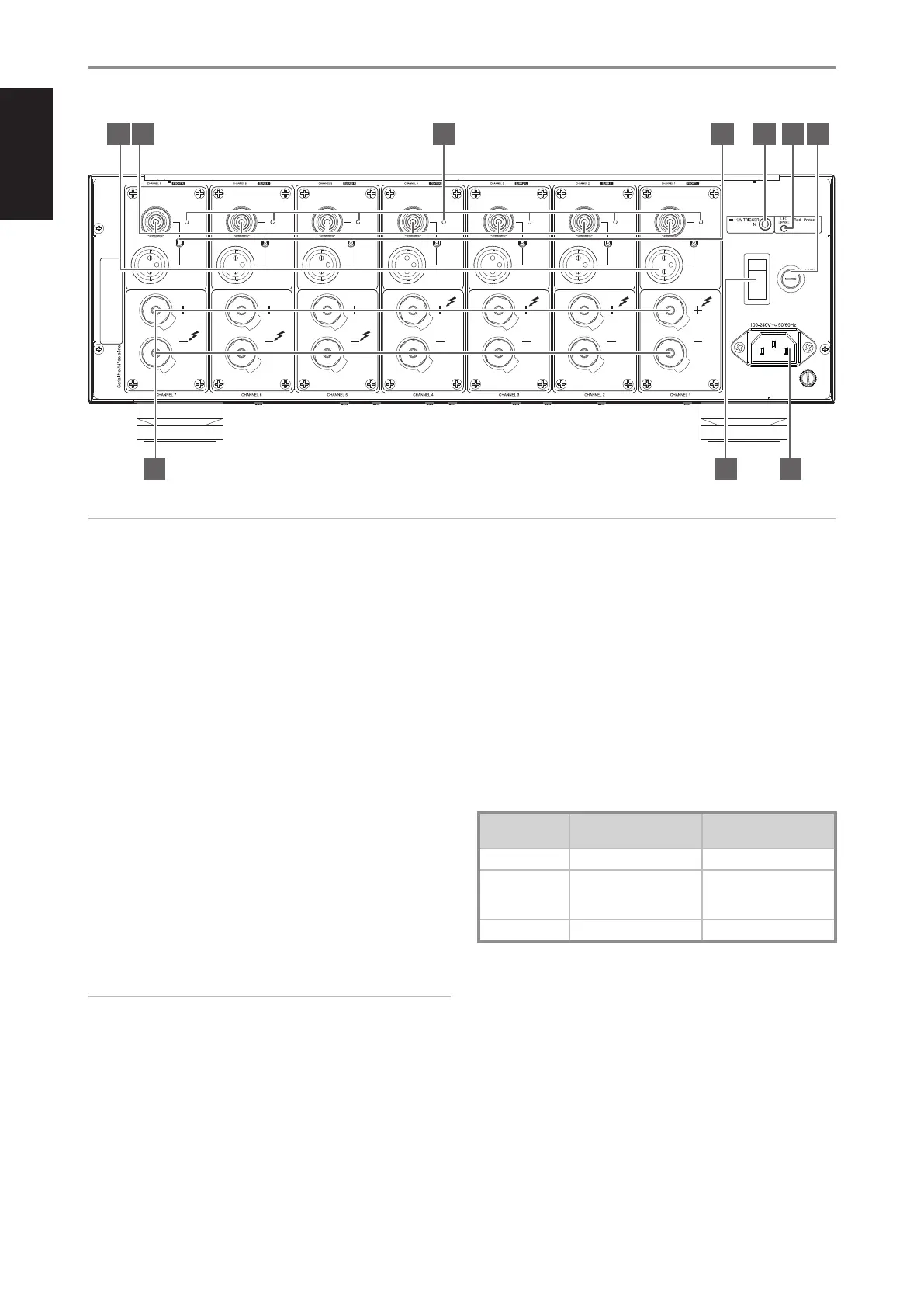
1 BALANCED
• Use the BALANCED analog audio input of the M28 if the external
source to be connected has BALANCED audio output. Superior
audio quality is ensured with the distinctive noise reduction
capability of BALANCED connection with XLR jacks.
• With BALANCED as the selected audio input, ensure that SELECT
switch is set to BALANCED.
• For optimum heat dissipation in an AV surround system, the
following audio channel allocations are recommended:
Channel 1 = Front Left speaker
Channel 2 = Surround Left speaker
Channel 3 = Surround Back Left speaker
Channel 4 = Center speaker
Channel 5 = Surround Back Right speaker
Channel 6 = Surround Right speaker
Channel 7 = Front Right speaker
PIN CONFIGURATION OF BALANCED XLR JACK
Pin 1: Ground
Pin 2: Positive (signal live)
Pin 3: Negative (signal return)
IMPORTANT NOTES
• Always turn OFF the M28 and other components in the system before
connecting or disconnecting anything to the BALANCED audio input
jacks.
• Before switching ON the M28 from standby mode for the rst time,
make sure that the volume control of the external source is set to
minimum level position. This prevents inadvertently beginning a session
at excessive volume.
· Depending upon the source’s conguration, analog audio input
connection can be made up to seven channels either via BALANCED or
SINGLE-ENDED input ports.
2 SINGLE-ENDED
• Use single-ended analog audio input for sources (preampliers or
processors) that are not equipped with BALANCED analog audio
output.
• With SINGLE-ENDED as the selected audio input, ensure that
SELECT switch is set to SINGLE-ENDED.
3 PROTECT
• When a specic channel goes to protect mode, the corresponding
PROTECT LED will turn red. The other ampliers that did not go
to protect mode will continue to function as indicated by their
respective PROTECT LEDs illuminated in green.
PROTECT LED INDICATOR COLORS
CONDITION PROTECT LED COLOR
POWER INDICATOR (NAD
LOGO) COLOR
Normal operation Green Bright/white
Overheat
Red (per applicable channels;
other channels may remain
green)
Bright/white
Short circuit No light (all channels) Red
IDENTIFICATION OF CONTROLS
REAR PANEL
© NAD M28
SELECT
BALANCED
SINGLE-ENDED
PROTECT
ANALOG AUDIO INPUT
SELECT
BALANCED
SINGLE-ENDED
PROTECT
ANALOG AUDIO INPUT
SELECT
BALANCED
SINGLE-ENDED
PROTECT
ANALOG AUDIO INPUT
SELECT
BALANCED
SINGLE-ENDED
PROTECT
ANALOG AUDIO INPUT
SELECT
BALANCED
SINGLE-ENDED
PROTECT
ANALOG AUDIO INPUT
SELECT
BALANCED
SINGLE-ENDED
PROTECT
ANALOG AUDIO INPUT
SELECT
BALANCED
SINGLE-ENDED
PROTECT
ANALOG AUDIO INPUT
POWER
ON
SPEAKER SPEAKER SPEAKER SPEAKER SPEAKER SPEAKER SPEAKER
4 5 6 7
8 9 10
1 2 3
ATTENTION!
Ensure that the M28 is unplugged before making any connections. It is also advisable to power-down or unplug all associated components while making
or breaking any signal or AC power connections.


 To Next Page