ENGLISH
12
SETUP MENU
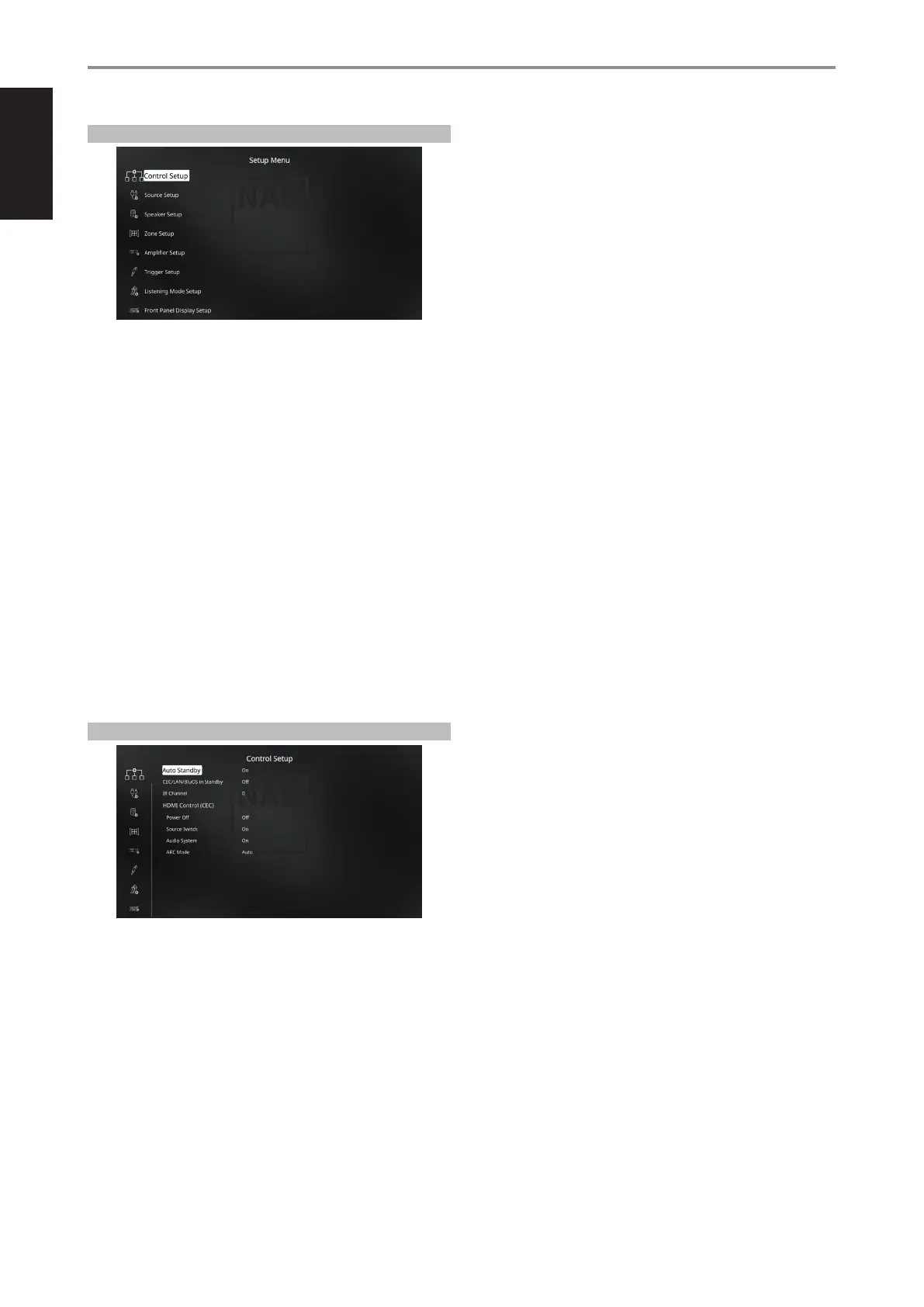
The Setup Menu allows one to customize the operation of the T 778 to the
ancillary equipment used in one’s specic A/Vsystem. Unless your system
exactly matches the factory defaults as shown in the accompanying Quick
Start Guide, you will need to use the setup menu to congure the inputs
of the T 778.
At Setup Menu, the following are congurable
• Control Setup
• Source Setup
• Speaker Setup
• Zone Setup
• Amplier Setup
• Trigger Setup
• Listening Mode Setup
• Front Panel Display Setup
• A/V Presets
• System and Upgrade
• Select Language
To access and navigate through Setup Menu and its sub-menu selections,
please refer to and follow the directions stated in the sections “DISPLAY THE
OSD” and “NAVIGATING THE OSD AND MAKING CHANGES”.
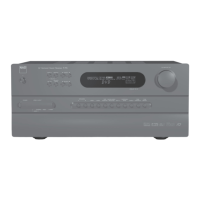
CONTROL SETUP
The T 778 supports HDMI Control (CEC) and Audio Return Channel (ARC)
functions. Both functions are possible if external devices that also support
both features are interconnected with T 778 via HDMI connection.
AUTO STANDBY
The T 778 can be setup to automatically go to standby mode if the current
Source has no active audio input for 30 minutes.
On: T 778 will go to standby mode automatically if the current Source
has no active audio input for 30 minutes.
O: T 778 remains active even if the current Source has no active audio
input.
CEC/LAN/BluOS IN STANDBY
Status of CEC, LAN and BluOS activity are indicated while the unit is at
standby mode.
On
• Enable CEC feature. Audio and video will continuously stream
from a CEC-enabled HDMI source to a CEC-enabled TV (with both
devices connected via T 778).
• LAN and BluOS connections continue to be active.
O
• T 778 will not pass through any CEC message. Audio and video
will not be streamed from a CEC-enabled HDMI source to a CEC-
enabled TV (with both devices connected via T 778).
• LAN and BluOS connections are idle or inactive.
HDMI CONTROL CEC
Consumer Electronics Control (CEC) is a set of commands that utilizes
HDMI’s two- way communication to allow for single remote control of any
CEC-enabled devices connected with HDMI. A CEC command will trigger
the necessary commands over HDMI for an entire system to auto-congure
itself to respond to the command.
When devices that support HDMI Control (CEC) are connected, the
following modes of operation can be executed via the T 778 or the external
device using any of the device’s remote control.
O: Applies to all CEC options below. At “O” setting, particular CEC feature
is defeated.
Power O: At “On” setting, the T 778 will automatically go to
standby mode if it receives a CEC standby command. On the other
hand, if the T 778 receives a CEC power up command, the T 778 will
correspondingly switch ON from standby mode.
Source Switch: At “On” setting, the T 778 will automatically switch
sources if another CEC device requests a Source change.
For example, if PLAY is pressed on a BD Player with CEC, the T 778
and TV with CEC will automatically switch to their respective input
connections – the T 778 switching to the HDMI input where the BD
Player is connected while the TV will switch to its input where the
T 778’s HDMI OUT is connected. This completes the auto-conguration
– the BD Player is automatically played back using the T 778 and TV.
Audio System: At “On” setting, the T 778 will broadcast a CEC message
indicating it is an active audio system. A CEC compatible TV will usually
mute its audio output when this happens. When this option is enabled,
the T 778 will also respond to CEC volume and mute commands. For
example, a CEC TV may forward the volume commands from its remote
to the T 778.
OPERATION
CONFIGURING T 778 SETUP MENU VIA ONSCREEEN DISPLAY


 To Next Page