NA
D
22
GB
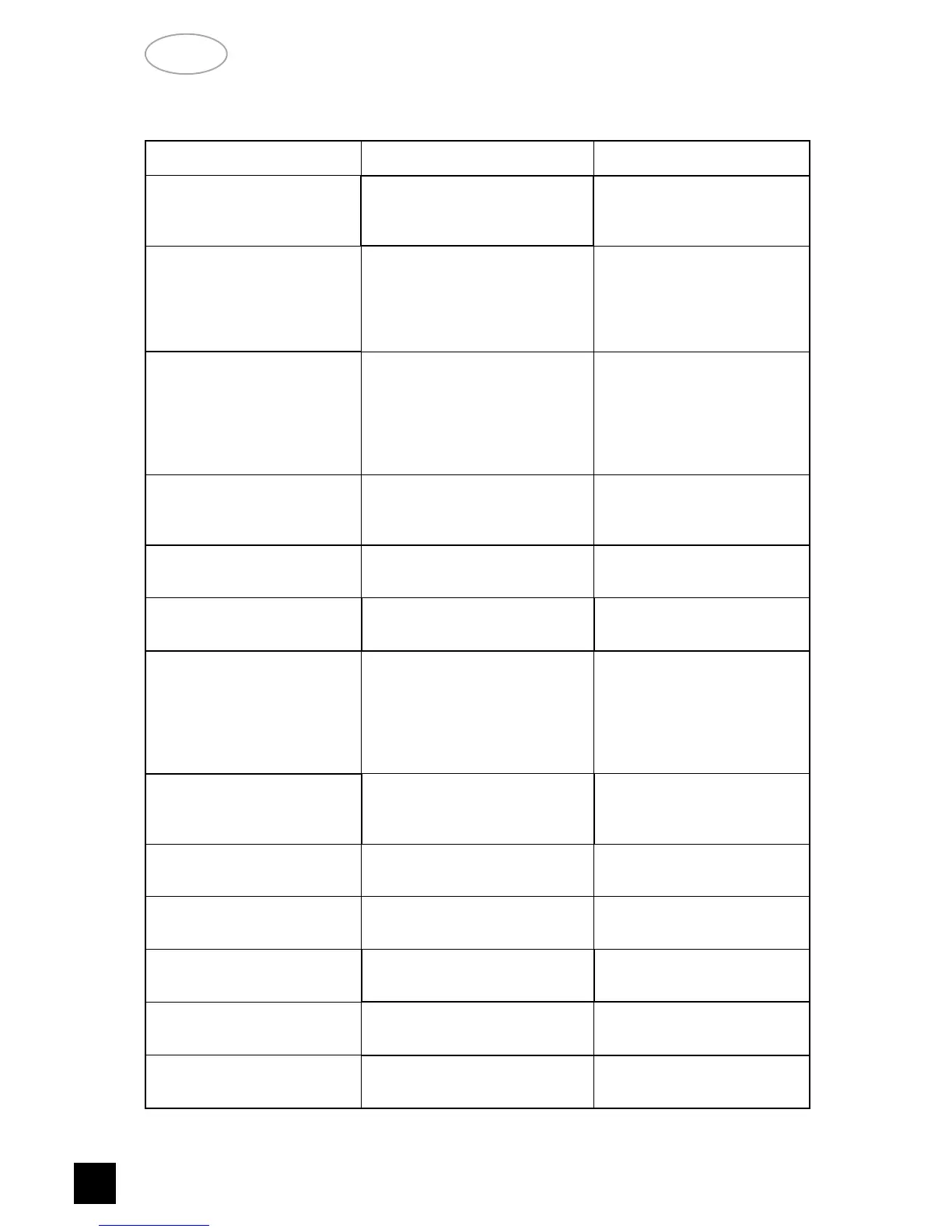
NO SOUND
• Power AC lead unplugged or
power not switched on
• Tape Monitor selected
• Mute on
• Check if AC lead is plugged in
and power switched on
• De-select Tape Monitor mode
• Switch off Mute
PROBLEM
CAUSE
SOLUTION
TROUBLESHOOTING
NO SOUND ON ONE CHANNEL
• Speaker not properly connected
or damaged.
• Input lead disconnected or
damaged
• In Setup “OFF” for surround
speaker selected
• Check connections and
speakers
• Check leads and connections
• Select appropriate Surround
mode (large or small)
NO SOUND ON SURROUND
CHANNELS
• No surround mode selected
• Mono sound source
• Speakers not properly connected
• Surround volume level too low
• Select a Surround Mode
• Test system with Stereo or
Dolby Surround material
• Check speakers and
connections
• Increase surround volume
level
NO SOUND ON CENTER
CHANNEL
• In Setup “OFF” for center speaker
selected
• Speaker not connected properly
• Center volume level set too low
• Select appropriate Center
mode (large or small)
• Check speaker and connection
• Increase center volume level
“DOLBY DIGITAL” OR “DTS”
AUTO-DETECTION FUNCTION
DOES NOT WORK
• Source not connected using
digital inputs
• Connect digital output of
source to T 760
WEAK BASS/ DIFFUSE
STEREO IMAGE
• Speakers wired out of phase • Check connections to all
speakers in the system
REMOTE CONTROL HANDSET
NOT WORKING
• Batteries flat, or incorrectly
inserted
• IR transmitter or receiver
windows obstructed
• IR receiver in direct sun or very
bright ambient light
• Check or replace batteries
• Remove obstruction
• Place unit away from direct
sun, reduce amount of
ambient light
NO SOUND WITH TUNER
• Antenna leads incorrectly
connected
• Station not selected or weak
signal with FM Mute on.
• Check antenna connections to
receiver
• Re-tune or switch off FM Mute
NOISE, HISS ON AM AND FM
• Weak signal • Check station tuning. Adjust
or replace antenna.
DISTORTION ON FM
• Multi-path signals or interference
from another station
• Check station tuning. Adjust
or replace antenna
WHISTLES OR BUZZES ON
FM & AM
• Interference from other electrical
sources - computers, games
consoles
• Check station tuning. Switch
off or move the source of the
electrical noise
WHISTLES OR BUZZES ON
AM
• Interference from fluorescent
lighting or electrical motors
• Check station tuning. Adjust
or replace AM antenna
NO RDS NAME (PS)
• Station signal too weak.
• Station not transmitting RDS data
• Check station tuning. Adjust
or replace antenna
• No remedy


 To Next Page