Need help?
Do you have a question about the Nanit N111 and is the answer not in the manual?
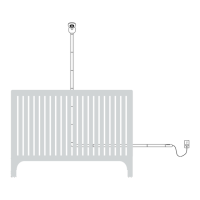
Overview of the Nanit Wall Mount installation process and optimal placement.
Lists all components included in the Nanit package for setup.
Lists the necessary tools for installing the Nanit system.
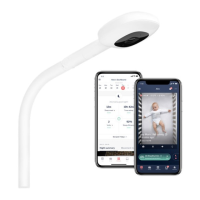
Connect the camera to the wall mount and plug in the power adapter.
Download the Nanit app, create an account, or log in to proceed.
Unplug the Nanit and detach the camera from the wall mount for assembly.
Use the template to measure and mark the centerline and anchor hole on the wall.
Drill a pilot hole, insert an anchor, and loosely attach the bracket with a screw.
Adjust the bracket angle using the level and mark the bottom anchor holes.
Drill holes, insert anchors, and secure the bracket with screws.
Align the Wall Mount with the bracket and press firmly until it clicks into place.
Clean the wall and attach the vertical cable covers along the cord path.
Select and attach the appropriate elbow joint for cable routing.
Attach the horizontal cable covers along the remaining cord path.
Continue installing cable covers until the entire cord is neatly managed.
Attach the end cap to the final cable cover for a finished look.
Reattach the camera to the mount and plug in the power to see the live stream.
Place the crib, complete in-app positioning, and adjust camera angle.
Disconnect the Nanit from the electrical outlet.
Remove the Nanit camera from the wall mount.
Carefully detach the cable covers sequentially from bottom to top.
Push the wall mount upwards, pull to detach, and then unscrew the bracket.
Confirms the importance of the template for optimal algorithm performance.
Emphasizes the necessity of cable covers for safety standards.
Provides guidance for troubleshooting camera pairing problems.
Details what the limited warranty covers and its duration.
Explains the process and requirements for claiming warranty service.
Lists items and conditions not covered by the limited warranty.
States the product is not a medical device and not FDA regulated.
Limits Nanit's liability for consequential, incidental, or special damages.
Explains consumer rights and how they may vary by jurisdiction.
 General
| Model | N111 |
|---|---|
| Category | Baby Monitor |
| Type | Smart Baby Monitor |
| Camera Resolution | 1080p HD |
| Field of View | 130 degrees |
| Night Vision | Yes |
| Audio | Two-way audio |
| Compatibility | iOS and Android |
| Temperature Sensor | Yes |
| Humidity Sensor | Yes |
| Motion Detection | Yes |
| Sound Detection | Yes |
| Power Source | AC Adapter |
| Wi-Fi Connectivity | 2.4GHz Wi-Fi |
| Mobile App | Nanit App (iOS and Android) |
| Cloud Storage | Subscription required |
| Mounting Options | Wall mount |
| Features | Breathing motion monitoring, sleep tracking |

 To Next Page