16
SPD:
50
FX: WELDING
0% - 100%
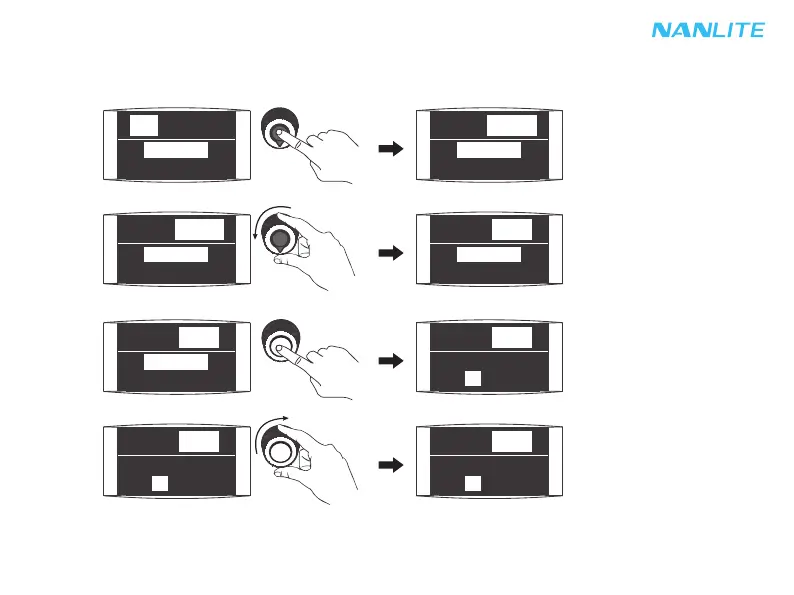
Press "left knob" to select DIM 1, DIM 2.
Rotate "left knob" to select corresponding value.
Press "right knob" to select SPD.
Rotate "right knob" to select corresponding value.
·Lighting effects and additional functionality maybe added with future firmware releases, for details of these please
see www.nanlite.com.
⑫WELDING
WELDING setting: Press "left knob" to select DIM 1, DIM 2, then rotate "left knob" to select corresponding value
according to demands; Press "right knob" to select SPEED, then rotate "right knob" to select corresponding value
according to demands, SPD range is from 1-100.
SPD:
50
FX: WELDING
0% - 100%
SPD:
50
FX: WELDING
0% - 100%
SPD:
50
FX: WELDING
0% - 99%
SPD:
50
FX: WELDING
0% - 99%
FX: WELDING
0% - 99%
SPD:
50
FX: WELDING
0% - 99%
SPD:
50
FX: WELDING
0% - 99%
SPD:
51


 To Next Page