17
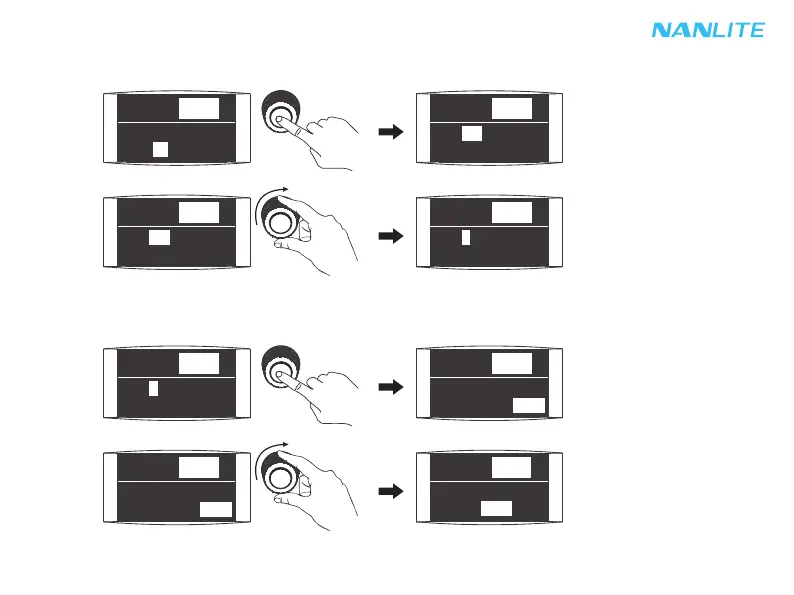
4. CHANNEL setting
Press "right knob" to select CHANNEL, rotate "right knob" to select the address.
Press "right knob" to select CHANNEL.
Rotate "right knob" to select the address.
5. LANGUAGE setting
Press "right knob" to enter LANGUAGE setting, rotate "right knob" to select the LANGUAGE according to demands.
Press "right knob" to enter the LANGUAGE setting.
Rotate "right knob" to select the LANGUAGE according to demands.
0% - 99%
通道:1
语言:
中文
FX: WELDING
0% - 99%
SPD:
51
LANGUAGE:
ENG
0% - 99%
CH: 512
LANGUAGE:
ENG
0% - 99%
CH: 512
LANGUAGE:
ENG
0% - 99%
CH: 1
LANGUAGE:
ENG
0% - 99%
CH: 1
0% - 99%
CH: 1
LANGUAGE:
ENG
0% - 99%
CH: 1
LANGUAGE:
ENG


 To Next Page
 Loading...