NAPCO Security Group
NAPCO Gemini C-Series Control Panel Programming Instructions--Volume 1
Page 58 Programming Instructions, Volume 1
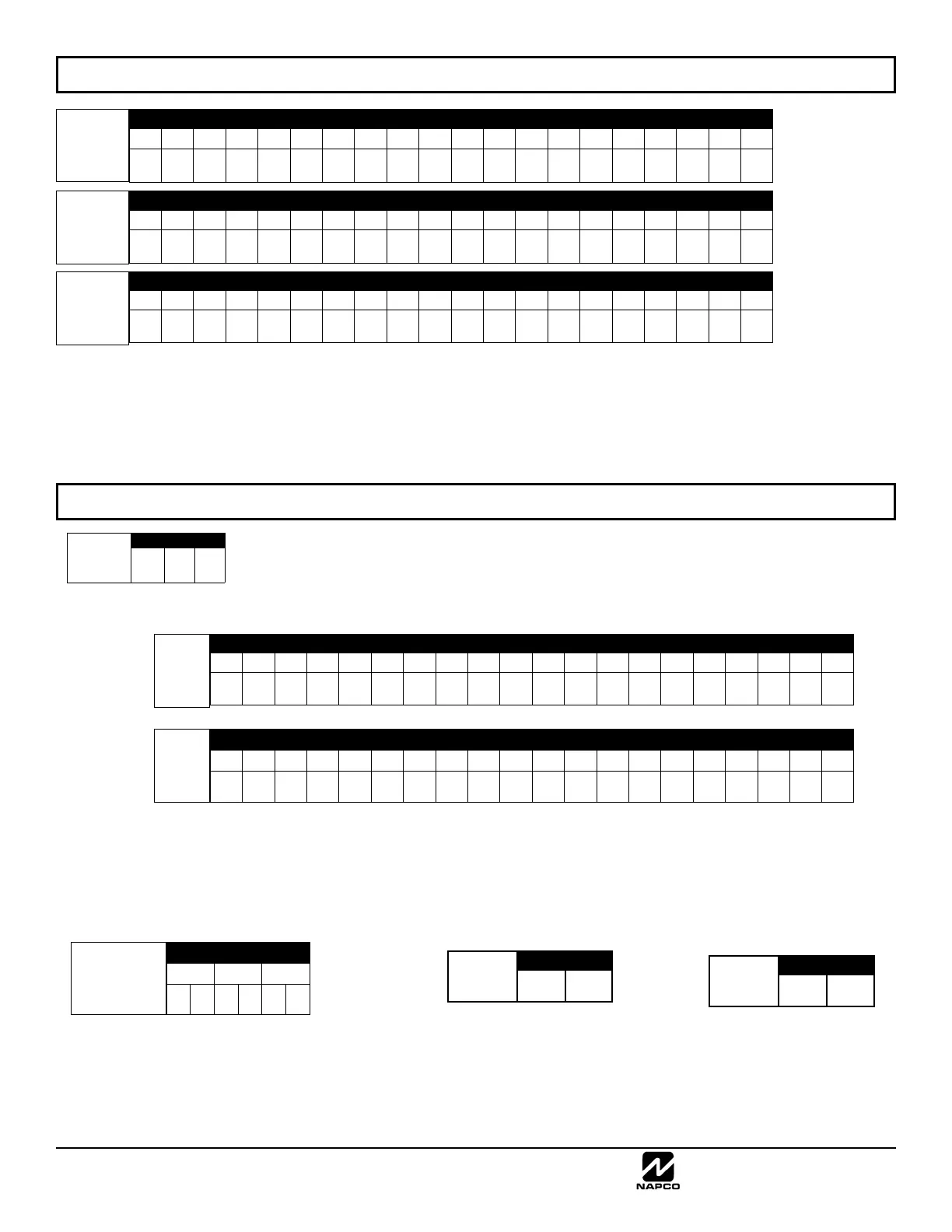
CS Receiver
1 Telephone
Number
(Digits 1-20)
ADDRESS 1040-1059 (DIGITS 1-20)
1040 1041 1042 1043 1044 1045 1046 1047 1048 1049 1050 1051 1052 1053 1054 1055 1056 1057 1058 1059
CS Receiver
2 Telephone
Number
(Digits 1-20)
ADDRESS 1062-1081 (DIGITS 1-20)
1062 1063 1064 1065 1066 1067 1068 1069 1070 1071 1072 1073 1074 1075 1076 1077 1078 1079 1080 1081
CS Receiver
3 Telephone
Number
(Digits 1-20)
ADDRESS 1084-1103 (DIGITS 1-20)
1084 1085 1086 1087 1088 1089 1090 1091 1092 1093 1094 1095 1096 1097 1098 1099 1100 1101 1102 1103
CS RECEIVER TELEPHONE NUMBERS: Enter telephone numbers for any of the three CS Receivers (Telco 1, 2 & 3).
1. Enter up to 20 digits from left to right. NOTE: Leave trailing boxes blank (•).
2. Valid entries are: 1-9, B = *button, C = #button, D = 3 sec. pause, E = Wait for dial tone, F = ignore location
Default for CS
Receiver 1 Telephone
Number depends on
Easy Menu Question
“CENTRAL PHONE
#”.
[Default = blank (•)]
across digits 1-20 for
CS Receiver
Telephone Numbers
1, 2 and 3.
CS RECEIVER TELEPHONE NUMBERS (ADDRESS 1040-1059, 1062-1081, 1084-1103)
DOWNLOAD/CALLBACK OPTIONS (ADDRESS 8175, 1104-1123, 1124-1143, 1713 & 1714)
ANSWER ON RING NUMBER: Enter the number of rings before automatic pickup by the control panel
when downloading from a computer (see Glossary in WI1093). Initial value of 000 becomes 15 rings.
1. Enter digits only.
2. Valid entries are: 003-015. NOTE: Default is 15 Rings. Press U to save.
CALLBACK TELEPHONE NUMBERS: Enter telephone numbers to be used when downloading from a computer.
1. Enter digits only.
2. Enter up to 20 digits from left to right. NOTE: Leave trailing boxes blank (•).
3. Valid entries are: 0-9, B = *button, C = #button, D = 3 sec. pause, E = Wait for dial tone, F = ignore location. Press U to save.
[Default = blank (•) for all digits 1-20]
ADDRESS 1104-1123 (DIGITS 1-20)
1104 1105 1106 1107 1108 1109 1110 1111 1112 1113 1114 1115 1116 1117 1118 1119 1120 1121 1122 1123
Callback
Telephone
Number 1
(Digits 1-20)
[Default = blank (•) for all digits 1-20]
ADDRESS 1124-1143 (DIGITS 1-20)
1124 1125 1126 1127 1128 1129 1130 1131 1132 1133 1134 1135 1136 1137 1138 1139 1140 1141 1142 1143
Callback
Telephone
Number 2
(Digits 1-20)
[Default = blank (•) blank (•)]
Download
Security Code
ADDRESS 1144-1146
1144 1145 1146
DOWNLOAD SECURITY CODE: Enter up to 6 digits to be used
for remote access when downloading from a computer.
1. Enter digits in address locations above.
2. Valid entries are: 0-9.
Note: Download Security Code must match the code entered
in the PCD-Windows Quickloader Download Software.
[Default = blank (•) blank (•)]
CALLBACK TELEPHONE NO. SELECT: Enter
either “1” for Callback Telephone Number 1 or
“2” for Callback Telephone Number 2.
1. Valid entries are: 1 or 2.
[Default = blank (•) blank (•)]
Valid entries - 01-99
ADDRESS 8175
[Default = 015]
Answer on
Ring
Number
Callback
Telephone
No. Select
ADDRESS 1713
Auto
Download
ID No.
ADDRESS 1714



 To Next Page
 Loading...