NV10/NV7.5 Operations and Maintenance Manual Operating the transmitter
Issue 3.4 2016-08-03 Page 2-47
• A parameter value in the yellow section (as applicable) of a meter bar indicates the
parameter is still within an operational range, but is approaching design
limitations.
• A parameter value in the red section of a meter bar indicates the parameter is
outside normal operating conditions.
Accessing meter information
Procedures for accessing and editing information in the Meters section of the AUI screen:
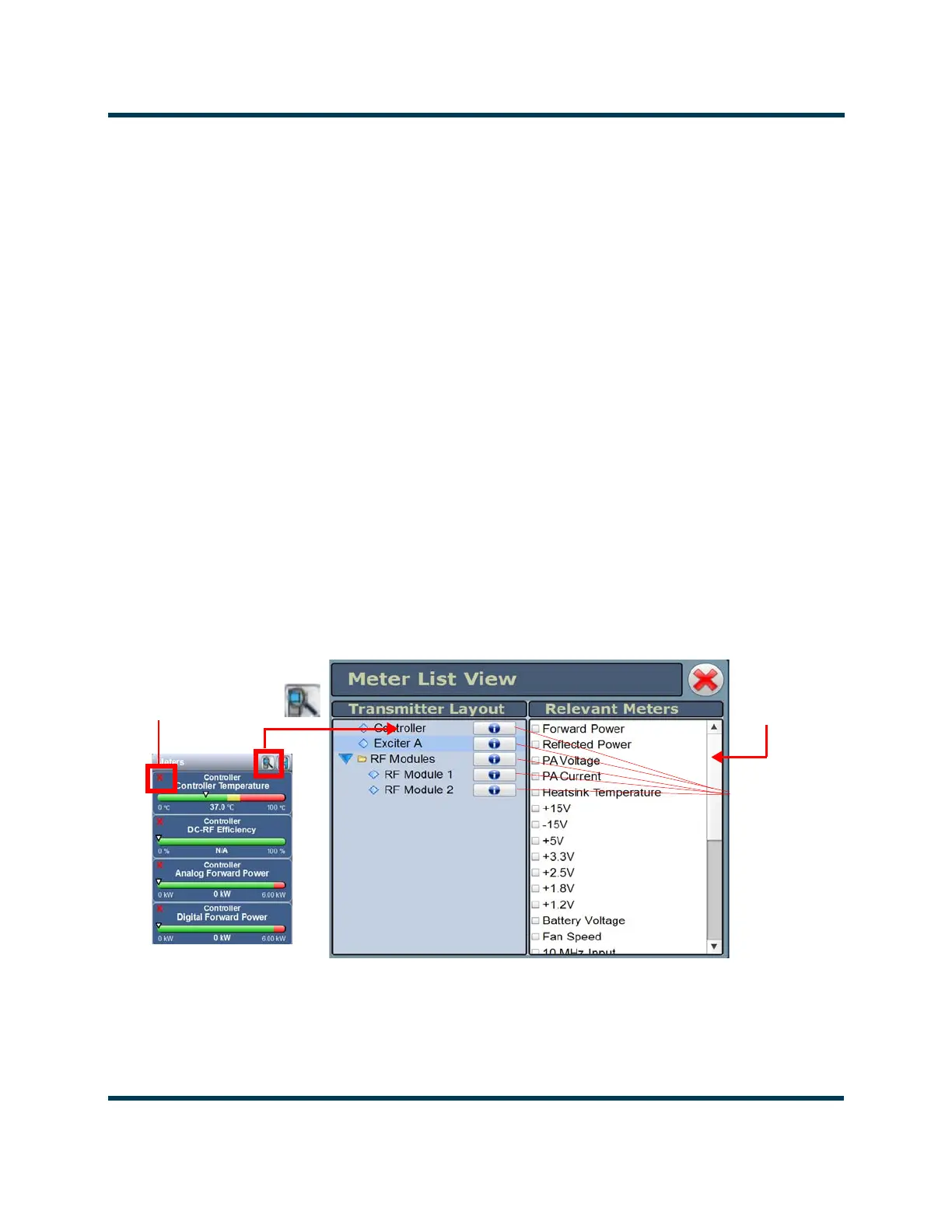
• To delete a meter from the Home page, press X in the Meters window
(Figure 2.31).
• To review all the meter options, press the meter list view shortcut button
(magnifying glass) at the top of the meters panel (see Figure 2.31). This will open
the Meter List View window.
•On the Meter List View screen users can see all relevant meters of a sub-device.
Select the sub-device in question under the Transmitter Layout column and the
Relevant Meters column will be populated. The desired Meters can now be
selected.
Figure 2.31: Meters List View Window (Exciter A shown)
Information
X
to close/delete
Buttons
(displays full
set of meters
for specific
sub-device)
Scroll Bar



 To Next Page