EasyManua.ls Logo

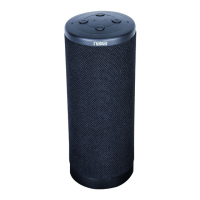
Naxa NAS-5006 - User Manual

Naxa NAS-5006
11 pages
Print Icon
To Next Page IconTo Next Page
Loading...
Please read this user manual carefully to ensure proper use of this product
and keep this manual for future reference
MODEL:NAS-5006
VOICE-ACTIVATED BLUETOOTH SMART SPEAKER WITH
GOOGLE AND SIRI ASSISTANT

Questions and Answers

  • R
    Robert DelacruzAug 11, 2025
    How to fix BT not functioning on Naxa NAS-5006?
    • M
      Mark KelleyAug 11, 2025
      If the Bluetooth on your Naxa Speakers isn't working, it could be due to a couple of reasons. First, make sure that the external Bluetooth device is successfully paired to the speaker. If it is paired, the external Bluetooth device might be too far away from the speaker. Try placing the external Bluetooth device closer to the speaker.
  • P
    Pamela PearsonAug 18, 2025
    How to fix Naxa NAS-5006 that won’t turn on?
    • Z
      zbuchananAug 18, 2025
      If your Naxa Speakers won’t turn on, the built-in battery might be dead. Try recharging the battery.
  • O
    oallenAug 27, 2025
    What to do if sound is distorted on my Naxa NAS-5006?
    • M
      Melissa RuizAug 27, 2025
      If you are experiencing sound distortion with your Naxa Speakers, it might be because the volume level of the connected or paired device is too high. Try reducing the volume level on that device.
  • C
    christophercurtisSep 3, 2025
    Why is there no sound coming from my Naxa NAS-5006 Speakers?
    • D
      Danielle LutzSep 3, 2025
      If your Naxa Speakers have no sound or the sound is weak, the volume level of the paired or connected device may be set too low. Try raising the volume level on that device.

Naxa NAS-5006 Specifications

General IconGeneral
TypePortable Bluetooth Speaker
Power Output5W
Color OptionsBlack
Signal-to-Noise Ratio≥70dB
BatteryRechargeable Lithium-ion
Bluetooth Version4.2
Bluetooth RangeUp to 33 feet (10 meters)
ConnectivityBluetooth, AUX, USB
Input Voltage5V DC
Speaker Size3 inches

Related product manuals