4-13
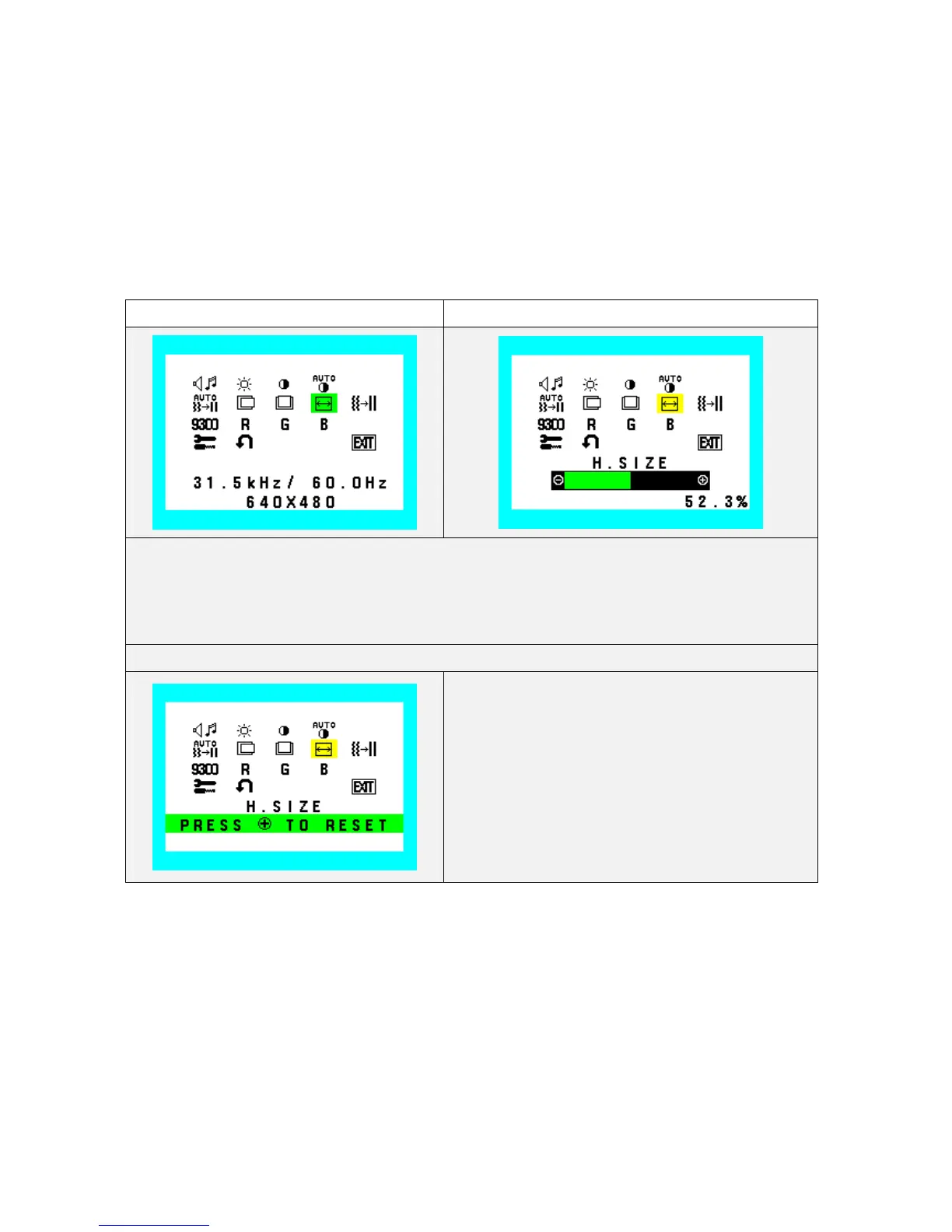
H. Size
Adjust the frequency of internal pixel clock.
When increasing the value, the width of display image become wider, and when decreasing the value, the width
becomes narrower. (Step 1pixel-clock .odd numbered, even numbered steps)
Indicator Value and Bar of minimum position should be 0.0%
Indicator Value and Bar of maximum position should be 100.0%
Factory setting: Optimal value for the signals, which is stated in the VESA standard.
H.Size(Clock) (Icon select) H.Size(Clock) (Adjust)
1. During H.Size function operate, H. Size Icon and slide bar color is changed from Normal condition.
2. “-” Value decrease (to narrow)
3. “+” Value increase (to wide)
4. At exiting from this state, adjusted value is saved to EEPROM.
H.Size(Clock) (Reset)
Recall H. Size value to factory setting









 To Next Page