4-22
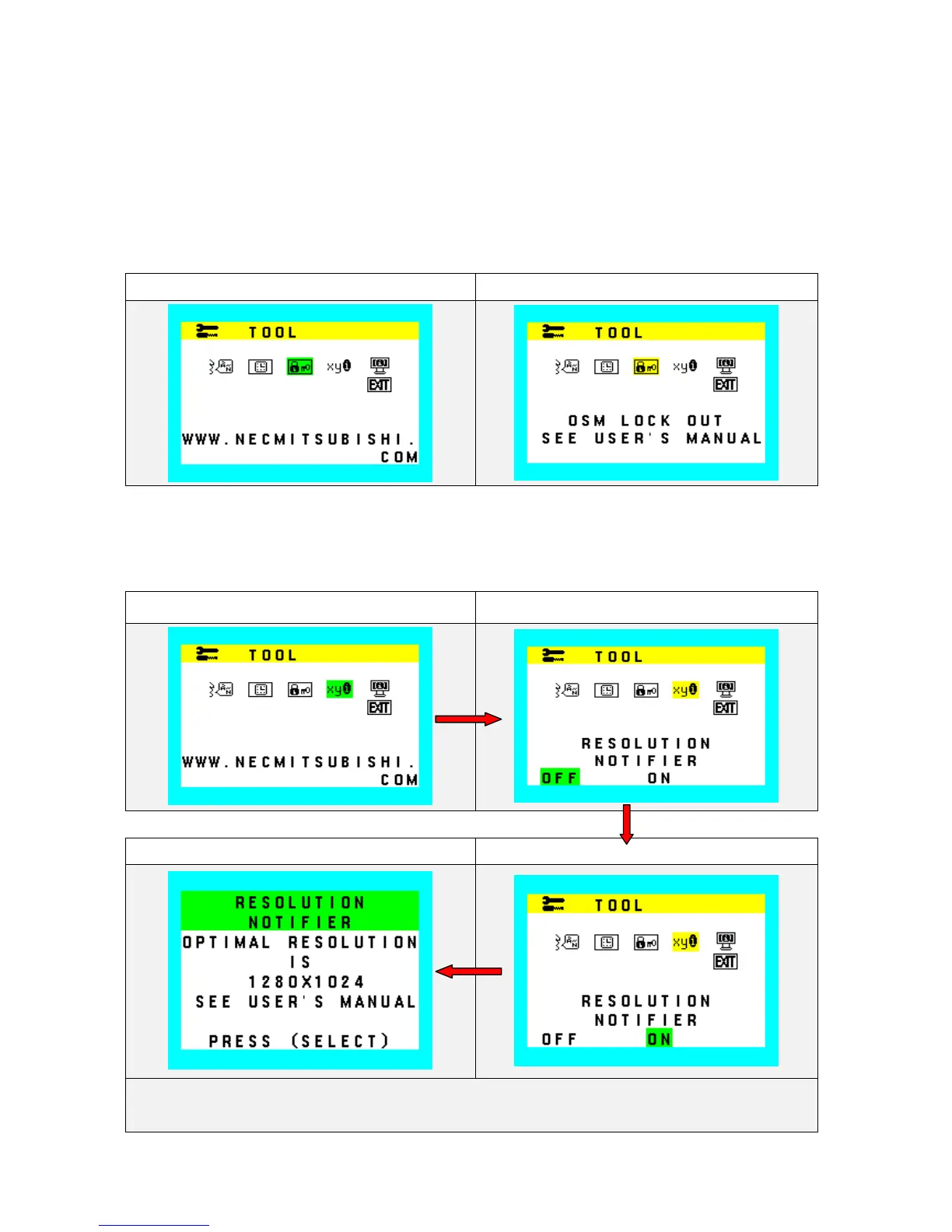
OSD Lock Out
This function locks out all access to OSD controls except volume, brightness and contrast control. When
attempting to activate OSD controls while in the lock out mode, simple OSD menu of volume, brightness and
contrast will appear.
To activate the OSD Lock Out function, enter to OSD LOCK OUT menu, then press “+” key and AUTO key hold
down simultaneously.
To de-activate the OSD Lock Out function, press “+” key and AUTO key hold down simultaneously.
OSD Lock Out (Icon Select) OSD Lock Out (Adjust)
Resolution Notifier
Activate or de-activate Resolution Notifier function.
Resolution Notifier (Icon select) Resolution Notifier (adjust)
Resolution Notifier (Message) Resolution Notifier (adjust)
During Resolution Notifier function operate, Resolution Notifier Icon and slide bar color is changed from
Normal condition.










 To Next Page