English−12
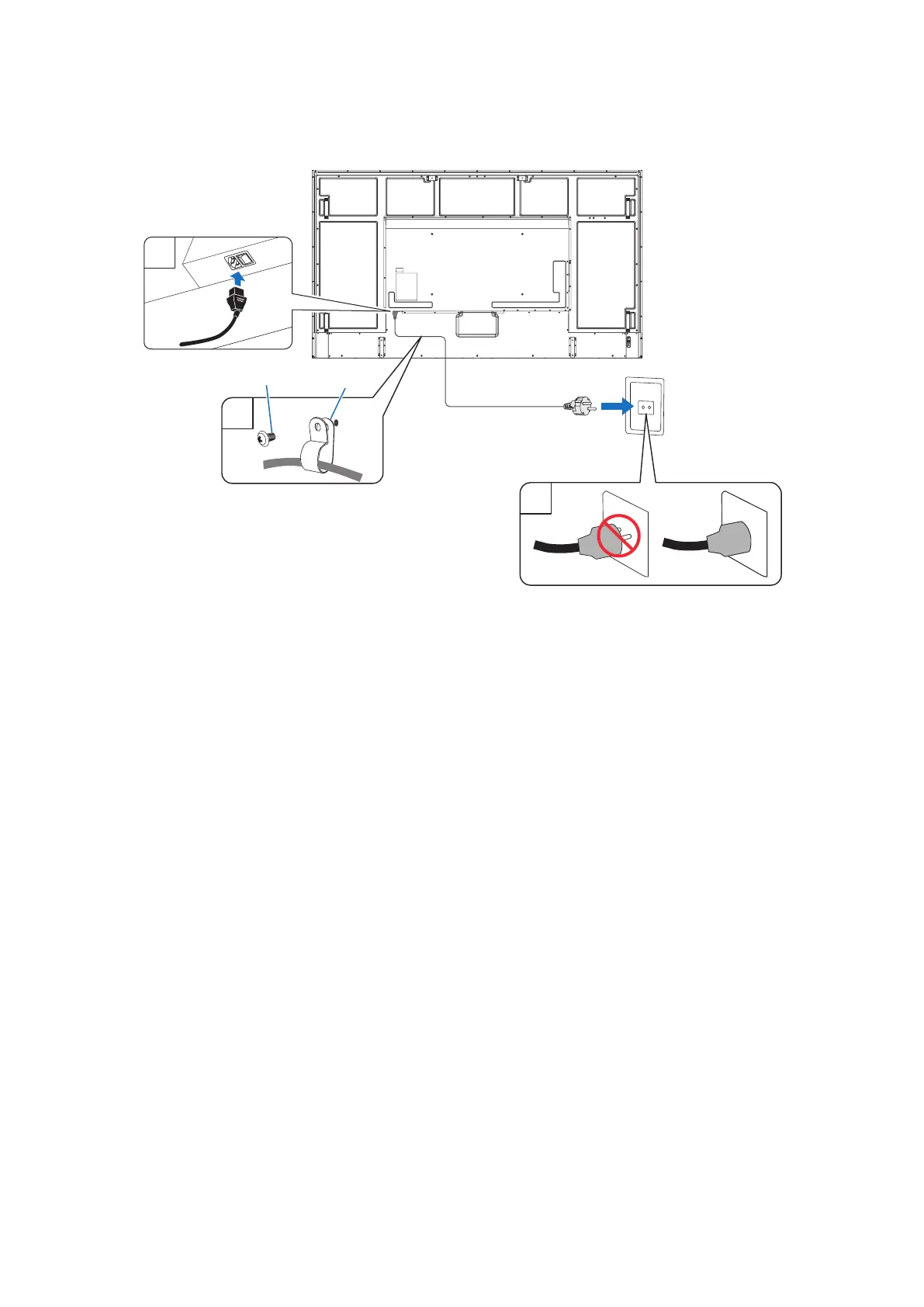
4. Connect the supplied power cord
NOTE: Please make sure that enough power is supplied to the monitor. Please refer to the “Power Supply” in the
specication (See “M981” on page 81).
Screw
Clamp
1
2
3
5. Cable information
CAUTION: Use the provided specied cables with this product so as not to interfere with radio and television reception.
For USB, please use a shielded signal cable with ferrite core.
For HDMI, RS-232C and DisplayPort, please use a shielded signal cable.
Use of other cables and adapters may cause interference with radio and television reception.
6. Turn on the power for the monitor and the external equipment
Switch on the monitor power rst.
7. Operate the attached external equipment
Select the input source for the attached equipment to show the image signal on screen.
NOTE: If you have selected anything other than HDMI1 for the input, if the main power is turned off, DDC communication
will not be available.
8. Adjust the sound
Make volume adjustments when required.
9. Adjust the picture settings (see page 89)
If necessary, make adjustments to the backlight, colors, contrast, and image position in the OSD PICTURE menu.









 To Next Page