EasyManua.ls Logo

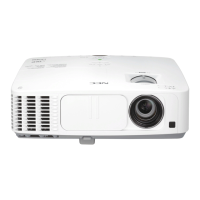
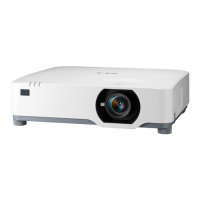
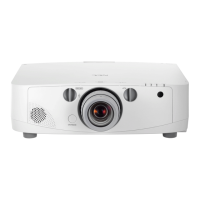
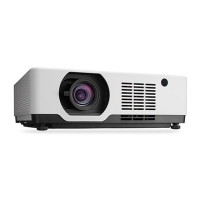
NEC PE506WL - User Manual

NEC PE506WL
123 pages
Print Icon
To Next Page IconTo Next Page
Loading...
Projector
PE506UL/PE456USL/PE506WL/
PE456WSL
User’s Manual
Please visit our web site for User’s Manual in the latest version:
https://www.sharp-nec-displays.com/dl/en/pj_manual/lineup.html
Model No.
NP-PE506UL/NP-PE456USL/NP-PE506WL/NP-PE456WSL

Table of Contents

Other manuals for NEC PE506WL

Questions and Answers

  • G
    gmichaelAug 16, 2025
    How to fix NEC PE506WL Projector that does not turn on?
    • S
      Sarah HarringtonAug 17, 2025
      If your NEC Projector isn't turning on, start by checking that the power cord is securely plugged in and the power button on the projector or remote is switched on. Overheating can also prevent the projector from turning on; ensure there's sufficient ventilation and move it to a cooler spot if necessary. The light module might need a minute to light up after being turned off. If using the projector above 5500 feet/1700 meters, make sure the [High altitude] setting is enabled. If you have just turned the projector off, wait for a moment. As a last resort, unplug the power cord, wait 5 minutes, and then plug it back in.
  • K
    Kelsey DuarteAug 19, 2025
    How to fix NEC Projector that does not turn on or shut down?
    • M
      Michael McfarlandSep 12, 2025
      If your NEC Projector won't turn on or shut down, here are a few things to check: First, ensure the power cord is securely plugged in and that the power button on both the projector and the remote are switched on. Check if the projector has overheated. If so, wait a full minute before attempting to power it on again. If you're using the projector at an altitude above 1700 meters / 5577 feet, verify that the altitude setting is correctly configured. You may need to set [High altitude] to "On". If none of that works, unplug the power cord, wait 5 minutes, and then plug it back in.
  • V
    veronica65Aug 22, 2025
    What to do if the picture suddenly becomes dark on my NEC PE506WL?
    • D
      Deborah HarrisAug 22, 2025
      If the picture on your NEC Projector suddenly becomes dark, it might be in Forced ECO mode due to high ambient temperature. You should also check your contrast and brightness settings, and verify that you're using the correct image mode settings.
  • N
    Natalie LopezAug 26, 2025
    How to fix a fuzzy picture on my NEC PE506WL Projector?
    • M
      matthewthomasAug 26, 2025
      To fix a fuzzy picture on your NEC Projector, first adjust the focus. Ensure that the projector is positioned at the proper projection distance. If the lens is dirty, it requires cleaning. Also, if you've recently moved the projector from a cold to a hot environment, condensation may have formed on the lens; wait until it evaporates before turning the projector on.
  • B
    Brenda VaughnAug 28, 2025
    How do I correct a non-square image on my NEC PE506WL?
    • J
      Jason OdomAug 28, 2025
      To correct a non-square image on your NEC Projector, begin by repositioning the projector to improve its angle relative to the screen. Additionally, use the Keystone correction function to rectify any trapezoidal distortion.
  • A
    Amanda DaughertyAug 31, 2025
    What to do if there is no picture on my NEC PE506WL Projector?
    • E
      Elizabeth VangAug 31, 2025
      If your NEC Projector isn't displaying an image, try these steps: First, make sure the correct input source is selected. If that doesn't work, press the SOURCE button or one of the source buttons again. Check that all cables are properly connected. Adjust the brightness and contrast in the menus. Ensure the AV-MUTE button hasn't been activated. If you've enabled the Security function, enter your registered keyword. Also, try reinstalling or updating the driver for your computer's graphics card. When connecting to a notebook PC, ensure the projector is in standby mode before powering on the PC. Finally, if the screen goes blank when using the remote, it might be due to your computer's screen-saver or power management settings.
  • T
    Tony SweeneySep 3, 2025
    What to do if my NEC PE506WL will turn off?
    • R
      rogersjefferySep 3, 2025
      To prevent your NEC Projector from turning off unexpectedly, make sure that the [Power management] setting is set to “Off.”
  • L
    lopezaudreySep 6, 2025
    Why is there no picture on my NEC Projector?
    • S
      Steven CurtisSep 6, 2025
      If there's no picture on your NEC Projector, several factors could be at play. First, ensure the correct input is selected and all cables are properly connected. Try adjusting the brightness and contrast settings in the menu. Also, verify that the AV-MUTE button hasn't been activated. If these steps don't resolve the issue, try resetting the projector to its factory default settings via the Expand Menu. If the security function is enabled, make sure you enter the registered keyword. Reinstalling or updating your graphics card driver may also help. Connect the projector and notebook PC while the projector is in standby mode and before turning on the power to the notebook PC. Finally, if using the remote control, the computer’s screen-saver or power management software may be the cause.
  • R
    Ryan BautistaSep 9, 2025
    Why does the picture suddenly become dark on my NEC Projector?
    • J
      Jennifer LopezSep 10, 2025
      If the picture on your NEC Projector suddenly becomes dark, start by checking your contrast and brightness settings. Next, verify that you're using the correct image mode settings. Keep in mind that the brightness will automatically reduce to protect the unit when the setting condition is over approximately 2600 meters / 8530 feet.
  • A
    Adam ClementsSep 12, 2025
    How to fix a fuzzy picture on NEC PE506WL?
    • K
      Kevin PerrySep 12, 2025
      If your NEC Projector's picture looks fuzzy, first try adjusting the focus. If that doesn't sharpen the image, reposition the projector to improve its angle to the screen. Make sure the distance between the projector and the screen falls within the lens's adjustment range. Also, consider whether the lens has been shifted beyond its guaranteed range. Lastly, if there's condensation on the lens, let the projector stand until it clears.

NEC PE506WL Specifications

General IconGeneral
Display TechnologyDLP
Speaker10W
Projection Size30 - 300 inches
Native Resolution1280 x 800
Lens ShiftHorizontal: ±23%
Keystone CorrectionVertical: ±30°
Input ConnectorsHDMI, VGA, Composite Video
Output ConnectorsVGA, Audio
NetworkRJ45
USBUSB Type-A
ConnectivityHDMI, VGA, LAN, USB
Weight10.1 lbs (4.6 kg)

Related product manuals