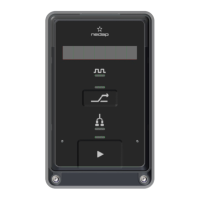
The Nedap InTouch, model VP5001, is a control unit designed to manage and monitor the milking process at individual milking points within a parlor. It provides real-time milk yield data for specific cows, measured by the SmartFlow milk meter. The InTouch features a user-friendly control panel with a display that shows the cow number and milk delivery information. Its buttons allow operators to control the milking process, prepare the parlor for cleaning, and add cow-specific separation rules. The InTouch is controlled by a Nedap VP8002 Velos Processing Unit (VPU), which can be accessed via a PC, tablet, or smartphone. Power and connectivity to the VPU are established through a CAN cable.
Function Description
The primary function of the InTouch VP5001 is to facilitate and control the milking process in a dairy parlor. It acts as an interface between the operator and the automated milking system, providing essential information and control options at each milking point.
- Milking Process Control: The InTouch allows operators to initiate, manage, and stop milking sessions. This includes starting the milking session for all milking positions in a swing-over or rotary parlor (or a single row in a row parlor) and initiating the milking of individual cows.
- Real-time Data Display: The unit's display shows crucial information such as the cow number and real-time milk yield. During milking, it alternates between displaying the cow number and the milk yield.
- Status Indication: An attention light on top of the control panel uses different colors and frequencies to indicate the current status of the milking process, such as standby, waiting for a cow, cow identification, milking in progress, stop milking, pre-wash, and wash.
- Pulsation Monitoring: A dedicated Pulsation LED blinks green during milking to indicate active pulsation and blinks blue in wash mode.
- Cow Separation: The InTouch features a Cow Separation button and LED. This button can be used to operate a separation gate, allowing for the separation of cows after milking based on pre-defined rules in Velos. The LED lights up blue when a separation rule is active.
- Cluster Status: The Cluster LED indicates the status of the milk cluster. When blinking or continuously on, it signifies that the milk cluster is down. When off, the cluster is up.
- Washing Mode Control: The InTouch enables operators to initiate "Pre-wash" and "Washing" modes for the milking points, preparing the parlor for cleaning.
Usage Features
The InTouch VP5001 is designed for intuitive operation within the milking parlor environment.
- Main Button Operation: The Main button is central to controlling the milking procedure. Short, medium, and long presses activate different functions, indicated by an LED light above the button.
- Short Press: Used to start milking an identified cow, stop milking in manual mode, or restart milking after a milk yield attention or cluster kick-off.
- Medium Press: Used to start a milking session, switch between automatic and manual milking modes, or initiate milk separation.
- Long Press: Used to start the "Washing" mode for all InTouch units in a parlor (or a single row in a row parlor).
- Guard Key: A hidden guard key around the Main button and Cow Separation button prevents false detections due to moisture, improving usability in wet conditions and preventing accidental activations during cleaning. When active, the Start/Stop LED or Cow Separation LED lights up red.
- Milking Procedure Workflow: The manual outlines a clear step-by-step procedure for milking, from checking standby mode and starting a session to handling cow identification, initiating milking, and managing automatic take-off.
- Manual Milking Mode: Operators can switch between automatic and manual milking modes during the process, providing flexibility for specific situations. In manual mode, the display shows an "h" symbol.
- Milk Separation Procedure: A specific procedure is provided for separating milk from identified cows, involving detaching the milk hose, pressing the Main button to start, and reattaching the hose after milking.
- Handling Attentions: The system provides visual cues (blinking red/white attention light) for milk yield attentions and outlines steps to address them, such as reconnecting the milk cluster and restarting milking.
- Dealing with Kicked-off Clusters: Instructions are given for situations where a cow kicks off the milk cluster, including stopping milking, reconnecting the cluster, and restarting.
- Milking without Cow Recognition: The manual describes how to manually start milking if a cow is not identified, ensuring that milking can proceed even without automatic recognition. In such cases, the milk yield is recorded but not assigned to a specific cow.
- Menu Navigation: The InTouch has a hidden menu accessible by simultaneously pressing the Cow Separation button and Main button for a long period. This menu allows for viewing system information (serial number, application version, address), performing internal tests (display/reset errors, enable outputs, display inputs, enable pulsators), and accessing factory settings. The Main button is used to navigate through options (short press) and change items (medium press).
Maintenance Features
Proper maintenance is essential for the longevity and optimal performance of the InTouch VP5001.
- Regular Cleaning: The outside of the InTouch should be cleaned regularly (at least once every two weeks) with a soft cloth and a non-aggressive cleaning agent.
- Power Washing: The outside of the InTouch is designed to withstand power washing.
- Electrical Safety: When working on the electrical installation, it is crucial to always turn off the mains power supply.
- Pneumatic Safety: If applicable, the air pressure supply to the pneumatic installation must be turned off when working on it.
- Prohibited Cleaning Methods: Power washing of electrical components is strictly prohibited. Corrosive and/or toxic cleaning agents should not be used.
- Professional Installation and Service: Installation and service of the InTouch should only be performed by locally qualified personnel.
- Cable Management: All cables must be properly concealed to prevent tripping hazards.
- Animal Safety: All components should be installed out of reach of animals to ensure their safety.
- Warranty Considerations: The manual emphasizes that damage or accelerated wear due to non-compliance with maintenance guidelines or improper power washing may not be covered by the manufacturer's warranty.


 To Next Page
 General