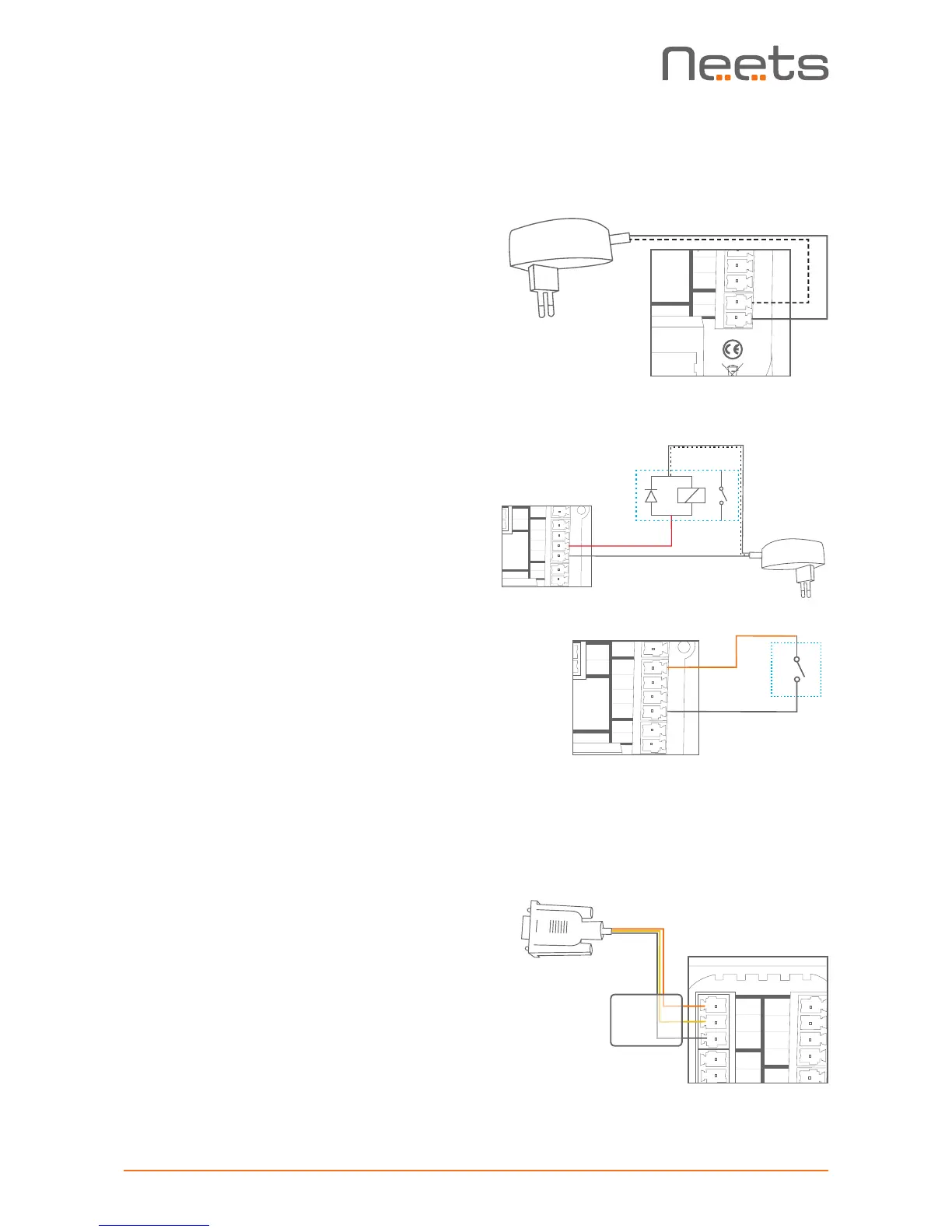
PIN 2 <-> Tx
PIN 3 <-> Rx
PIN 5 <-> GND
Connections and Controls
Power input port
Connect the EcHo Plus to the supplied universal
mains AC power adaptor. Using the supplied 2 pole
screw block terminal connect white/black wire to
12V and black wire to GND.
I/O ports
EcHo Plus has three I/O (Inputs/Outputs) available
that can be configured as either output or input.
The ports are not potential free; you may need
external relays to prevent ground loops depending
on your application.
When used as outputs, the I/O ports are active
low. When activated, the I/O ports are tied to GND
through a FET transistor, called open drain/collector
function.
When used as inputs the inputs are default HIGH
and must be connected to ground in order to
change state to LOW.
RS-232 port
The RS-232 port is used for one- or two-way
communication. A two way port is used for devices
where reply commands is used. Connect the EcHo
Plus as shown here.


 To Next Page