PROGRAMMING INSTRUCTIONS
Set Time of Day
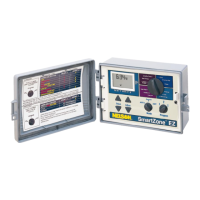
Turn the large dial to the TIME position. Press SELECT to select between hours, minutes,
and 12/24 hour mode. Press ADJUST to scroll to the correct time or adjust between 12/24
mode.
Set Today’s Date and Current Day of the Week
Turn the large dial to the DATE position. Press SELECT keys to select between day,
month and year positions. Press ADJUST keys to scroll to the current date. The correct
day of the week will automatically show on LCD screen when today’s date is adjusted. The EZ
Pro™ controller is leap year compliant.
Select Zones and Set Their Run Times
A zone run time determines the duration a zone will run.
Turn the large dial to the ZONE/RUN TIME position. Turn PROGRAM dial to choose program
A, B or C. Press SELECT to choose the zone you want for the selected program (A, B, or
C). With the zone number displayed on the LCD, press ADJUST to adjust the RUN TIME
for that zone. RUN TIMES can be set from 1 minute to 9 hours 59 minutes. Continue selecting
zones and adjusting their run times until you have all the zones you want in the selected
program.
12


 To Next Page