EN
HR
23
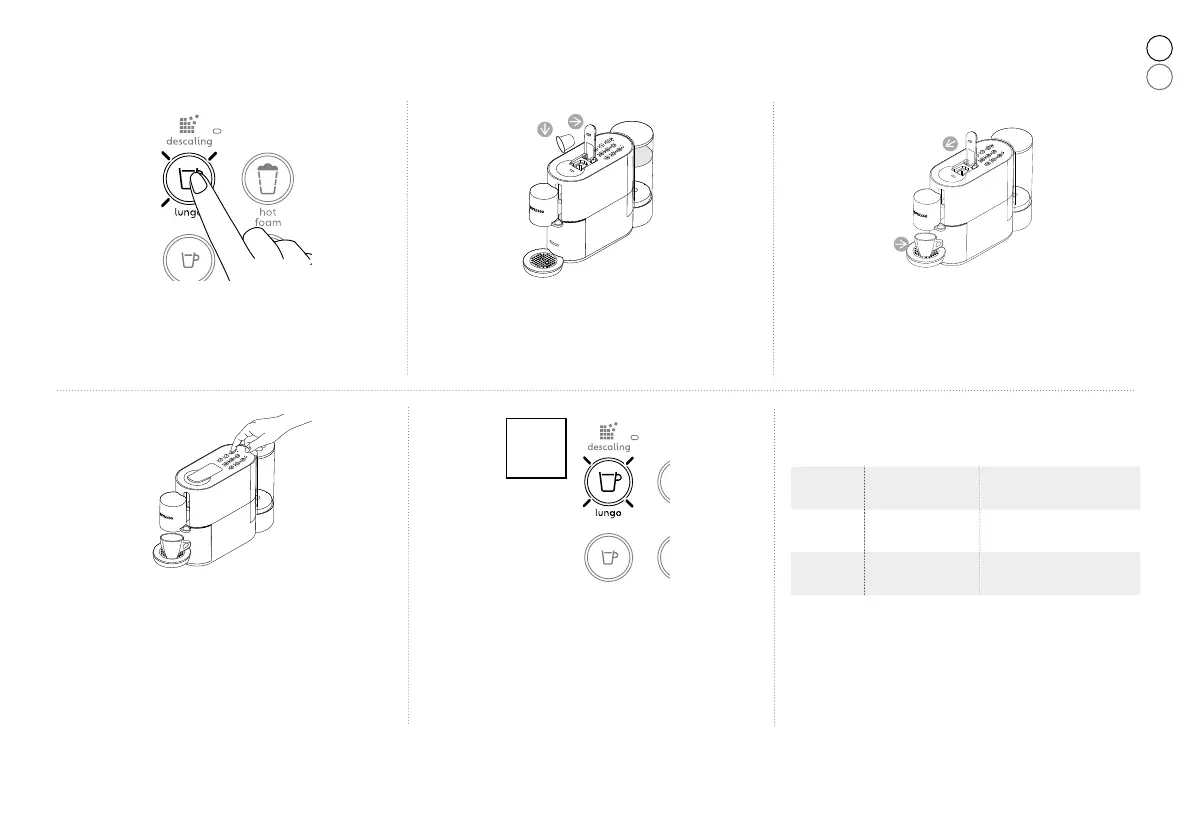
Programming coffee volume /Programiranje zapremine vode
❶ Turn on the machine by pressing one of the
coffee keys (Ristretto, Espresso, Lungo).
Uključite uređaj pritiskom na gumb za
Ristretto, Espresso ili Lungo.
❹ Press and hold the Ristretto, Espresso or
Lungo key. Release the key as soon as the
desired volume is reached.
Pritisnite i držite gumb Ristretto, Espresso ili
Lungo gumb. Pustite gumb kada se pojavi
željena zapremnina..
x3
❺ The programmed key blinks rapidly 3 times to
confirm the new setting. The coffee volume
level is now stored.
Programirani gumb će zatreperiti brzo tri
puta, potvrđujući kako je novo podešavanje
sačuvano.
❷ Lift the lever completely and insert a capsule.
Podignite ručicu i ubacite kapsulu.
❸ Close the lever and place a cup under the
coffee outlet.
Spustite ručicu i postavite šalicu ispod.
NOTE: We recommend that you maintain the factory settings for
Ristretto, Espresso and Lungo to ensure the best results in your cup
for all our black coffees.
NAPOMENA: Preporučujemo da zadržite tvorničke postavke za
Ristretto, Espresso i Lungo kako bi osigurali najbolji doživljaj u
svojoj šalici - za sve naše crne kave.
Recipes /
Napitak
Factory settings /
Fabričko-
podešavanje /
Programmable quantity /
Programirane količine
Ristretto 25 ml
From 15 to 35 ml /
Od 15 do 35 ml
Espresso
40 ml
From 35 to 70 ml /
Od 35 do 70 ml
Lungo 110 ml
From 70 to 150 ml /
Od 70 do 150 ml






 To Next Page