4 • SCREENGUARD AUTOMATIC SCREEN FILTERS OPERATION INSTALLATION AND MAINTENANCE GUIDE
• Prior to installation or handling of the filter, read carefully the installation and operation instructions carefully.
• Confirm filter draining prior to service.
• Take precautions while lifting, transporting or installing the filter.
• Installation of the filter should be performed so as to avoid direct water splashing on any of the filter parts and
especially on the electronic control unit.
• Confirm that filter weight, when full, meets the support construction requirements.
• Prior to installation confirm that line pressure matches filter’s operational pressure.
• During installation, use standard flanges and connections only.
• Check that all filter flange bolts are properly secured.
• Please note, the filter enters a flushing mode automatically, without prior warning.
• Use original parts only when servicing the filter.
• NETAFIM can not accept responsibility for any changes or modifications to the equipment.
SPECIFICATIONS
GENERAL INFORMATION
• Minimum operating pressure: 30 psi
• Maximum Operating Pressure: 150 psi
• Maximum Water Temperature: 149˚ F (65˚ C)
• End Connections: Flanged
• Screen Mesh Sizes: 080, 120, 150, 200
• Sizes: 4”, 6”, 8” and 10”
• Control voltage: DC Latching
• Filter housing: baked epoxy, carbon steel coated
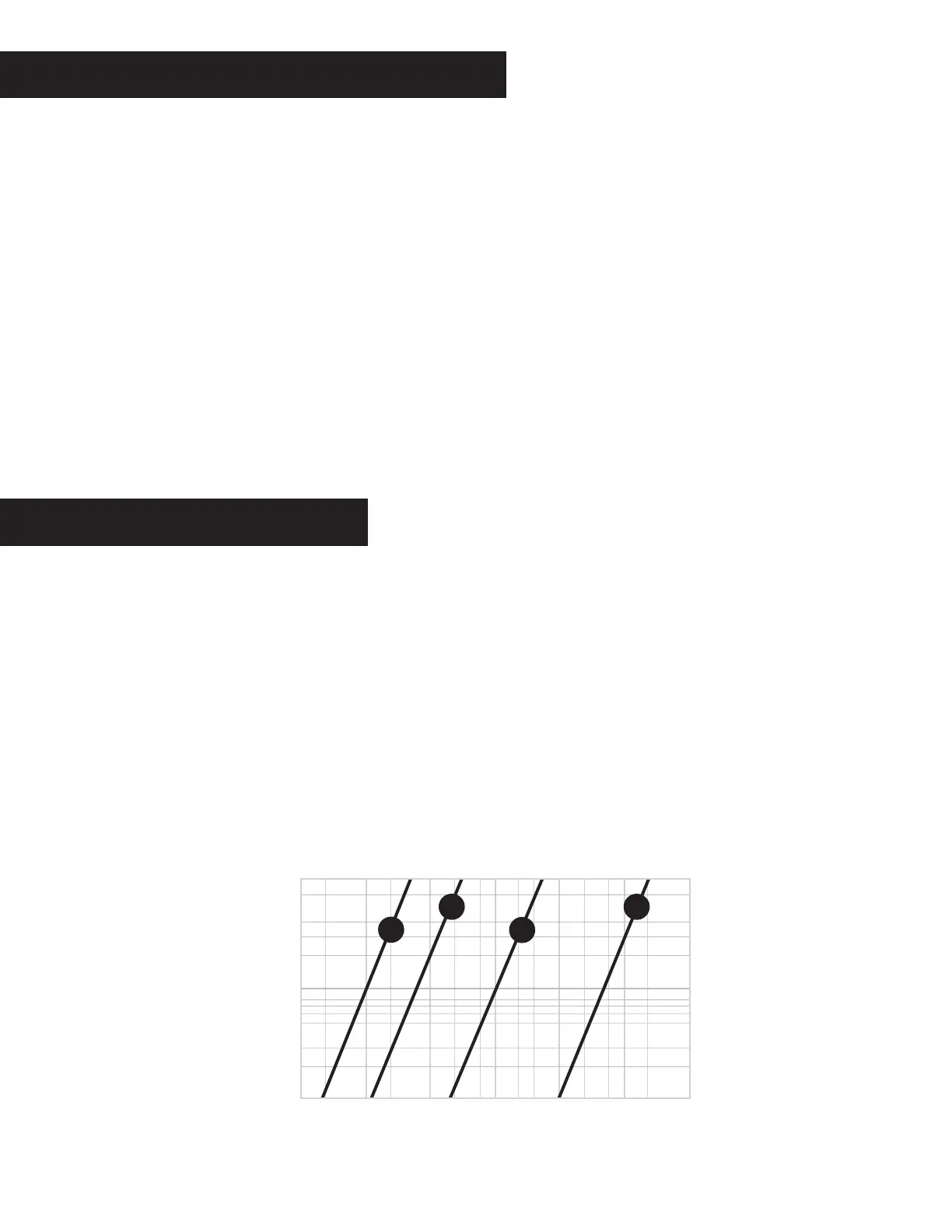
HEADLOSS (FLOW VS. PRESSURE)
1,000 2,000 2,5001,500450
0.14
14
1.4
FLOW RATE (GPM)
PRESSURE (psi)
10"
8"
6"
4"


 To Next Page