Install hardware | Stage 2
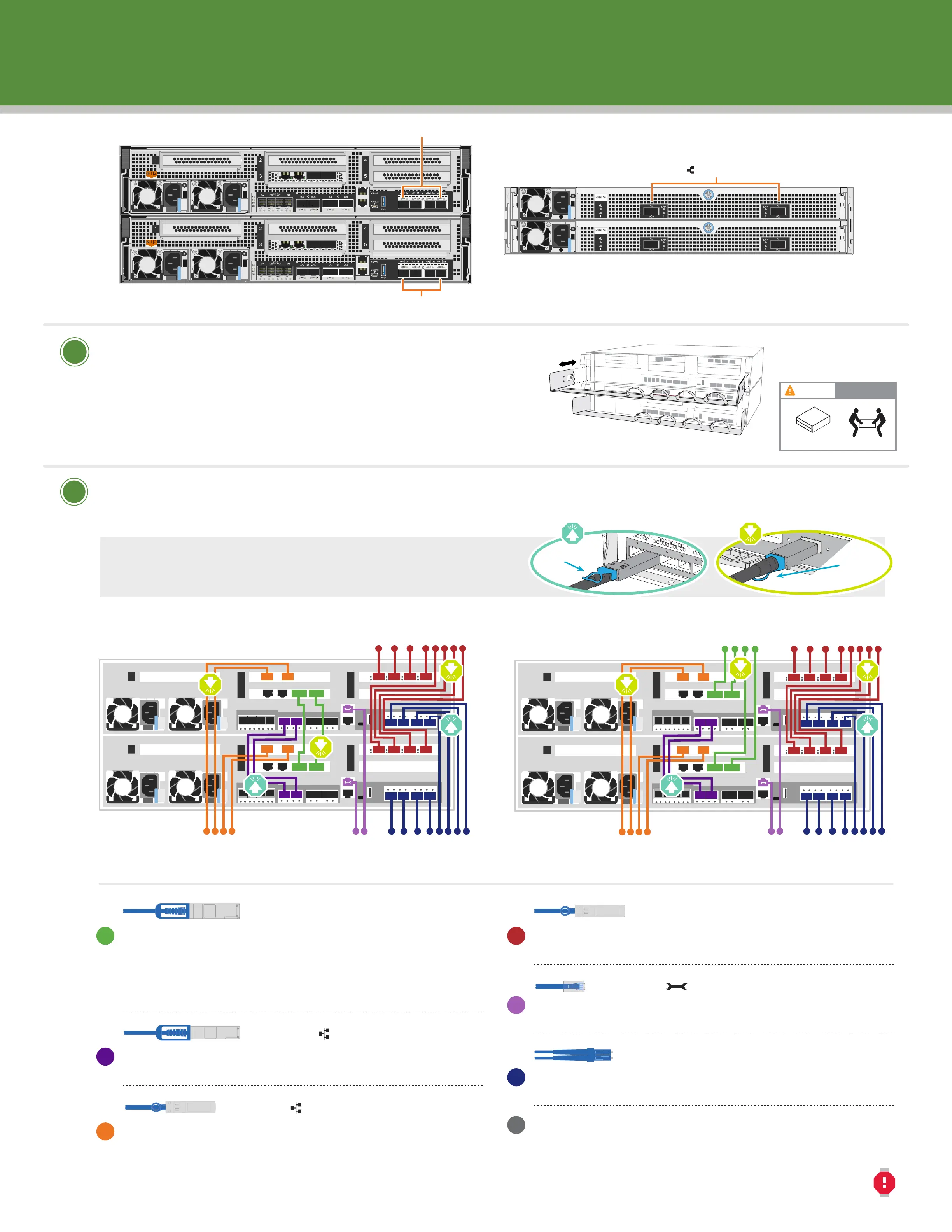
Switchless cluster: Connect ports e3a to e3a and
ports e3b to e3b
Switched cluster: Controller 1: Connect port e3a to switch 1
and port e3b to switch 2. Controller 2: Connect port e3a to
switch 1 and port e3b to switch 2.
Connect ports e0a to e0a and ports e0b to e0b.
(HA interconnect only)
Connect ports to the 25 GbE data network switches.
(optional, configuration dependent)
• Install the slide rail or telco tray kits, as needed, and then install and
secure your system using the instructions included with the kit.
• Attach cable management devices to the back of each controller (as shown).
• Place the bezel on the front of the system.
• Install any drive shelves for your system.
Install system in a rack or cabinet
1
2
LIFTING HAZARD
CAUTION
≥ 50.1 kg (≥ 110.2 lbs.)
Cable the controller for a switchless or switched cluster
See your network administrator for help connecting to your switches.
DO NOT plug the power cables into a power source yet.
The system will boot as soon as the power cables are plugged into the power source and power supplies.
100 GbE cables (cluster network)
25 GbE cables
Ethernet cables
Optical cables
Pull-tab
Attention: Be sure to check the illustration arrow for the
proper cable connector pull-tab orientation.
Note: To unplug a cable, gently pull the tab to release the locking mechanism.
Pull-tab
X1151A
X1148A
Connect ports to the FC data network switches.
(optional, configuration dependent)
Connect the Wrench port (e0M/BMC) to the management
switches
Connect the mezzanine ports (e0e | 0e through e0h | 0h) to
either 25 GbE or 16 Gb FC switches; configuration dependent.
Strap the cables to the cable management arms.
(not shown)
25 GbE cables
FC cables
Rear view of NS224 drive shelf
e0a-e0b ports
Switched cluster
To Ethernet or FC switches
(optional, configuration-dependent)
To Ethernet or FC switches
(optional, configuration-dependent)
To cluster
switches
To 25 GbE data
network switches
(optional, configuration-dependent)
To management
network switches
To 16Gb FC or
25GbE switches
(optional, configuration-dependent)
To 25 GbE data
network switches
(optional, configuration-dependent)
To management
network switches
21
3
4
5
21
3
4
5
e0a e0b
e0a e0b
Switchless cluster
21
3
4
5
21
3
4
5
To 16Gb FC or
25GbE switches
(optional, configuration-dependent)
e0a
e3b e3a
e0b
e0a e0b
e3b e3a
e3b e3a
e3b e3a
16Gb FC or 25GbE
16Gb FC or 25GbE
Rear view of AFF A400 System












 To Next Page