14 of 15
CF40MESH – Wireless Troubleshooting Guide
FA01365 v. 1.01 10 February 2023
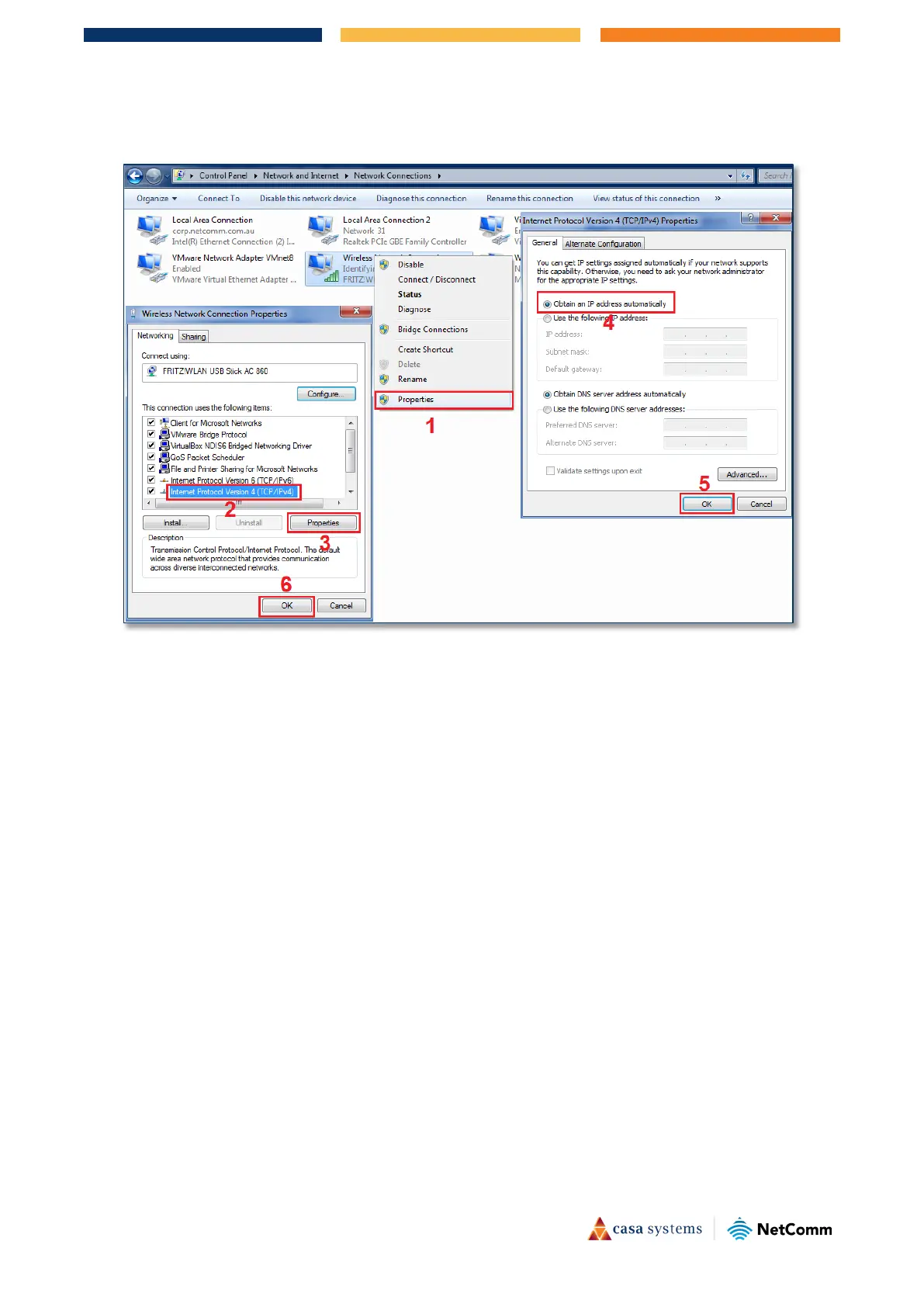
3 The Control Panel page will display:
4 Right mouse click the
Wireless Connection link and:
i From the drop down menu, click
Properties (1),
The
Wireless Network Connection Properties dialog will open
ii Select the
Networking tab and then select Internet Protocol Version 4 (TCP/IPv4) (2), then
click the
Properties button (3),
The
Internet Protocol Version 4 (TCP/IPv4) dialog box will open.
iii Select the
General tab and select Obtain an IP address automatically,
iv Click the
OK button at the bottom of the Internet Protocol Version 4 (TCP/IPv4) dialog box,
and
v Click the
OK button at the bottom of the Wireless Network Connection Properties dialog
box.



 To Next Page