Configuration Procedure
Enable SIM and Log in
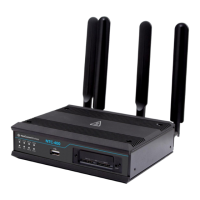
Please follow below steps to set up IP WAN on your NTC-402 router.
1 Connect the NetComm Wireless NTC-402 router via the following steps:
a Use a small Phillips screwdriver to remove the two screws securing the metal plate covering the two
SIM slots on the front of the router.
b Insert your Telstra SIM card (until you hear a click) into one of the SIM slots found at the front of the
router.
c Connect an RJ45 networking cable to the LAN port of the router.
d Connect the other end of the RJ45 networking cable to a port on your computer.
e Plug in the router’s power cord and turn on the power switch at the power point.
f Wait approximately 1.5 minutes for the router to power up.
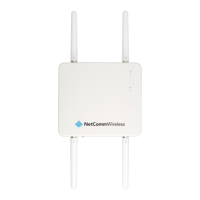
2 Log on to Web interface from a web browser:
a URL address is: http://192.168.20.1
b Username is: root
c The Password can be found printed on the router’s label and on the last page of the Quick Start
Guide.
Figure 1 –Log in screen
d Click the Login > button.


 To Next Page