This document is the user manual for the NETGEAR 4-Stream AX3000 WiFi 6 Router, Model RAX36S. It provides comprehensive information on hardware setup, network connection, Internet settings, access control, performance optimization, router management, VPN usage, port forwarding, and troubleshooting.
Function Description:
The NETGEAR RAX36S is a 4-Stream AX3000 WiFi 6 Router designed to provide a robust and secure home network. It acts as a central hub for Internet access, managing wired and wireless connections for various devices. Key functions include:
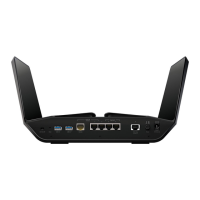
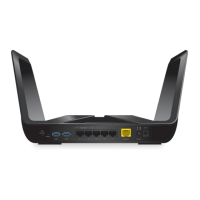
- Internet Connectivity: Connects to an Internet modem (cable or DSL) via a Gigabit Ethernet WAN port to provide Internet access.
- Local Area Network (LAN): Features four Gigabit Ethernet RJ-45 LAN ports for wired device connections.
- Wireless Connectivity (WiFi 6): Supports WiFi 6 (802.11ax) for high-speed wireless connections across 2.4 GHz and 5 GHz bands. It is also backward compatible with 802.11a/b/g/n/ac WiFi standards.
- Network Access Control (ACL): Allows users to manage which devices can access the network and the Internet based on MAC addresses, providing enhanced security.
- Internet Site and Service Blocking: Enables blocking of specific websites (keywords/domains) and Internet services, either continuously or based on a schedule.
- Dynamic Quality of Service (QoS): Optimizes Internet traffic for applications like gaming, video streaming, and VoIP by prioritizing bandwidth.
- Universal Plug and Play (UPnP): Facilitates automatic discovery and connection of Internet appliances and computers on the network.
- Virtual Private Network (VPN) Service: Allows remote, secure access to the home network via OpenVPN client-to-gateway tunnels.
- Port Forwarding and Triggering: Configures rules for incoming Internet traffic to reach local servers or applications, useful for online gaming or hosting services.
- Dynamic DNS (DDNS): Enables access to the home network using a domain name even with a dynamically assigned IP address from the ISP.
- WiFi Access Point Mode: Can be configured to function as a WiFi access point on an existing local network.
- VLAN/Bridge Settings: Supports setting up bridges for port groups or VLAN tag groups, particularly useful for IPTV services.
Important Technical Specifications:
- Wireless Technology: WiFi 6 (802.11ax)
- WiFi Bands:
- 2.4 GHz AX: 2x2 (Tx/Rx) 1024/256 QAM, 40/20 MHz, up to 600 Mbps
- 5 GHz AX: 2x2 (Tx/Rx) 1024 QAM, 80/40/20 MHz, up to 2401 Mbps
- Data Rates: Auto Rate Sensing
- Data Encoding Standards: IEEE 802.11ax 2.4 GHz 1024 QAM support, IEEE 802.11ax 5 GHz 80 MHz 1024 QAM support. (Note: Maximum wireless signal rate is theoretical; actual throughput varies based on network conditions and environmental factors.)
- Ethernet Ports:
- 1x Gigabit Ethernet RJ-45 WAN port (10BASE-T, 100BASE-TX, 1000BASE-T compatible)
- 4x Gigabit Ethernet RJ-45 LAN ports (10BASE-T, 100BASE-TX, 1000BASE-T compatible)
- Security: WPA2-Personal [AES], WPA-Personal [TKIP] + WPA2-Personal [AES], WPA/WPA2 Enterprise, WPA3-Personal.
- Protocols: TCP/IP, RIP-1, RIP-2, DHCP, PPPoE, PPTP, Bigpond, Dynamic DNS, UPnP, SMB.
- Power Adapter:
- North America: 100-120V, 50/60 Hz input
- UK, Australia, Europe: 220V, 50/60 Hz input
- All regions (output): 12V/1.5A DC output
- Dimensions: 9.27 x 7.26 x 2.25 inches (236 x 184 x 57 mm)
- Weight: 1.10 lb (500 g)
- Operating Temperature: 0° to 40°C (32° to 104°F)
- Operating Humidity: 90% maximum relative humidity, noncondensing
- Electromagnetic Emissions: FCC Part 15 Class B, EN 55022 (CISPR 22), Class B C-Tick N10947
- Default LAN IP Address: 192.168.1.1
- Default Subnet Mask: 255.255.255.0
- Default DHCP Server: Enabled, with a range of 192.168.1.2 to 192.168.1.254.
- Default Admin Username: admin
- Default Admin Password: password (after factory reset)
- Default WAN MTU Size: 1500
Usage Features:
- Easy Setup: Can be set up automatically using a web browser or the Nighthawk app.
- Multiple Login Types: Supports ISP login, WiFi network key, NETGEAR account login, and router admin login.
- Web Browser Interface: Access and manage router settings via
http://www.routerlogin.net.
- Nighthawk App: Install and manage the router, update firmware, personalize WiFi, and register the router. Includes "Anywhere Access" for remote management.
- WPS (Wi-Fi Protected Setup): Simplifies connecting WPS-enabled devices to the WiFi network without manual password entry.
- Guest WiFi Network: Create separate WiFi networks for guests with optional isolation from the main local network.
- WiFi Schedule: Program the router to turn off WiFi signals during specific times.
- LED Control: Option to turn off all router LEDs except the Power LED.
- Time Zone and NTP Server Settings: Configure time synchronization and time zone.
- Implicit Beamforming: Improves WiFi range and performance by directing signals to clients.
- Airtime Fairness: Ensures all WiFi clients receive equal network time, preventing slower devices from monopolizing bandwidth.
Maintenance Features:
- Firmware Updates: Check for and install new firmware automatically or manually to ensure optimal performance and security.
- Admin Password Management: Change the default admin password and enable password reset for recovery.
- Configuration File Management: Back up current settings to a computer, erase settings, or restore from a saved file.
- Factory Reset: Return the router to its original factory default settings using the Reset button or the Erase function in the web interface.
- Logging and Email Notifications: View detailed logs of router activity and security events, with an option to receive email notifications.
- Internet Traffic Monitoring: Monitor Internet traffic volume and set limits, with options to blink the Internet LED or disconnect the Internet when limits are reached.
- Troubleshooting Guides: The manual includes sections for quick tips, LED-based diagnostics, and solutions for common connectivity and login issues.
- Support Resources: Directs users to netgear.com/support and community.netgear.com for further assistance and downloads.

 Need help?
 General



 To Next Page