EasyManua.ls Logo

NETGEAR WN121T - User Manual

NETGEAR WN121T
52 pages
Print Icon
To Next Page IconTo Next Page
Loading...
202-10209-02
February 2007
NETGEAR, Inc.
4500 Great America Parkway
Santa Clara, CA 95054 USA
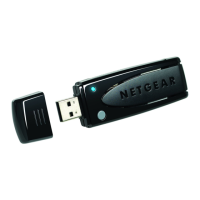
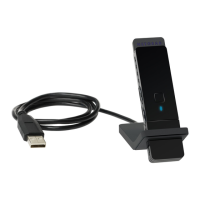
NETGEAR Next 300 Mbps
Wireless USB 2.0 Adapter
WN121T User Manual

Table of Contents

Other manuals for NETGEAR WN121T

Questions and Answers

  • A
    Adrienne MartinAug 9, 2025
    Why can't my NETGEAR WN121T connect to an available access point?
    • W
      wbartonAug 9, 2025
      If your NETGEAR Adapter cannot connect to an available access point with good signal strength: * If the access point uses WPA-PSK, ensure you have the correct WPA-PSK passphrase. Otherwise, the adapter might remain connected to the previous access point, preventing the change. * If the access point is WEP protected (64 or 128 bit encryption), you will be prompted to enter the WEP encryption security information.
  • H
    hannah95Aug 14, 2025
    How to maximize throughput on my NETGEAR WN121T Adapter?
    • J
      Jessica RodriguezAug 14, 2025
      To maximize throughput on your NETGEAR Adapter: * Ensure the VPN firewall is connected to a USB port v2.0; a v1.1 USB port will limit its performance. * For optimal performance, connect to high-speed network equipment.
  • M
    Megan LopezAug 19, 2025
    What to do if NETGEAR WN121T Adapter connects to access point but not internet?
    • S
      Sandra TranAug 19, 2025
      If your NETGEAR Adapter connects to the access point but not to the internet or other computers on the network, here are a few things to try: 1. Check that the access point is physically connected to the Ethernet network. 2. Ensure that the IP addresses and Windows networking parameters are configured correctly. 3. Restart the cable or DSL modem, router, access point, and computer. This could be a physical layer problem or a network configuration problem.
  • H
    Heather Gamble MDAug 25, 2025
    How to fix no IP address assigned to NETGEAR WN121T?
    • A
      Angel ColemanAug 25, 2025
      If no IP address is assigned to your NETGEAR Adapter, it might be because you upgraded your Next 300 Mbps WN121T Wireless USB 2.0 Adapter software and did not reboot your system. Try restarting your computer or connecting to a different access point. Shutting down the Smart Wizard or disabling/enabling the card usually does not help.
  • R
    Rhonda JuarezAug 29, 2025
    How to stop NETGEAR WN121T Adapter Smart Wizard from asking to save settings?
    • J
      Jennifer MaynardAug 29, 2025
      If the Smart Wizard for your NETGEAR Adapter keeps prompting you to save settings, it's because you're changing settings. To avoid this, simply click Apply before closing the Smart Wizard.
  • D
    Diana GarciaSep 3, 2025
    Why are there two WN121T icons in my NETGEAR Adapter system tray?
    • M
      Melissa CruzSep 3, 2025
      Two WN121T icons in the system tray indicate that you have an older software version installed on your system that needs to be removed.

NETGEAR WN121T Specifications

Wireless Speeds IconWireless Speeds
802.11b speeds1, 2, 5.5, 11 Mbps
802.11g speeds6, 9, 12, 18, 24, 36, 48, 54 Mbps
802.11n draft speeds6, 6.5, 13, 13.5, 19.5, 26, 27, 39, 40.5, 53, 54, 58.5, 65, 78, 81, 104, 108, 117, 121.5, 130, 135, 162, 216, 243, 270, 300 Mbps
Weight and Dimensions IconWeight and Dimensions
dimensions103.99 x 91.98 x 16 mm
weight2.59 oz (73.6 g)

Related product manuals