Operator’s Handbook
Use
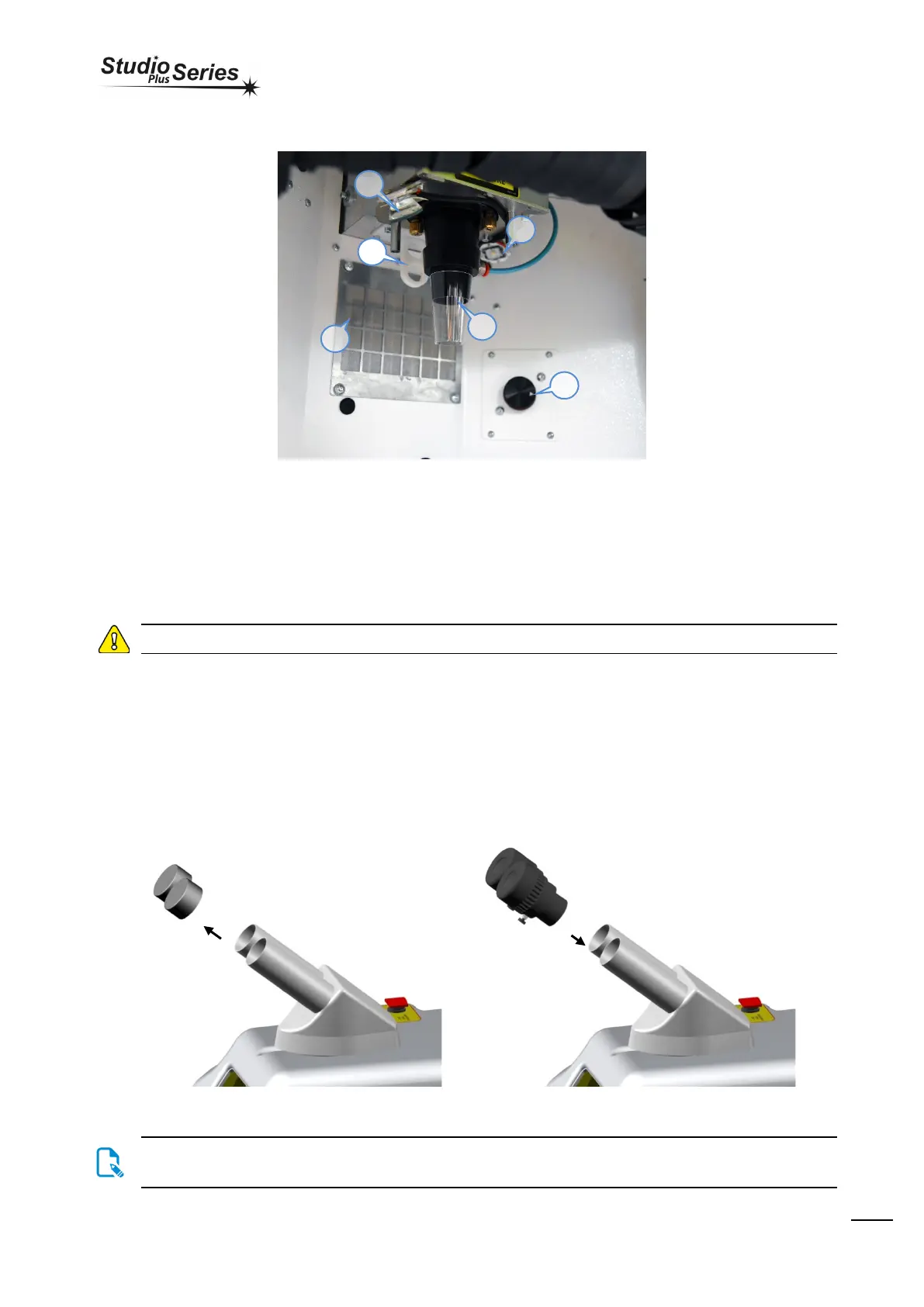
Inside welding chamber
2. SPOT diameter regulator
3. Rotary for settings the working parameters
5. Plastic cone for Argon/Air output
Use
Please read the Safety Information section before using the device.
This paragraph explains how to use and the meaning of each menues loaded into the LASER welding unit.
Recommendations
Before beginning re gular use of the device it is recommended checking to ensure that it is in suitable working condition and that there are no
defective or worn parts. Perform any regular maintenance or repairs that may be required.
Positioning and ergonomics
Microscope eyepieces
Remove the caps that protect the stereo microscope, insert the eyepieces and, once positioned properly in the housing, tighten the fixing screw.
Store the caps and eyepiece wrappers for future use.
One of the eyepieces has a crosshair for sighting, this is usually positioned on the right tube of the stereo microscope. The diopter
dial may be adjusted: once the eyepieces are positioned properly, rotate the dial clockwise or counterclockwise depending on the
focus you wish to achieve. Refer to the scale printed on each eyepiece.
3


 To Next Page