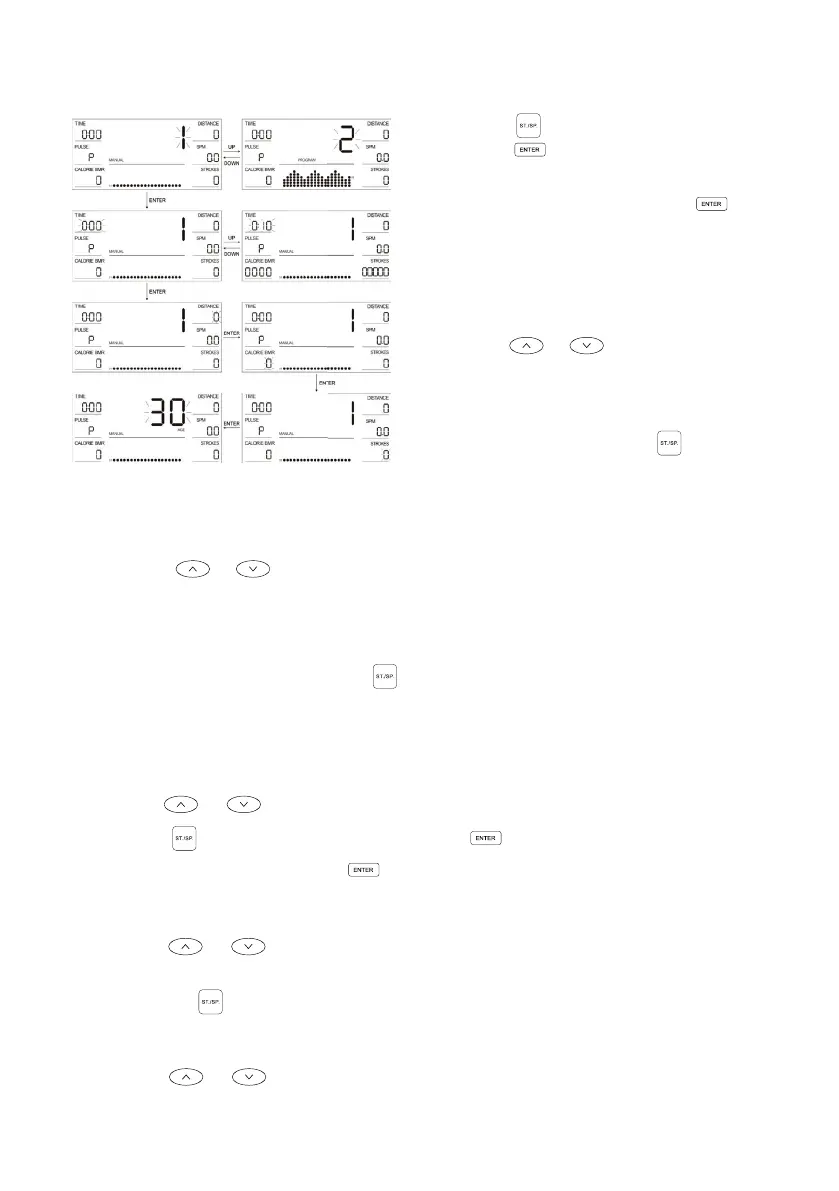
MANUAL (PROGRAMME 1 )
1. Press the to start the exercise or
press the button to enter the
setting mode.
2. In the settings mode, press the
button to select and set the items in
order. To highlight the current setting,
the relevant function will flash (TIME,
DISTANCE, CALORIE, STROKES and
AGE)
3. Use the or buttons to toggle
through each function
4. The functions will automatically
exit after all functions are selected.
Alternatively, pressing the will
start the exercise whilst in the current
function.
5. During exercise, the resistance force will adjust automatically in accordance with
the setting mode (whilst in programmes 2-12). Or this can be adjusted manually
using the or buttons.
6. When any item (TIME, DISTANCE, CALORIE and STROKES) is set, this will be
displayed as a downward count during exercise. Once the count reaches zero, the
exercise will automatically stop with a sound prompt of a double beep.
7. During exercise, you can press the to stop the function of the device.
PROGRAM (PROGRAMME 2-12)
1. Press the or button to select the programme mode.
2. Press the to start the exercise or press the button to enter settings mode.
3. In the settings mode, press the button to select and set the items in order.
To highlight the current setting, the relevant function will flash (TIME, DISTANCE,
CALORIE, STROKES and AGE).
4. Press the or to manually adjust the function.
5. The functions will automatically exit after all functions are selected. Alternatively,
pressing the will start the exercise whilst in the current function.
6. During exercise, the resistance force will adjust automatically in accordance with
the setting mode (whilst in programmes 2-12). Or this can be adjusted manually
using the or buttons.


 To Next Page