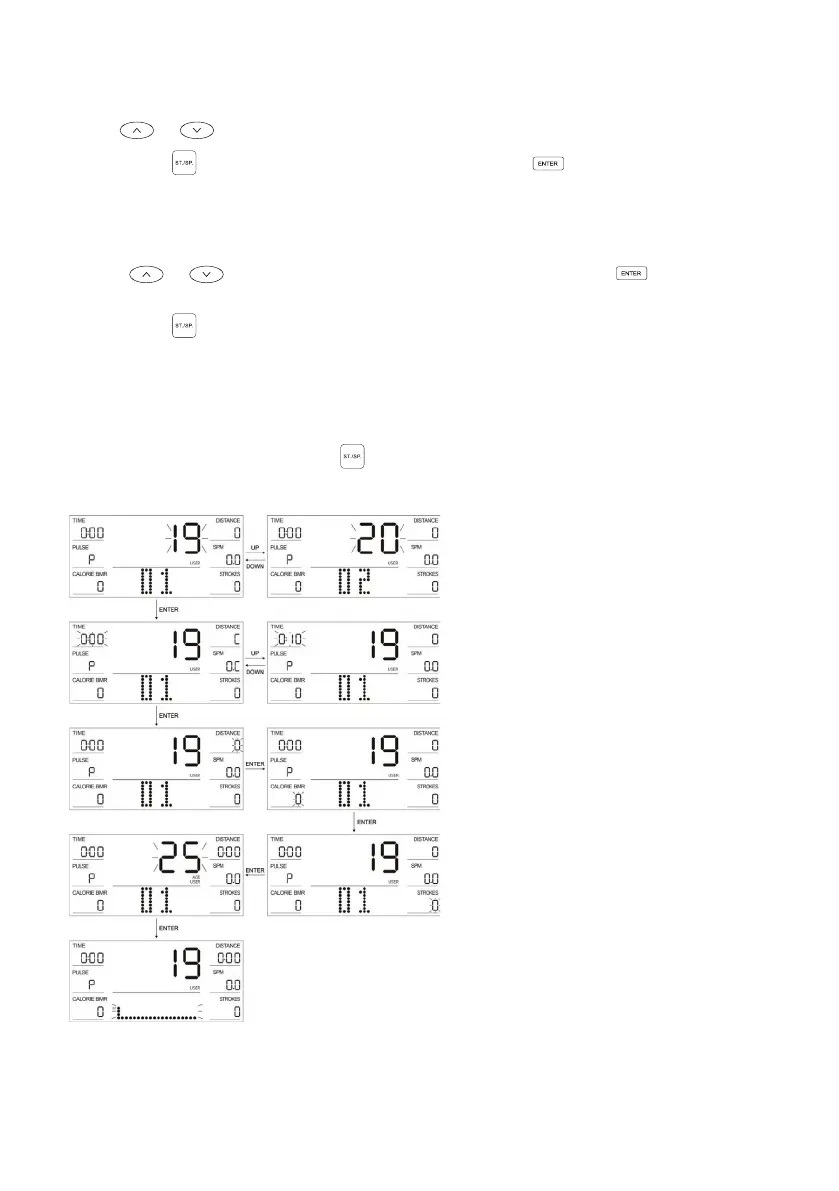
USER PROGRAMME (PROGRAMME 19-22)
1. Use or buttons to toggle between U1 ~ U4 (users 1-4).
2. Press the button to start the exercise or press the button to enter settings
mode.
3. In the setting mode, the setting order is as follows: TIME → DISTANCE → CALORIE
→STROKES → AGE → RESISTANCE FORCE OF EACH COLUMN.
4. Use or to toggle up/down through functions and press to select the
next item.
5. Press the button to start the exercise. During exercise, the resistance will adjust
automatically in accordance with the target value of the heart rate.
6. When any item (TIME, DISTANCE, CALORIE and STROKES) is set, this will be
displayed as a downward count during exercise. Once the count reaches zero, the
exercise will automatically stop with a sound prompt of a double beep.
7. During exercise, you can press button to stop the device at any time.


 To Next Page