www.newrocktech.com
4-22
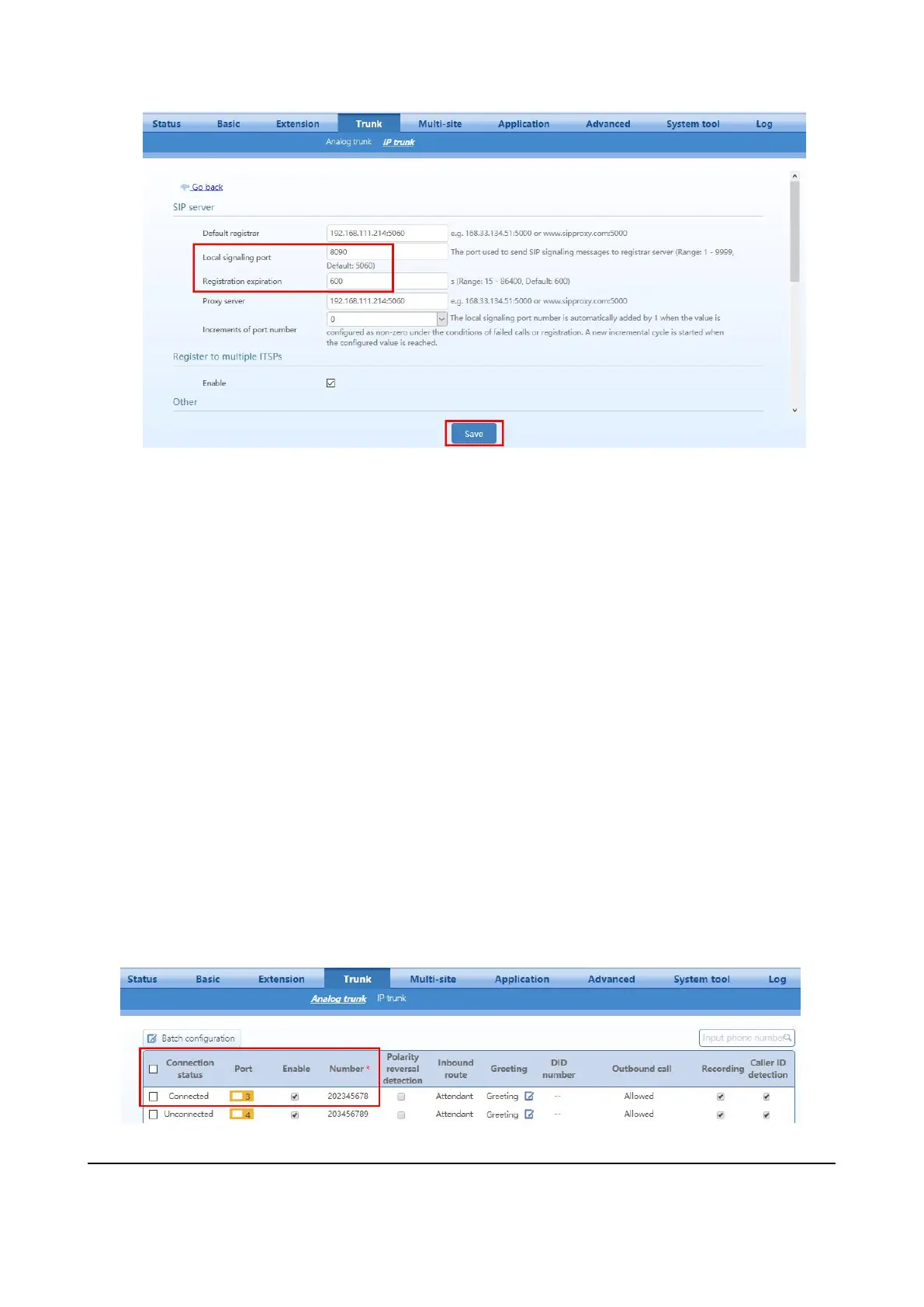
Step 6 Click Save. The configuration takes effect after the device is restarted.
Step 7 To verify your progress, perform the following tasks:
After the devices reboot, click Trunk > IP trunk. Verify that the line is registered. You may
need to refresh the browser screen to see the new status.
Use an external phone, such as a cell phone, to place an inbound call to the telephone number
that was assigned by your ITSP. Assuming that you have left the default settings in place, the
Auto Attendant answers the call. You can then dial an extension number to verify that the call
rings to the station.
4.1.2 Configuring the OM20 for PSTN Connectivity
Public Switched Telephone Network (PSTN) access is an optional if you have an internet telephone service.
You can connect up to four standard analog telephone lines to OM20 depending on the model you purchased
and then configure it so that the users can place and receive calls through the PSTN lines.
Follow this procedure:
Step 1 Log in to OM20 as Admin account
Step 2 Go to Trunk > Analog trunk to verify if the line connection line status is connected and configure
the actual trunk number.


 To Next Page