www.newrocktech.com
5-45
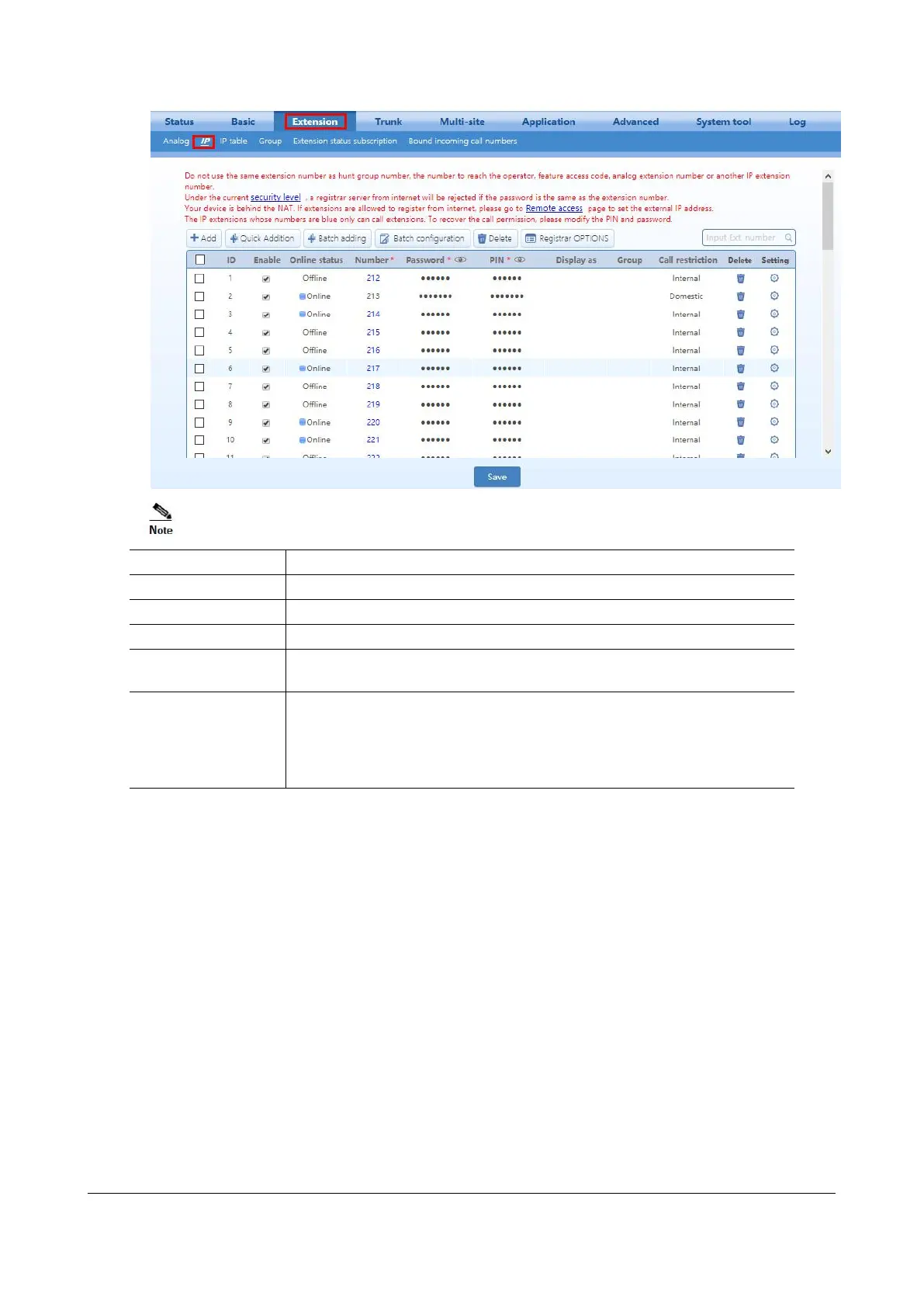
Select to use this line. By default, the line is enabled.
Displays the current status of the IP extension.
The password used for extension registration. The password is the same as PIN
by default. After the password is changed, the PIN does not change.
PIN, Group, display
as, Call restriction,
Email, Mobile
phone, Call transfer
to outside, Settings
See the description on Analog extensions
Step 3 Click Save to save the configuration.
5.7 Activating the Voice Mail
When the extension user cannot receive the incoming call, the calling party can leave a message after the
prompt.
Step 1 Go to Application > Recording, and enable the recording.
The storage path of recorded files is varied depending on the recording mode, for example, if
Internal USB flash drive is selected, the voicemail messages will be stored in the internal USB
flash drive.
Step 2 Go to Extension > Analog/IP > Setting, and set the Call Forward to CFA (voicemail) or
CFB/CFNA (voicemail).


 To Next Page