44
CONNECTION OF THE POWER SUPPLY CABLE
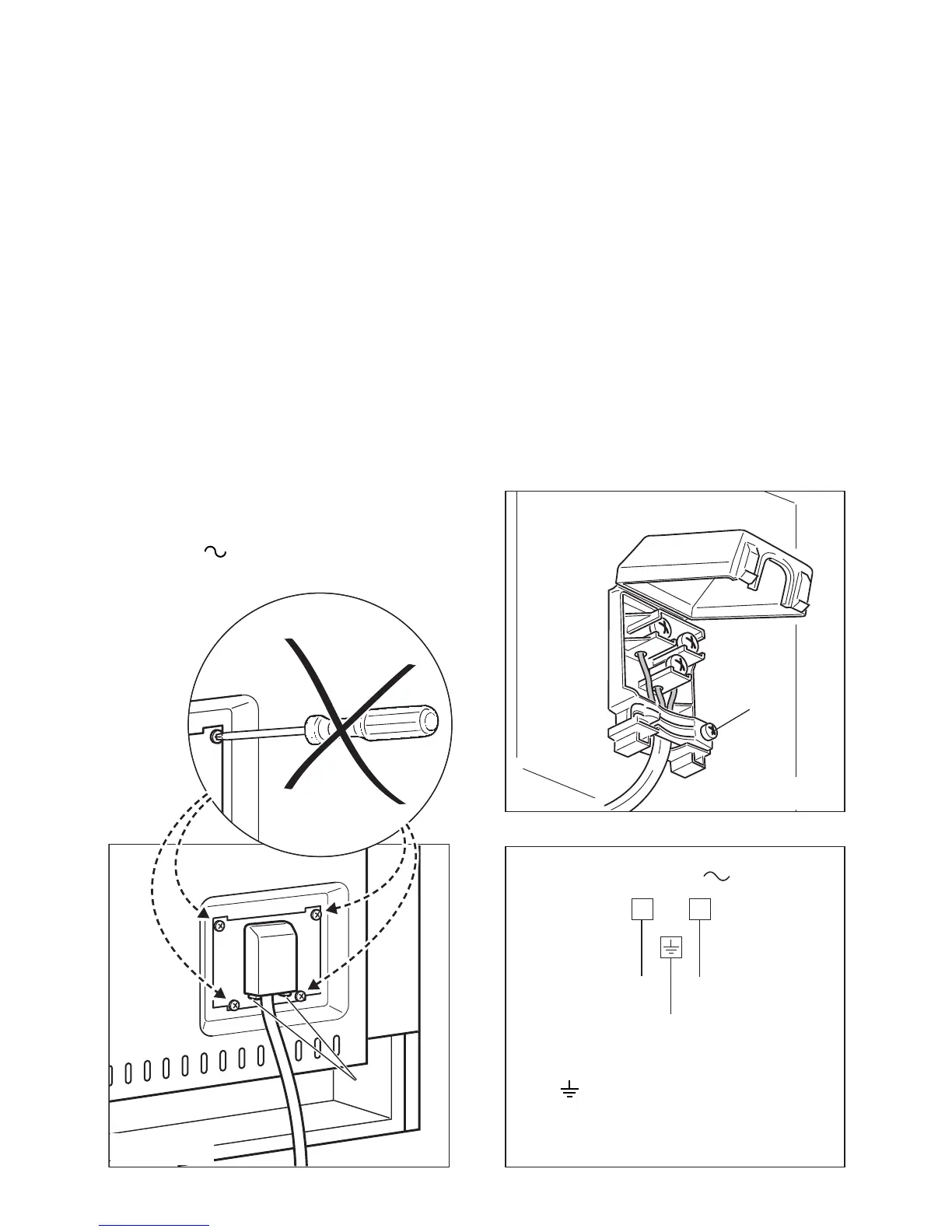
– Unhook the terminal board cover by inserting a screwdriver into the two hooks A
(fig. 10.1).
– Open the cable gland by unscrewing screw F (fig. 10.2), unscrew the terminal screws.
– Insert the feeder cable of the suitable section (as described in the next chapter) into
the cable gland.
– Connect the phase and earth cables to the terminal block according to the diagram
in figure 10.3.
– Pull the feeder cable and block it with cable gland.
– Close the terminal block cover (check the two hooks A are correctly hooked).
IMPORTANT: To connect the power supply cable DO NOT unscrew the screws
fixing the cover plate behind the terminal block.
WARNING: If the power supply cable is damaged, it must be replaced only by an
authorised service agent in order to avoid a hazard.
Fig. 10.1
A
F
Fig. 10.2



 To Next Page