EasyManua.ls Logo

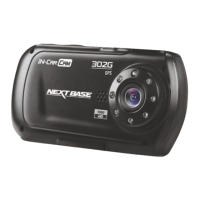
NextBase 302G Deluxe - User Manual

NextBase 302G Deluxe
32 pages
Print Icon
To Next Page IconTo Next Page
Loading...
Instruction Manual
inc. Driving Recorder Player
Software Installation Guide

Questions and Answers

  • T
    Taylor Webb Jr.Aug 19, 2025
    What to do if my NextBase 302G Deluxe says “SD Card Full”?
    • J
      Joshua ThompsonAug 20, 2025
      This message appears because the SD card is full and the Loop recording function is set to OFF. To resolve this, set the “Loop Recording” function to 3mins (default). This enables the cycle recording function and automatic deletion of older files.
  • C
    Cynthia SalazarAug 21, 2025
    How to fix NextBase DVR when video has no sound?
    • E
      Eric RothAug 21, 2025
      If your NextBase DVR video has no sound, ensure that the “Record Audio” setting is turned ON within the Video Menu.
  • J
    Jennifer FletcherAug 23, 2025
    Why my NextBase DVR can not lock onto satellite?
    • K
      Kelli SantosAug 25, 2025
      It can take up to 10 minutes to find the three satellites required to achieve a stable signal after powering on the NextBase DVR with a clear view of the sky. Atmospheric conditions, buildings, trees obscuring the sky, and heated or reflective windscreens can affect reception. Try turning the NextBase DVR off and on to restart the GPS search procedure.
  • J
    jacobcareyAug 26, 2025
    What to do if NextBase 302G Deluxe DVR shows “SD Card Error”?
    • D
      Darlene CamachoAug 26, 2025
      The “SD Card Error” message means the SD card has become unusable by the NextBase DVR. To fix this, remove useful files using your PC and then perform a “FORMAT” upon the SD card from within the SETUP menu.
  • Y
    yweberAug 27, 2025
    How to make NextBase DVR sucker stay in place?
    • P
      Paul PerezAug 27, 2025
      To ensure the sucker stays in place on your windscreen: * Remove the protective cover (plastic film) from the suction pad. * Ensure the rotary dial is fully counter clockwise. * Make sure the glass is smooth and clean. * Do not stick to glass that has any non-smooth effect or paint whatsoever. * Affix to the glass firmly and then rotate the dial clockwise, until the latch is felt to engage.
  • J
    James HintonAug 29, 2025
    How to fix blurred video image on NextBase 302G Deluxe?
    • M
      mrosalesAug 29, 2025
      If the video image on your NextBase DVR is blurred, remove the protective lens cover, clean the lens, and clean the windscreen inside and out.
  • J
    Jennifer ChandlerAug 31, 2025
    Why NextBase 302G Deluxe DVR has no power but works on PC?
    • R
      Ricardo DavisAug 31, 2025
      If your NextBase DVR has no power but works on your PC, the cigarette power cable is not working. Inspect the fuse in the Car Power plug. If the fuse is blown, replace it with a 2A 20mm type. Also, inspect the power cable for damage which may have caused the fuse to blow.
  • L
    Lynn PowersSep 2, 2025
    What to do if NextBase 302G Deluxe DVR video recording is jumpy?
    • M
      Michael ReedSep 2, 2025
      If video recording on your NextBase DVR is jumpy or freezes, remove the SD card and reformat it to remove non-contiguous files. For best recording, use a branded class 10 type (30MB/s) SD card of 8 to 32GB recommended size. If the issue persists, the playback PC may not be sufficient for the playback software; try an alternative PC.
  • F
    Frederick NicholsSep 4, 2025
    Why does my NextBase 302G Deluxe shuts down by itself?
    • F
      Frank HooperSep 5, 2025
      Your NextBase DVR might shut down by itself because the battery has gone flat, or there is no power to the device and the AutoPower Off period (which is in the SETUP menu) has been triggered.
  • J
    jamesmooreSep 6, 2025
    What does “Memory error” mean on NextBase 302G Deluxe DVR?
    • G
      georgemunozSep 6, 2025
      The “Memory error” message means the SD card has become unusable by the NextBase DVR. To fix this, remove useful files using your PC and then perform a “FORMAT” upon the SD card from within the SETUP menu.

NextBase 302G Deluxe Specifications

General IconGeneral
BrandNextBase
Model302G Deluxe
CategoryDVR
LanguageEnglish

Related product manuals