5.3.
Inserting the memory card
A memory card must have been inserted in order to save photos and videos. Insert a SD/SDHC memory
card in the memory card compartment before switching on the camera.
Note:
• Instead of
type LR6 (AA) batteries, rechargeable batteries with the same specication (with
2000 mAh or higher) may be used. We recommend NiMh batteries with low self discharge
(not supplied).
•
An alarm is sounded if battery charge is too low.
Switch o the camera and open as described in section 6.1.
11
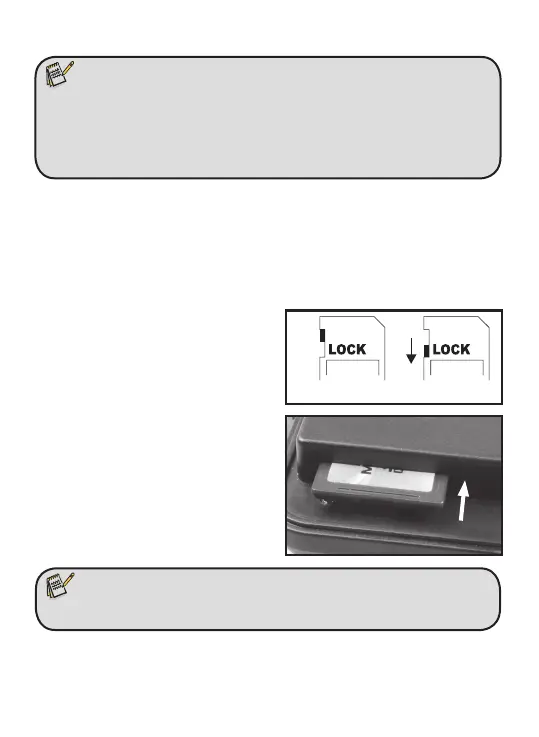
Prior to inserting the memory card ensure that
the lateral write protection on the memory
card has not beet activated (see gure).
If the camera displays "Card protected", remove
the memory card and change the position of
the memory protection.
Insert the memory card as shown in the
adjacent illustration. Push the memory card
into compartment until it clicks into place.
To remove the memory card push card in again
until it is partly ejected.
Note:
•
SD/SDHC memory cards up to a capacity of 32 GB are supported.
Write Protection
Write Protection


 To Next Page