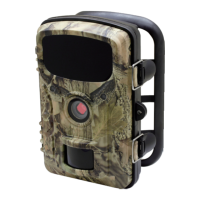
This document is an instruction manual for the Nextech QC8067 4G Outdoor Trail Camera. It provides comprehensive information on the camera's features, setup, operation, and troubleshooting.
Function Description
The Nextech QC8067 is a 4G outdoor trail camera designed for capturing photos and videos in various outdoor environments. Its primary function is to detect motion and capture images or videos of wildlife or other subjects, which can then be transmitted via a 4G cellular network. The camera supports different recording modes, including photo-only, video-only, and photo+video, allowing users to customize how they capture events. It features night vision capabilities with IR LEDs, enabling it to operate effectively in low-light conditions. The integrated cellular modem allows for remote monitoring and management through a dedicated mobile application, providing users with real-time access to captured media and camera settings. The camera is designed to be waterproof, making it suitable for outdoor deployment in various weather conditions.
Usage Features
The camera offers a range of features to enhance its usability and performance.
- Mobile App Control: The camera is compatible with a mobile application ("Camera Trap Wireless") available on both iOS and Android platforms. This app allows users to fully control camera settings, view uploaded pictures and video clips, and monitor the camera's status remotely.
- Account Setup: To utilize the cellular transmission features, users need to create an account within the mobile app. The app guides users through a simple on-screen menu for account creation.
- Camera Association: A QR code displayed on the camera's screen can be scanned using the mobile app to easily associate the camera with the user's account, enabling seamless connectivity.
- Image and Video Management: Within the app, users can select individual or multiple pictures, mark favorites, and share captured media. The app also allows for GPS tagging of images, helping users track and recall camera locations.
- Customizable Settings: The camera offers extensive customization options for its operation.
- Mode Selection: Users can choose between Photo, Video, or Photo+Video modes based on their monitoring needs.
- Interval Setting: The interval between successive triggers can be adjusted from seconds to 60 minutes, preventing unnecessary shots and conserving memory.
- Time Lapse: A time-lapse function allows the camera to automatically take photos or videos at set intervals, regardless of motion detection, useful for observing slow-moving phenomena like plant growth or cold-blooded animals.
- PIR Sensitivity: The Passive Infrared (PIR) sensor's sensitivity can be set to High, Medium, or Low, optimizing detection based on ambient temperature and desired range.
- Flash Light: Options for Auto, High, or Low flash intensity are available, with different ranges suitable for various distances and lighting conditions.
- Timer Function: Users can set specific time periods during which the camera will capture images without requiring a trigger, with adjustable intervals.
- Photo and Video Resolution: Multiple resolution options are available for both photos and videos, allowing users to balance image quality with storage space and upload speed.
- Picture Number: Users can specify how many photos are taken in sequence per trigger.
- Cellular Settings: The cellular modem can be turned on or off. Users can also monitor connection status, including signal strength, and view the QR code for app association.
- Upload Frequency and Resolution: Options for uploading photos once per day, twice per day, hourly, or instantly are provided, along with choices for upload resolution to manage data and battery usage.
- Time Zone: The camera's time zone can be set.
- Date & Time Format: Users can set the date, time, and choose between 12hr or 24hr format.
- Camera Naming: A custom name can be assigned to the camera, which appears on image timestamps.
- Time Stamp: The option to include data, time, temperature, and battery percentage on photos/videos can be toggled on or off.
- Temperature Units: Temperature can be displayed in Fahrenheit or Celsius.
- Password Protection: A four-digit password can be set to prevent unauthorized access to camera settings.
- Beep Sound: The camera's beep sound can be enabled or disabled.
- Auto Power Off: The camera can be set to automatically power off after a period of inactivity in SETUP mode.
- Backlight Time: The LCD monitor's backlight duration can be adjusted.
- Language: Multiple language options are available for the menu.
- TF Card Detection: A function to test the speed of the TF card is included to ensure optimal performance.
- Mounting Options: The camera can be mounted using the provided adjustable web belt around a tree trunk or via a 1/4"-20 tripod socket for use with tripods or other mounting accessories.
- Live View: The "Direct Connect" feature in the smartphone app allows for a live view from the camera's lens, aiding in positioning and verifying the sensing angle and monitoring distance.
- External Power Source: The camera supports an optional external 12V solar panel for continuous power, which can also charge its internal rechargeable Lithium-ion battery.
Maintenance Features
The manual outlines several maintenance and troubleshooting features to ensure the camera's longevity and optimal performance.
- Battery Installation: Clear instructions are provided for inserting 8 AA batteries, emphasizing correct polarity and the recommendation to use lithium batteries for longer life. A warning against mixing new and old batteries or alkaline and lithium batteries is included.
- TF and SIM Card Installation: Guidance is given for inserting the TF memory card (up to 32GB, class 6 or above recommended) and the SIM card, including visual aids for correct orientation.
- Antenna Installation: Users are instructed to screw the antenna hand-tight to ensure a water-sealed connection, with a caution against overtightening.
- Power On and Status Check: After setup, users can switch the camera to SETUP mode to power it on and initiate a SYNC process. Indicators on the viewscreen help confirm SIM card status, signal strength, and network connection.
- TF Card Formatting: The camera allows users to format the TF card, which is recommended for cards previously used in other devices to prevent compatibility issues. Users are warned to back up any desired files before formatting.
- Factory Reset: A "Reset to Factory" option allows users to restore all parameters to their original default settings, useful for resolving unexpected camera behavior.
- Firmware Update: The camera supports firmware updates via the TF card, ensuring the device can be kept up-to-date with the latest improvements.
- Troubleshooting Guide: A comprehensive troubleshooting section addresses common issues such as:
- Continuous images of no subject ("false triggers"): Suggestions include repositioning the camera, changing sensor levels, and avoiding heat sources or windy areas.
- Shorter than expected battery life: Advice includes optimizing upload resolution and frequency, using new alkaline or lithium batteries, and using good quality TF cards.
- Camera stops taking images or won't take images: Recommendations include checking TF card capacity, battery status, and formatting the TF card if it was used in another device.
- Camera won't power up: Instructions emphasize correct battery installation and polarity.
- Dark or bright night/day photos/videos: Tips include checking battery power, flash settings, subject distance, and camera aiming relative to light sources.
- Photos with streaked subjects: Suggestions involve adjusting resolution settings for fast-moving subjects.
- Short video clips: Advice includes checking TF card capacity and battery power.
- Missing date/time stamp: Users are reminded to enable the "TIME STAMP" option.
- Photos not capturing subjects of interest: Recommendations include adjusting PIR sensitivity based on temperature and avoiding obstructions.
- PIR sensor LED issues: Explanation of LED behavior in setup vs. use modes.
- Display screen powering off: Clarification that this is a battery-saving feature.
- Camera not retaining settings: Reminder to press "OK" to save changes after adjusting settings.
- Warranty Information: Details on the 12-month warranty, coverage, and how to claim warranty are provided, along with contact information for Electus Distribution.

 Need help?
 General

 To Next Page