15
Using an external power source (optional, user provided)
Optionally, you can connect the Accessory Solar Panel to the “DC In” jack at the
bottom of the camera (other external power supplies should not be used, as the
camera and/or display may not function correctly). If the solar panel is connected
and AA batteries are installed, the camera will be powered by the solar panel’s
rechargeable Lithium-ion battery, as long as it provides adequate voltage (if not,
the camera will switch to battery power). The solar panel’s battery will power the
camera at night.
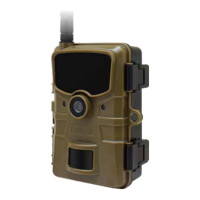
Antenna guide
For optimal network reception with your camera, use the following antenna place-
ment guide:
1. Mount camera away from any type of metal.
2. Antenna should be vertical from the camera.
3. As much as possible, antenna should be away from obstructions.
4. Ensure antenna is screwed in tight so a proper connection is made.
The Wildlife Camera can be connected to a computer using the supplied USB
cables to view existing photos/videos.
1. Connect the camera to your computer using the USB cable.
2. The camera switches on automatically in the
3. USB mode, irrespective of the selection on the mode switch.
4. The camera installs itself on the computer as an additional drive under the name
“Removable storage device”
5. Double click on the device to detect the folder “DCIM”.
6. The photos and videos are located in the sub folders of the “DCIM” folder.
7. You can copy or move photo and video files on the computer. Alternatively you
can insert the memory card in a card reader on the computer.
CONNECTING TO A COMPUTER
NOTE: Mac computers show an “Unknown” drive on the desktop. When clicking on
this drive, the program “iPhoto” is automatically started.


 To Next Page