X-COM
10
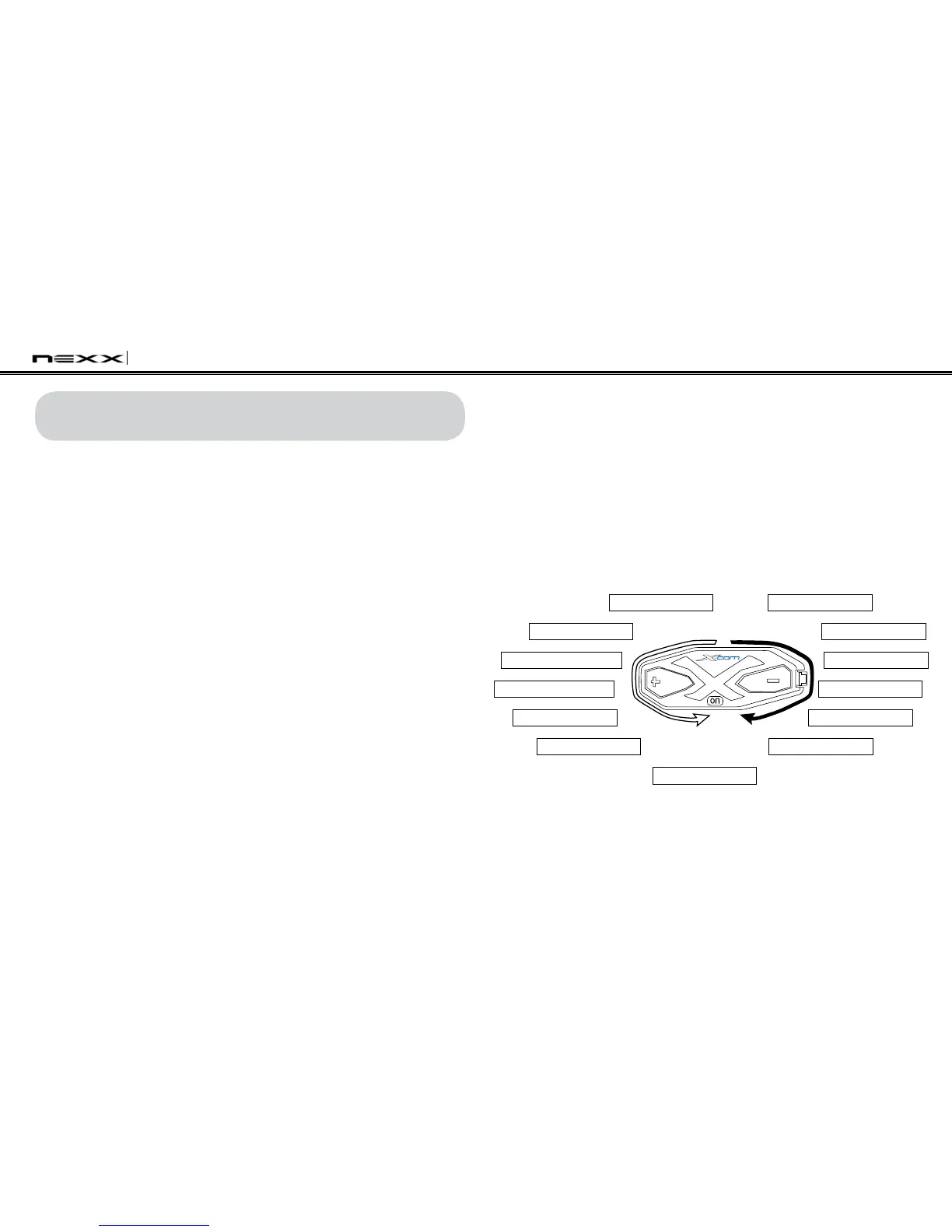
The voice prompt for each menu item is as follows:
(1) Phone pairing
(2) Multipoint pairing
(3) Phone selective pairing
(4) Media selective pairing
(5) Speed dial
(6) VOX phone
(7) VOX intercom
(8) VOX sensitivity
(9) Voice prompt
(10) Sidetone
(11) Delete all pairings
(12) Factory reset
(13) Exit conguration
Phone pairing
Exit configuration
Multipoint pairing Factory reset
Phone selective pairing
Delete all pairings
Media Selective pairing
Sidetone
Speed Dial Voice prompt
VOX phone VOX sensitivity
VOX intercom
6. X-COM CONFIGURATION SETTING
You can set the configuration of the X-COM by the voice menu
instructions as below.
1. To enter the voice configuration menu, press and hold the
Center Button for 12 seconds until the LED shows solid blue
and you hear high tone double beeps. You will also hear the
voice prompt saying “Conguration menu”.
2. Tap the (+) Button or the (-) Button to navigate between the
menus. You will hear voice prompts for each menu item as
below.
3. You can enable / disable a feature or execute a command by
tapping the Center Button.
4. If you want to exit configuration immediately, tap the (+) Button
or the (-) Button until you hear the voice prompt saying “Exit
conguration”, then tap the Center Button.


 To Next Page