Home
Nexx
Conference System
XCOM3
Page 8 (Installing the Headset on Your Helmet)
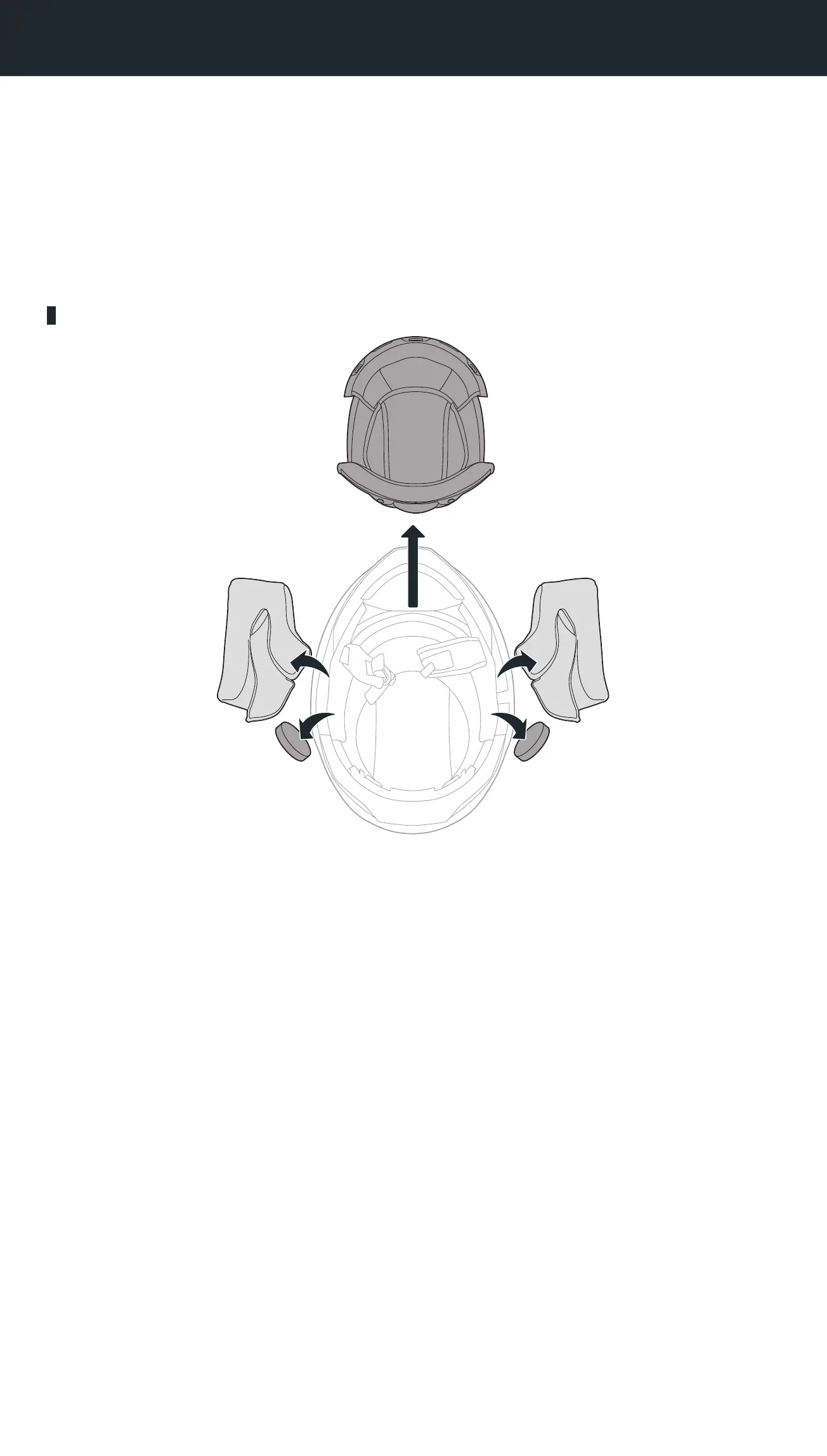
Nexx XCOM3 - Installing the Headset on Your Helmet; Preparing the Helmet for Installation
44 pages
Manual
Save Page as PDF
To Next Page
To Next Page
To Previous Page
To Previous Page
Loading...
X.COM3 - MOTORCYCLE BLUETOOTH COMMUNICA
TION SYSTEM
8
2
INST
A
LLING THE HE
ADSE
T ON Y
OUR HELME
T
The following
NEXX helmets
ar
e compatible with the
X-COM 3
.
•
Y
.100, Y
.100 R, X.WST3, X.WED3
2
.1
PREP
ARI
NG THE HELME
T F
OR I
NST
ALL
A
TION
Inner Padding
7
9
Table of Contents
Main Page
Table of Contents
2
Sena Motorcycles App and NEXX Device Manager
5
About the X-Com 3
6
Product Features
6
Package Contents
6
Product Details
7
Installing the Headset on Your Helmet
8
Preparing the Helmet for Installation
8
Installing the Headset
10
Install the Inner Padding
14
Getting Started
15
Legend
15
Powering on and off
15
Charging
15
Checking the Battery Level
16
Volume Adjustment
16
Pairing the Headset with Other Bluetooth Devices
17
Phone Pairing
17
The First Time You Turn on the Headset
17
Starting with Your Headset Powered off
18
Starting with Your Headset Powered on
18
Second Mobile Phone Pairing
19
Gps Pairing
19
Mobile Phone Usage
20
Making and Answering Calls
20
Speed Dialing
20
Assigning Speed Dial Presets
20
Using Speed Dial Presets
20
Stereo Music
22
Bluetooth Stereo Music
22
Music Sharing
22
Bluetooth Intercom
23
Intercom Pairing
23
Using the Smart Intercom Pairing (SIP)
23
Using the Button
24
Last-Come, First-Served
24
Two-Way Intercom
25
Multi-Way Intercom
25
Starting a Three-Way Intercom Conference
25
Starting a Four-Way Intercom Conference
26
Ending Multi-Way Intercom
27
Three-Way Conference Phone Call with Intercom Users
28
Group Intercom
29
Universal Intercom
30
Universal Intercom Pairing
30
Two-Way Universal Intercom
30
Multi-Way Universal Intercom
31
Three-Way Universal Intercom
31
Four-Way Universal Intercom
32
Using the Fm Radio
33
Fm Radio On/Off
33
Seek and Save Radio Stations
33
Scan and Save Radio Stations
34
Temporary Station Preset
34
Navigating Preset Stations
35
Function Priority and Firmware Upgrades
36
Function Priority
36
Firmware Upgrades
36
Configuration Setting
37
Headset Configuration Menu
37
Delete All Pairings
37
Remote Control Pairing
37
Software Configuration Setting
38
Headset Language
38
Audio Equalizer (Default: Off)
38
VOX Phone (Default: Enable)
38
VOX Intercom (Default: Disable)
39
VOX Sensitivity (Default: 3)
39
HD Intercom (Default: Enable)
39
HD Voice (Default: Enable)
39
Audio Source Priority (Default: Intercom)
40
Enabling/Disabling Audio Multitasking™ (Default: Disable)
40
Background Volume (Default: Level 5)
41
Sidetone (Default: Disable)
41
Voice Prompt (Default: Enable)
41
RDS AF Setting (Default: Disable)
41
FM Station Guide (Default: Enable)
41
Advanced Noise Control™ (Always On)
42
Region Selection
42
Troubleshooting
43
Factory Reset
43
Fault Reset
43
Quick Reference
44
Related product manuals
Nexx XCOM3 PRO
56 pages



 To Next Page