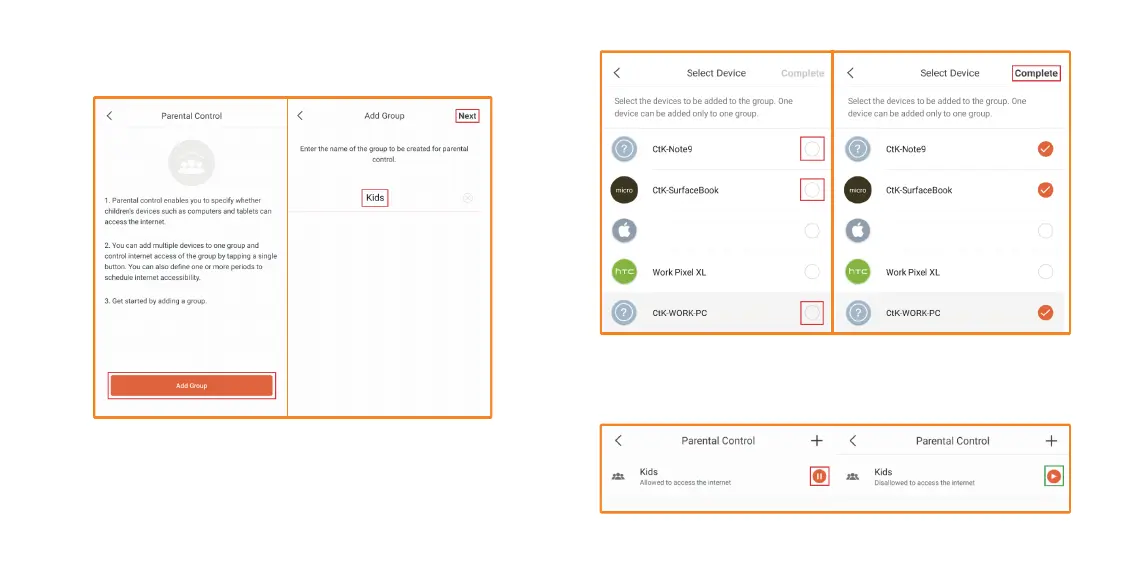
2. Tap on Add group. For this example, we will use a Kids group. Tap
on Next.
3. Now choose which user/devices you wish to add to the Kids Group.
For this example, we will add all the devices named “CtK”. Tap on the
circle next to each device named CtK, it should show a check mark.
Tap on Complete. It will take you back to main Parental Control Page.
4. On this screen you can tap on the Pause button to stop allowing
everyone in that group the use of the Internet. Then tap on the Play
button to allow them access to the Internet again.
Apple Phone Apple Phone


 To Next Page