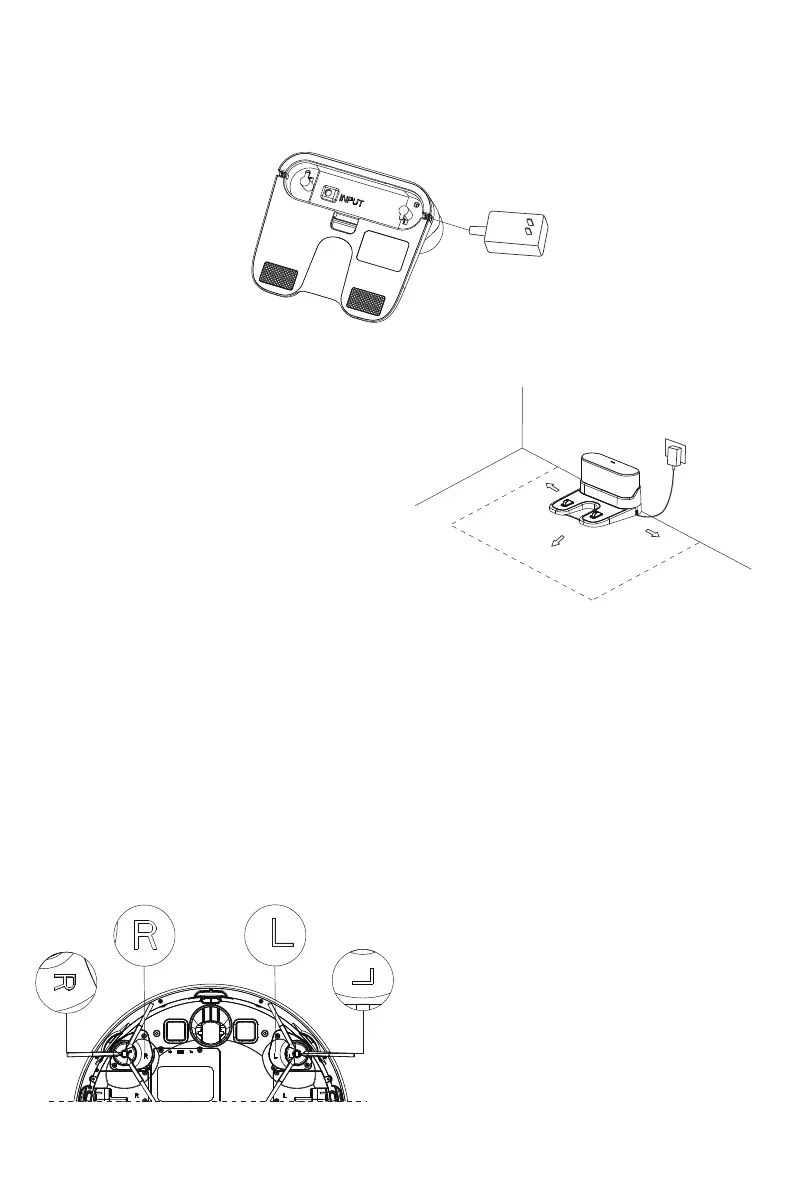
1. Connect the power cord, and then put the excess wire into the wire box.
2. Place the charging stand against a wall on a flat floor, and then connect
to power.
Note:
• Make sure there is a space of more than
0.5 meters on both sides and more than
1.5 meters on the front.
• While installing, try to keep the power cord
in the air; if it is close to the ground, it may
be dragged by the host, causing the charging
stand to lose power.
•The charging indicator light is always on
when the power is on.
1.6ft/0.5m
5ft/1.5m
1.6ft/0.5m
Installation Steps
3. Please keep the charging station out of direct sunlight and don't move
it around unnecessarily.
4. Installation of the Side Brush
Make sure that the left side brush and the right
side brush correspond to L and R on the bottom
casing, press L and R side brushes after installation,
and tighten the fixing with the screws.
Note:
- Direct sunlight will interfere with recharging signal and consequently the robot may be
unable to return to the charging station.
11


 To Next Page