myDAQ iDaq Component – User Guide
12
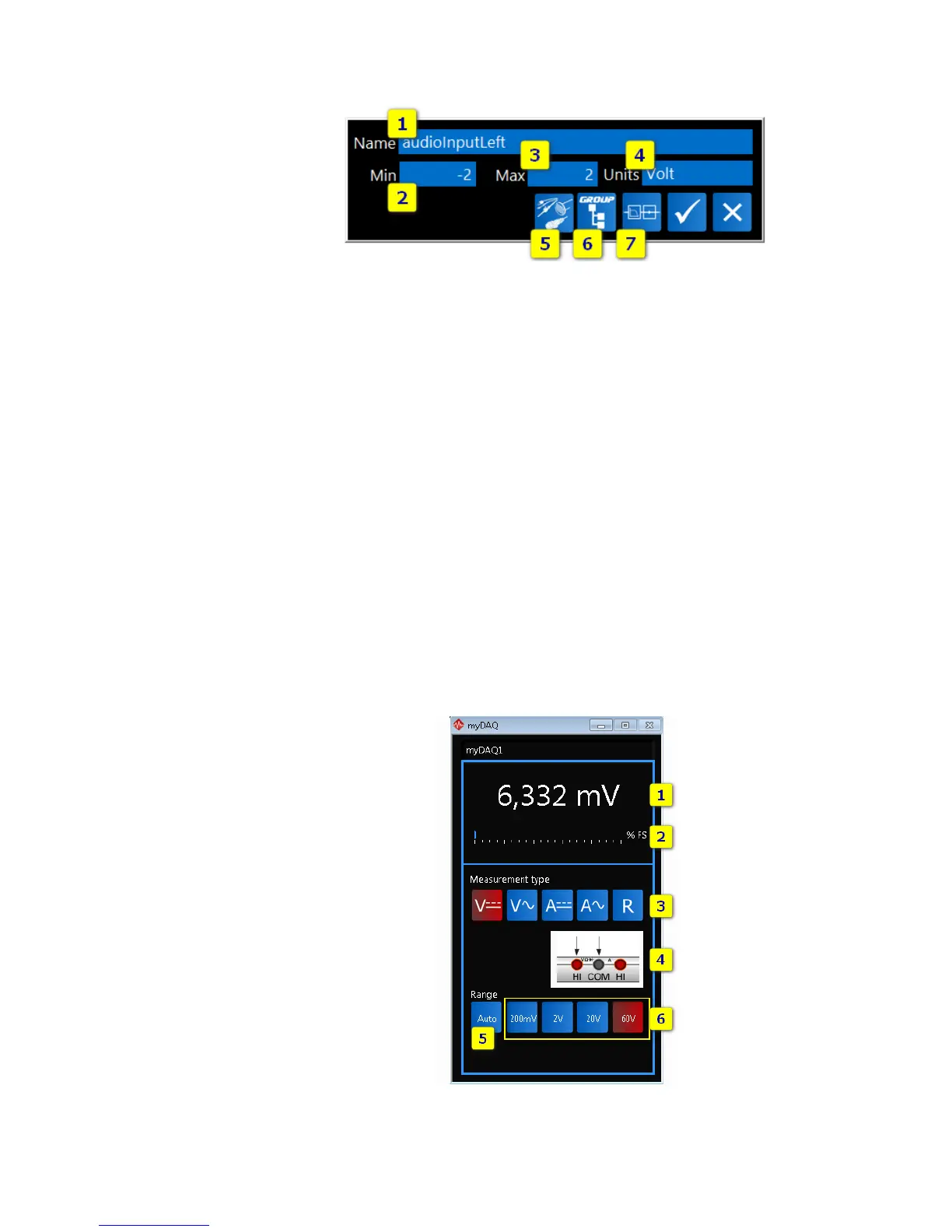
FIGURE 9 - CHANNEL PROPERTIES EDITOR
As shown in the Channel properties editor, for each channel, several details are editable:
1. Channel Description. It is the channel name.
2. Minimum Range Value. This value indicates the lower limit of signal range,
expressed in "Units".
3. Maximum Range Value. This value indicates the upper limit of signal range,
expressed in "Units".
4. Units. It is the channel unit of measurement.
5. Sensor Type. Define the sensor type.
6. Group. Define a group name for the selected channel.
7. Edit Processing Units button. Use this button to edit processing units associated to
selected channels. To get more details about Waveform Processing Units, see
Waveform Processing Units User Guide.
MYDAQ DIGITAL MULTIMETER (DMM)
myDAQ board has a 60 V digital multimeter that can be easily used in iDaq. When a new
myDAQ device is added in the active device list, the DMM console appears. As shown in the
following figure, myDAQ DMM allows you to measure voltage, resistance, and current.
FIGURE 10 – MYDAQ DMM



 To Next Page