5. ADVANCED MENU OPTIONS
5.1 Measurement
The Measurement menu contains four selectable items: Unit,
Group, Test Mode, Preset.
From the home screen, touch “MENU/ENTER” to enter the main
menu.
5.2 Unit
The measuring unit can be selected under this menu. Different
range models may have different unit selection capabilities. Touch
“MOVE/UP” or “DOWN” keys to shift to the next selection. Press
“ZERO/EXIT” to cancel or touch “MENU/EXIT” to confirm and exit.
5.3 Group
When several test samples need to be measured, the samples
can be coded into groups. The range is 01-99. When set to “00”,
changes to “01 automatically as “00” is not an available choice.
Press “MODE/UP” to adjust the value, touch “PRINT/SAVE” to
shift to the next position. Touch “ZERO/EXIT” to cancel; press
“MENU” to confirm and exit.
Menu
Measurement
Unit
Group
Test Mode
Capacity (TTC-E Only)
Preset
Memory
Browse
Print All
Print Select
Upload
Delete Select
Delete All
System
Display Mode
Auto Power Off
Backlight
Key Tone
Language
Date/Time
Diagram Scale
Key Setting
Display Direction
Default
Information
Calibration
Torque
Sensitivity
Weight
Force
3
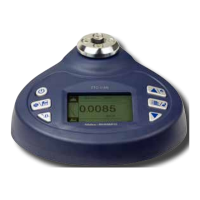
3. KEY FUNCTIONS
POWER: Push for 2 seconds to power On or Off
SAVE/PRINT: Print the current force value or
store data, depending on the key setting. (See 7 for
key setting)
Changing Values: Select next digit location.
MENU/ENTER: Enter the menus.
In Menus: Select or Enter
ZERO/EXIT: Zeros Values
In Menus: Back or Exit
MODE/UP: Changes the measurement mode
In Menus: Moves selection up or increases the
value.
DOWN: Moves selection down or decreases the value.
4. MENU STRUCTURE
www.GlobalTestSupply.com
Find Quality Products Online at: sales@GlobalTestSupply.com


 To Next Page