63
t
❚❚ Flash Mode
The flash mode can be selected using the Flash mode item in
the shooting menu (0 109).
1 P Programmed auto or A Aperture-priority auto exposure modes only.
2 S Shutter-priority auto and M Manual exposure modes only.
N Fill flash: Use for additional lighting or to fill in shadows.
Nj
Red-eye reduction: Use for portraits. Red-eye reduction lamp
lights before flash fires, reducing “red-eye”.
Np
Slow sync
1
: Shutter speeds slow automatically to capture
background lighting at night or under low light.
Njp
Red-eye slow sync
1
: Combine red-eye reduction with slow
sync for portraits that include background lighting.
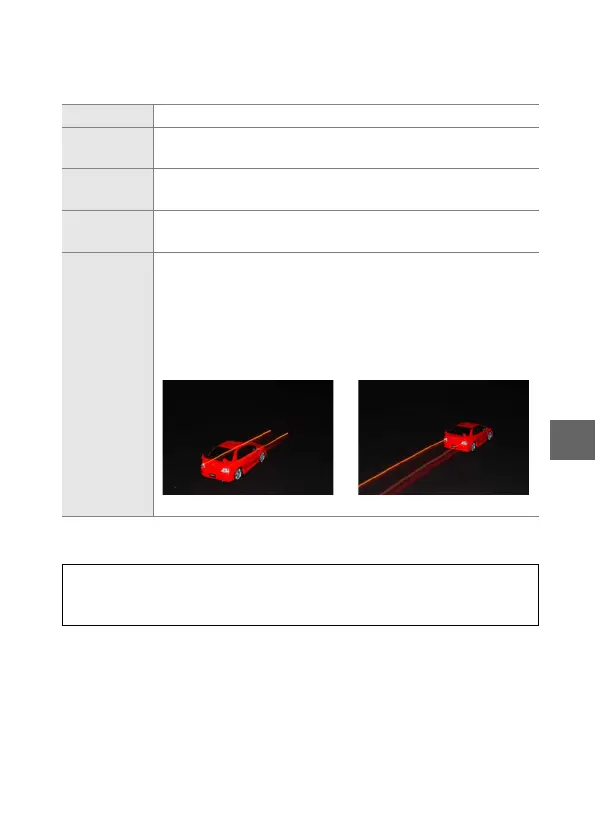
Nq / Nr
Rear- curtain slow sync
1
/Rear- curtain sync
2
: The flash fires just
before the shutter closes, creating a stream of light behind
moving objects as illustrated below at right (other flash
modes use front-curtain sync, in which the flash fires as
the shutter opens; the effect this produces with moving
light sources is shown below at left).
Front-curtain sync Rear-curtain sync
A
See Also
See page 148 for information on choosing how the camera controls
flash output. For information on adjusting flash level, see page 149.



 To Next Page
 Loading...









