41
Connecting to Televisions, Computers, and Printers
Connecting to Televisions, Computers,
and Printers
In addition to viewing pictures on the camera, you can also:
• View pictures on TV and record movies to video (see below)
• Copy pictures to a computer for storage and editing ( 42)
• Print pictures on a home printer ( 46) or order prints from photofinisher
Before connecting the camera to another device, it may be necessary to
change the Interface settings in the setup menu ( 64). See “Menus”
( 53) for more information. To prevent the camera from turning off unex-
pectedly during connection, use fresh batteries or an optional EH-65A AC
adapter kit.
1
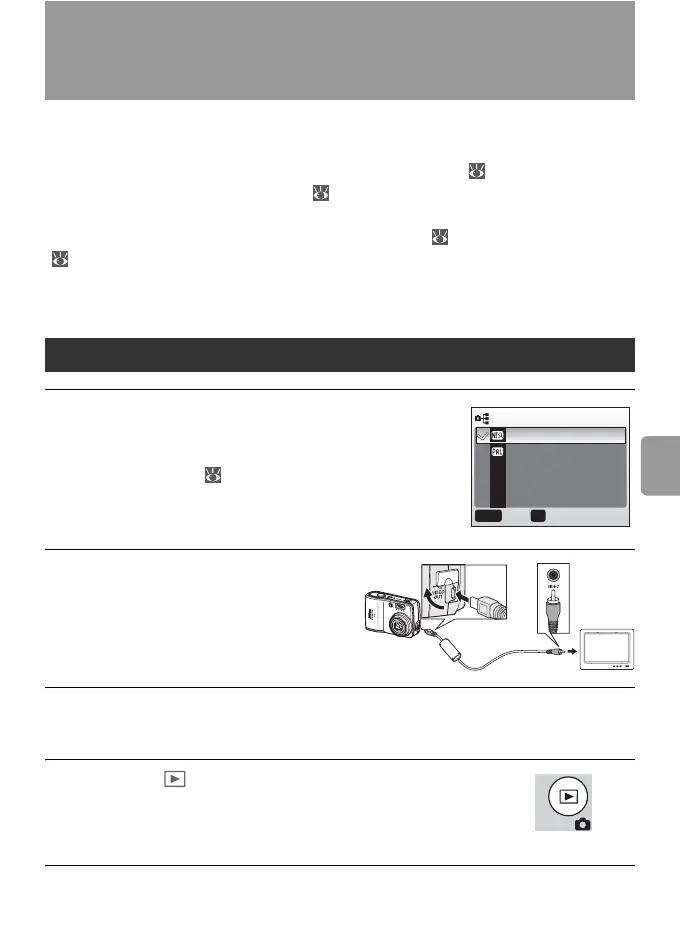
The Interface>Video mode item in
the setup menu offers a choice of
NTSC and PAL standards for analog
video output ( 64). Select a standard
to match the television.
2
Turn the camera off and con-
nect the video cable.
Connect the black plug to the
camera, the yellow plug to the
video-in jack on the TV.
3
Tune the television to the video channel.
For details, consult the documentation for the TV.
4
Press the button for about one second to
turn the camera on.
The camera monitor will remain off and the television
will show the image normally shown in the monitor.
Viewing Pictures on TV
VIDEO MODE
NTSC
PA L
MENU OK
ConfirmExit



 To Next Page